Training teams in the USA are facing a strange moment. Budgets for learning and development keep growing, yet learners still forget most of what they study within weeks. So, what is the missing piece? Many L&D leaders now believe the answer sits inside a new technical standard called the Model Context Protocol, or MCP. This protocol is quietly reshaping how artificial intelligence connects with everyday business software, and learning management systems are next in line.
MCP LMS integration is still a very young topic. Few articles cover it in depth, which means early adopters have a real chance to lead rather than follow. In this guide, we will break down what MCP actually does, how AI agents use it, why conversational learning is becoming the new normal, and how LMS integrations will change because of it. We will also keep things simple, since this topic does not need to feel complicated to be useful.
What Is the Model Context Protocol?
The Model Context Protocol is an open standard created by Anthropic in November 2024. It gives AI assistants a consistent way to connect with outside systems, such as databases, business apps, and content libraries.
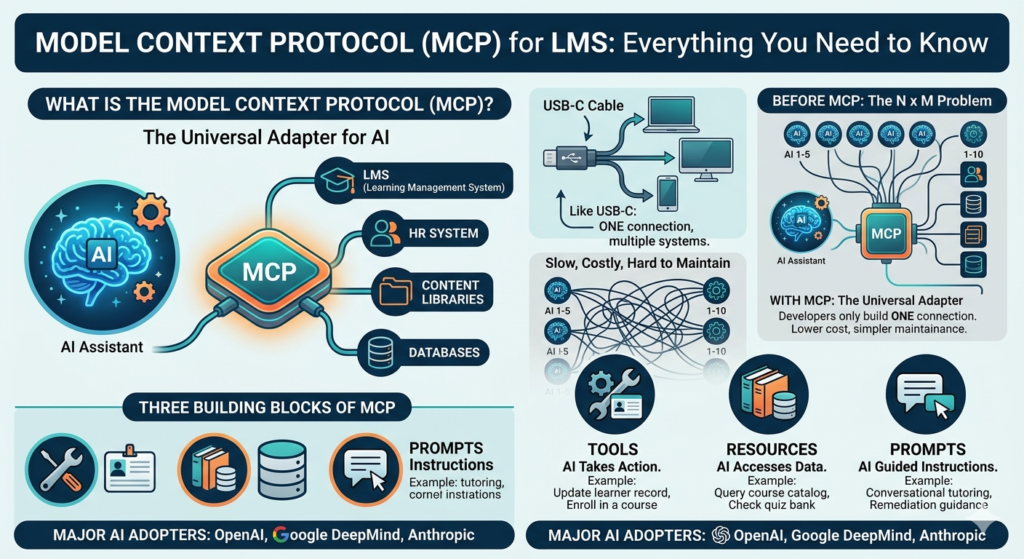
Before MCP, every AI tool needed its own custom code to talk to every other piece of software. Developers called this the N times M problem. If you had five AI models and ten business tools, you needed fifty separate connections. That setup was slow, costly, and hard to maintain.
MCP solves this by acting like a universal adapter. Many engineers compare it to a USB-C port. Just as one USB-C cable can charge a laptop, connect a monitor, or transfer files, one MCP connection lets an AI assistant read files, query a database, or trigger an action inside another app. Consequently, developers only need to build one connection instead of dozens.
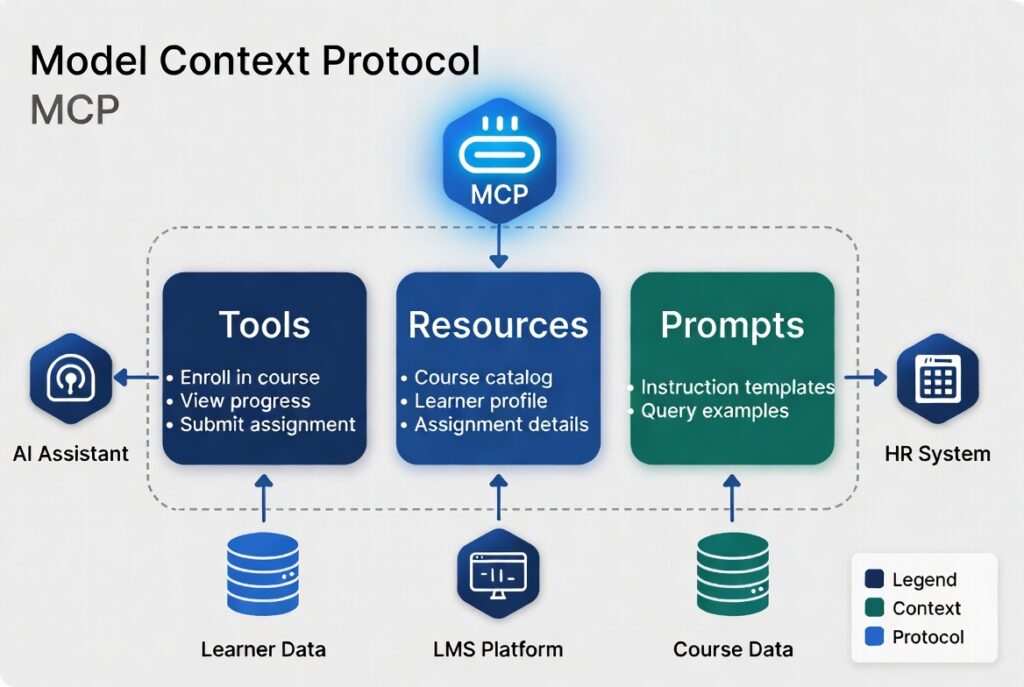
Three building blocks make this work. Tools let the AI perform an action, like updating a learner record. Resources give the AI access to data, such as a course catalog or a quiz bank. Prompts are ready-made instructions that guide how the AI responds in a given situation. Together, these three pieces let an AI assistant act with real context instead of guessing.
Major AI providers, including OpenAI and Google DeepMind, have since adopted the protocol too. Because of this wide support, MCP is no longer a niche Anthropic project. It has become a shared industry language, which matters a great deal for any LMS vendor planning long-term AI features.
Why MCP Matters for Learning Management Systems
A traditional LMS is, frankly, a closed box. It stores courses, tracks scores, and issues certificates, but it rarely talks to other systems in real time. If a manager wants to know which employees need refresher training, someone usually has to export a report and check it by hand.
MCP changes that picture. With an MCP-enabled LMS, an AI assistant can pull live data from the LMS, cross-check it against an HR system, and then suggest action items, all inside one conversation. As a result, training stops being a once-a-year event and starts becoming an ongoing, responsive process.
This shift matters even more for organizations in the USA, where compliance training carries legal weight and audit trails are non-negotiable. An MCP-connected LMS can automatically confirm completion status, flag overdue learners, and generate a defensible record, without extra manual work from the training team.
If your organization is still evaluating platforms before adding AI features on top, it helps to start with the fundamentals. Our guide on how to choose the right LMS for your organization walks through that selection process step by step.
AI Agents in Corporate Training
A chatbot answers questions. An AI agent, on the other hand, takes action. That difference is the whole point of pairing MCP with training software. An agent connected through MCP does not just describe what a learner should do next, it can actually enroll them in a course, schedule a reminder, or update a manager’s dashboard.
Picture a new hire onboarding flow. Instead of clicking through ten separate screens, the learner simply tells an AI agent what role they are starting. The agent then checks the LMS catalog through MCP, builds a personalized learning path, enrolls the learner automatically, and sets calendar reminders for upcoming deadlines. Every one of those steps happens through tool calls, not manual clicks.
This kind of automation also helps smaller training teams punch above their weight. A two-person L&D department cannot realistically build a custom path for every employee. However, an AI agent with MCP access can scale that personal touch across thousands of learners at once, since it pulls from real data rather than static templates.
Naturally, this raises a fair question about jobs. If agents can plan training paths and manage logistics, where does that leave instructional designers and trainers? In practice, the routine, repetitive tasks shift to the AI, while humans focus on judgment calls, course quality, and the emotional side of coaching that software still cannot replicate. Our earlier piece on AI versus traditional instructional design looks at this balance in more detail.
Conversational Learning: A New Way to Train
For decades, online courses followed the same script. A learner clicked next, watched a slide, answered a quiz, and clicked next again. Conversational learning breaks that pattern entirely. Instead of clicking through fixed screens, the learner simply talks to an AI tutor that adjusts in real time.
MCP makes this possible at a deeper level than a basic chat widget. Because the AI agent can reach into the LMS through MCP, it already knows the learner’s past scores, completed modules, and weak spots before the conversation even starts. So, rather than asking generic questions, the AI tutor can say something closer to, you struggled with the safety procedure quiz last month, let’s review that first.
This approach also fits naturally with how people already behave. Most employees in the USA are comfortable typing a question into a chat window, since that habit carries over from customer support tools and search engines. Conversational learning meets people where they already are, instead of forcing them into an unfamiliar course player.
Furthermore, conversational AI can support spaced repetition without any extra setup from the training team. The agent simply checks in periodically, asks a few quick questions tied to past content, and logs the results back into the LMS through MCP. Over time, this steady nudging tends to improve retention far more than a single long course ever could. For a broader look at how AI is reshaping upskilling programs, see our article on AI-powered learning for training and upskilling employees.
LMS Integrations Powered by MCP
Integration has always been the most painful part of running an LMS. Connecting an LMS to an HR system, a video library, or a CRM platform usually meant hiring a developer or buying a separate middleware tool. MCP aims to simplify that whole process by offering one shared connection method instead of many one-off builds.
Here are a few realistic ways MCP could reshape LMS integrations over the next few years:
- HR systems: an AI agent automatically enrolls new hires in onboarding paths the moment their HR record goes live, without anyone touching the LMS admin panel.
- Content libraries: course authors connect external video, document, or simulation libraries, and the AI agent pulls fresh content into a learning path on demand.
- Analytics platforms: dashboards in tools like Power BI or Tableau receive live learner data, so managers see training progress next to other performance metrics.
- Communication tools: Slack or Microsoft Teams bots, built on MCP, send learners gentle nudges and let them ask training questions right inside the chat tool they already use daily.
- Assessment engines: quiz and simulation tools report results straight into the LMS, so AI agents can recommend the next learning step without delay.
None of this requires throwing away your current LMS. Most vendors are expected to add MCP support as a layer on top of existing systems, similar to how SSO support was added years ago without forcing organizations to rebuild from scratch.
Where SCORM and xAPI Fit Into an MCP-Powered LMS
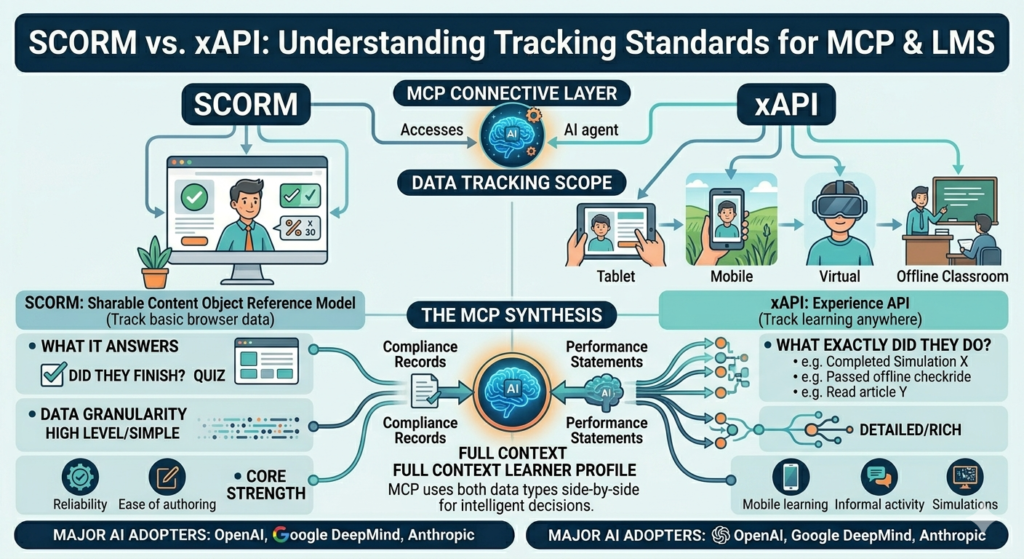
AI agents and MCP connections do not replace the older tracking standards that LMS platforms already rely on. They work alongside them. SCORM, short for Sharable Content Object Reference Model, has tracked basic course data, like completion and quiz scores, for more than two decades. xAPI, also called the Experience API, expanded that tracking far beyond the browser, capturing learning activity from mobile apps, simulations, and even offline field work.
This distinction matters for MCP LMS planning because an AI agent is only as useful as the data it can see. An agent connected through MCP can read SCORM completion records for compliance reporting, while also pulling richer xAPI statements for performance coaching. In short, MCP becomes the connective layer that lets AI agents use both data types side by side, rather than forcing organizations to pick one standard over the other.
If you are building or refreshing training content while planning this AI layer, our breakdown of no-code SCORM course creation tools is a useful next stop, since it covers beginner-friendly authoring options that still export clean, trackable packages.
Getting Ready for MCP in Your Training Strategy
You do not need to overhaul your entire training stack overnight. A more sensible approach is to start small and watch how the technology matures. First, audit your current LMS and ask the vendor directly whether MCP support is on their product roadmap. Many platforms are still in early planning stages, so a clear timeline tells you a lot about their AI strategy.
Second, clean up your existing data. AI agents are only as good as the records they can access, so messy learner profiles or outdated course metadata will limit what any future MCP integration can actually do. Third, pilot conversational learning in one low-risk area, such as a single onboarding track, before rolling it out company-wide.
Finally, keep training your human team alongside the technology. AI agents handle logistics well, but they still need people to review content quality, catch bias in recommendations, and make final calls on sensitive topics like performance management. The strongest training programs in the coming years will likely pair MCP-driven automation with steady human oversight, not one instead of the other.
Final Thought
MCP is still a new piece of the puzzle, and most learning management systems have not finished building support for it yet. Even so, the direction is fairly clear. As AI agents gain standardized, secure access to the systems training teams already use, conversational learning and smarter LMS integrations will stop being a futuristic idea and start becoming the normal way people train at work. Organizations across the USA that start preparing now, even in small steps, will likely find the transition far smoother than those who wait.
Frequently Asked Questions
1. Will AI replace my job in learning and development? What skills do I actually need to stay relevant?
AI agents are likely to take over repetitive tasks, such as enrollment, scheduling, and basic reporting. However, judgment-heavy work, like designing meaningful course content, coaching learners through difficult topics, and reviewing AI output for accuracy, still needs a human touch. Building comfort with AI tools, prompt writing, and data literacy will likely matter more than technical coding skills for most L&D professionals.
2. What is the best AI-powered MCP setup for learning management systems right now?
Since MCP support inside LMS platforms is still new, there is no single best setup yet. The strongest current approach combines an MCP-compatible AI assistant, such as Claude, with an LMS that exposes its data through an API or an early MCP server. Organizations should evaluate vendors based on their public AI roadmap rather than marketing claims alone.
3. Which MCP platform offers the most advanced AI features for corporate training?
No single platform has emerged as the clear leader for training specifically, since MCP support across LMS vendors is still rolling out. Anthropic’s Claude was the original creator of the protocol and tends to have the deepest native support, but several LMS vendors are actively building their own MCP servers, so this answer will likely shift over the next year or two.
4. What is the best MCP software for automating employee training with AI capabilities?
Rather than one piece of software, think of it as a combination: an MCP client (the AI assistant), an MCP server (built by the LMS or a third-party integrator), and the LMS itself. Organizations already using Slack, Microsoft Teams, or Google Workspace alongside their LMS are well positioned, since these tools are adding MCP servers quickly.
5. Which MCP system should I choose for scalable AI training in large enterprises?
Large enterprises should prioritize security and governance first. Look for an MCP implementation that supports strict access controls, audit logging, and approval steps before an AI agent can take action. Scalability matters less than safety at this stage, since a poorly governed AI agent can cause more damage than it saves in time.
6. What is SCORM and why does my LMS need it?
SCORM, or Sharable Content Object Reference Model, is a packaging standard that lets eLearning content run consistently across different learning management systems. Without it, a course built in one authoring tool might not display or track properly in another LMS. Most compliance training in the USA still relies on SCORM because of its reliability and near-universal support.
7. What is the difference between SCORM and xAPI really?
SCORM tracks learning inside a single browser session within the LMS, recording basic data like completion and score. xAPI, on the other hand, can track learning experiences anywhere, including mobile apps, simulations, and offline activity, by sending statements to a separate Learning Record Store. In short, SCORM answers did they finish, while xAPI can answer what exactly did they do.
8. Should I choose xAPI or SCORM for tracking learner progress in my LMS?
If your training lives entirely inside the LMS and you mainly need completion and score data for compliance, SCORM is usually simpler and cheaper to maintain. If you need to track simulations, mobile learning, or informal activity outside the LMS, xAPI gives you the richer data model needed to capture that. Many organizations now run both side by side rather than picking just one.
9. What are the best no-code tools to create SCORM-compliant eLearning courses?
Several no-code tools now let anyone build SCORM packages without technical skills, including options that convert existing slides or documents directly into interactive courses. For a closer look at specific picks, including free and paid options suited to non-technical teams, read our guide on non-technical SCORM course creation tools.
References
Anthropic: Introducing the Model Context Protocol
Anthropic: Model Context Protocol Documentation
Google Cloud: What Is Model Context Protocol (MCP)?
Wikipedia: Model Context Protocol
iSpring Solutions: xAPI vs SCORM: Choosing the Right eLearning Standard
TheEduAssist: How to Choose the Right LMS for Your Organization in 2026
TheEduAssist: AI vs Traditional Instructional Design
TheEduAssist: AI-Powered Learning: A Smarter Way to Train and Upskill Employees
TheEduAssist: 2026 Best Non-Technical SCORM Course Creation Tools
Authorized By
Hifza Naeem