The No-Fluff Buyer’s Guide That Actually Saves You Time and Money
If you’ve ever sat through a 45-minute LMS demo only to realise it doesn’t support mobile learning, you already know: choosing the wrong platform is expensive. Not just in licensing fees, but in wasted implementation time, frustrated learners, and L&D programs that quietly under perform for years.
Here’s the reality: The LMS market has never been more crowded. With over 900 platforms available globally and a market expected to reach $47.47 billion by 2030, the number of options is overwhelming. But more options don’t make the decision easier. They make it harder.
This guide cuts through the noise. Whether it’s selecting your first LMS, swapping out a legacy platform or scaling training across tens of thousands of employees, here’s everything you need to make a confident, data-backed decision in 2026.
What Is an LMS and Why Does Your Choice Matter More Than Ever in 2026?
A Learning Management System (LMS) is a software platform that lets organizations create, deliver, track, and report on training and development programs. But that’s just the technical definition. In practice, your LMS is the infrastructure on which your entire L&D strategy runs.
Get it right, and you get:
- Higher employee engagement with learning content
- Faster onboarding at scale
- Measurable ROI from training programs
- Compliance coverage across regulated roles
- Data you can actually act on
Get it wrong, and you get:
- A platform nobody uses
- Integration headaches with your HRIS and other tools
- Vendor lock-in that’s painful to escape
- A learning culture that stalls before it starts
The stakes are real. According to LinkedIn’s 2025 Workplace Learning Report, 94% of employees say they would stay longer at a company that invested in their learning and development. Your LMS is how you deliver on that promise, or fail to.
Step 1: Define Your Training Needs Before You Look at a Single Platform
The most common LMS buying mistake is starting with the product instead of the problem. Before you request a demo, get brutally clear on your own requirements.
Ask Your Organization These Questions First:
- Who are your learners? Employees, customers, partners, or a mix?
- How many users? 25 internal staff or 25,000 global employees?
- What types of content will you deliver? Video, SCORM courses, live webinars, microlearning, assessments?
- Do you need compliance tracking? HIPAA, OSHA, financial compliance?
- How will learners access it? Desktop only, mobile-first, or offline capability needed?
- What integrations are non-negotiable? Salesforce, Workday, BambooHR, Zoom, Microsoft Teams?
- What’s your internal tech capacity? Can you manage a complex admin setup, or do you need plug-and-play?
Pro tip: Write these down as a formal Requirements Document before you start vendor conversations. This will save you hours of back and forth, and immediately weed out platforms that can’t meet your baseline.
Step 2: Learn About the Different Types of LMS Platforms
Not all LMS platforms are created equal. Knowing the core types will help you quickly narrow down your choices.
| LMS Type | Best For | Example Platforms |
| Cloud-Based (SaaS) | Most organisations, fast deployment, auto-updates | Docebo, TalentLMS, Cornerstone |
| Open-Source | Tech-savvy teams who want full customization control | Moodle, Open edX, Canvas |
| Installed / Self-Hosted | Enterprises with strict data sovereignty requirements | Moodle (self-hosted), Totara |
| Extended Enterprise | Training customers, partners, and resellers at scale | Docebo, Absorb LMS, Skilljar |
| AI-Powered LMS | Organizations prioritizing personalization and adaptive learning | 360Learning, EdApp, Degreed |
| Mobile-First LMS | Frontline or deskless worker training | EdApp, TalentLMS, iSpring Learn |
Step 3: Top 10 LMS Features to Consider in 2026
Not all features are the same. This is what actually drives the needle on learner outcomes and admin efficiency.
1. AI-Driven Personalisation
- Can the LMS tailor learning paths based on individual performance data?
- Does it recommend content based on gaps in skills, role or career goals?
- Platforms like Docebo and 360Learning are at the vanguard of this development.
- For a deeper look at how AI is reshaping learning delivery, see our article on AI vs. Traditional Instructional Design: What’s Actually Better for Learners? — It’s directly relevant to your LMS strategy.
2. Mobile Learning and Accessing Offline
- In 2026, more than 70% of learners access training on a mobile device at least once
- Look for a responsive design, a dedicated mobile app and the ability to download for offline use
- Especially useful for frontline, field-based or shift staff
3. Content and Authoring Tool Compatibility
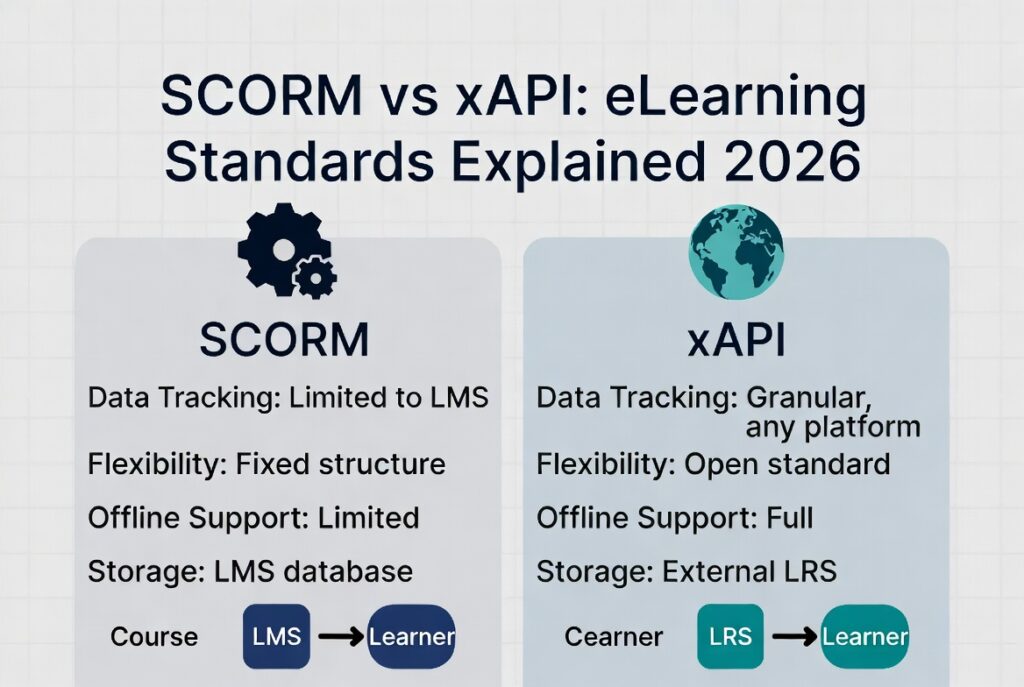
- SCORM, xAPI (Tin Can), AICC, and CMI5 compliance is non-negotiable
- Does it come with its own authoring tool? Or does it integrate with Articulate 360, Adobe Captivate, or iSpring?
- Video content hosting, micro learning modules, and assessment builders are all important
4. Reporting and Analytics
- Can you monitor completion rates, quiz scores, time-on-task and learning paths?
- Does it have custom dashboards for managers and executives?
- Sophisticated platforms can predict learner drop-off and flag at-risk learners before they disengage
5. Compliance and Certification Management
- Automated notifications for certifications nearing expiry and reminders to re-enroll
- Audit trails for regulated industries (healthcare, finance, manufacturing)
- Mandatory training task and role-based compliance monitoring
6. Integrations and API Flexibility
- HRIS integrations: Workday, BambooHR, SAP Success Factors
- Communication tools: Slack, Teams, Zoom
- CRM tools: Salesforce (critical for sales training programs)
- Open API availability for custom integrations
7. Social and Collaborative Learning Features
- Discussion boards, peer-to-peer feedback and cohort-based learning
- Leaderboards, gamification features (points, badges, completion streaks)
- Manager coaching workflows embedded in the platform
8. White-Labeling and Branding
- Can your organization’s brand be on the platform and not the vendor’s logo?
- Custom domains, branded login pages and UI customisation on the learner-facing side
9. Scalability and Multi-Tenant Support
- Can we scale the platform from 200 users to 20,000 without re-platforming?
- Multi-tenant support matters if you’re training across subsidiaries, regions, or client organizations
10. Vendor Support and Implementation
- What does onboarding look like? Is there a dedicated implementation team?
- What are the uptime standards and support response service level agreements (SLAs)?
- Is there a self-serve knowledge base and active user community?
Step 4: LMS Pricing Models Explained, What You’ll Actually Pay
LMS pricing is notoriously opaque. Here’s what to expect and what to watch out for.
| Pricing Model | How It Works | Best For | Watch Out For |
| Per Active User / Month | Pay only for users who log in that month | SMBs, seasonal training orgs | Costs spike during onboarding periods |
| Per Registered User | Pay for every user in the system, active or not | Predictable budget planning | Scales expensive as headcount grows |
| Flat Rate / Unlimited Users | Fixed monthly or annual fee regardless of users | Large enterprise teams | Often locked to feature tiers |
| Open Source (Free) | Platform is free; you pay for hosting and dev | Tech-savvy teams | Hidden cost: internal developer time |
| Revenue Share | Platform takes a cut of course sales | Training businesses selling courses | Costly at high volume |
Hidden costs to always ask about: Implementation fees, Custom integrations, Additional admin seats, Advanced analytics modules, Content storage limits, Customer support tier upgrades
Step 5: AI and the LMS, What’s Real vs. Marketing Hype in 2026
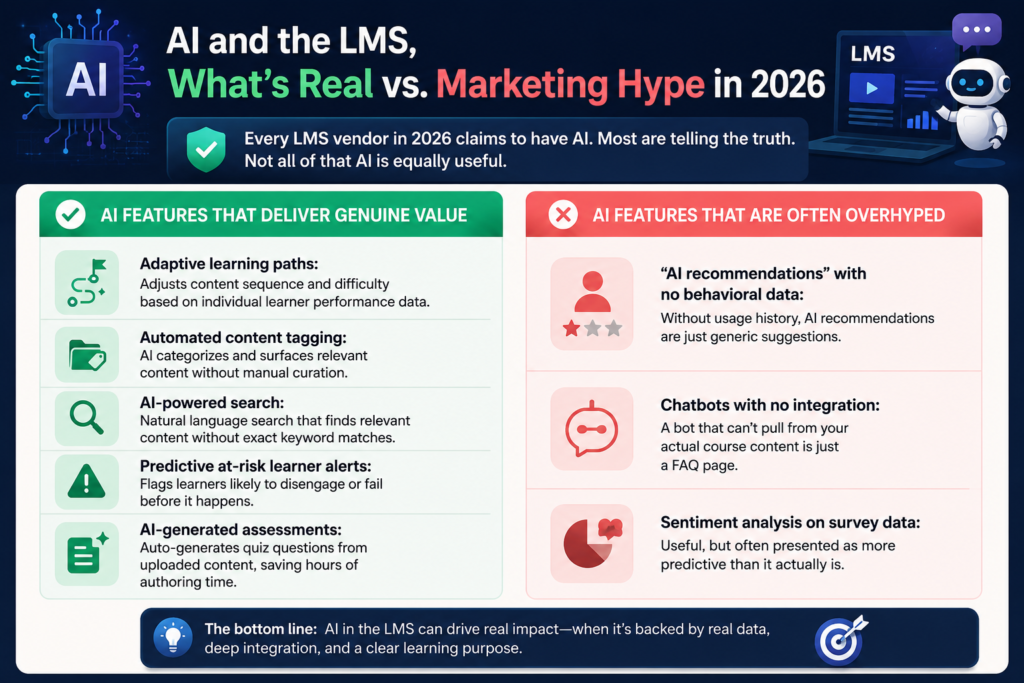
Every LMS vendor in 2026 claims to have AI. Most are telling the truth. Not all of that AI is equally useful.
AI Features That Deliver Genuine Value:
- Adaptive learning paths: Adjusts content sequence and difficulty based on individual learner performance data
- Automated content tagging: AI categorizes and surfaces relevant content without manual curation
- AI-powered search: Natural language search that finds relevant content without exact keyword matches
- Predictive at-risk learner alerts: Flags learners likely to disengage or fail before it happens
- AI-generated assessments: Auto-generates quiz questions from uploaded content, saving hours of authoring time
AI Features That Are Often Overhyped:
- “AI recommendations” with no behavioral data: Without usage history, AI recommendations are just generic suggestions
- Chatbots with no integration: A bot that can’t pull from your actual course content is just a FAQ page
- Sentiment analysis on survey data: Useful, but often presented as more predictive than it actually is
For a thorough breakdown of what AI-powered learning can and cannot do, our article on AI vs. Traditional Instructional Design covers the research and real-world evidence in detail.
Step 6: The LMS Evaluation Scorecard , How to Compare Platforms Objectively
Once you’ve built your shortlist, score each platform consistently. Here’s a framework your team can use.
| Evaluation Criteria | Weight | Score (1–5) | Weighted Score |
| Core LMS features (content delivery, tracking, assessments) | 20% | ___ | ___ |
| AI and adaptive learning capability | 15% | ___ | ___ |
| Mobile and offline access | 10% | ___ | ___ |
| Integration with existing tools (HRIS, CRM, comms) | 15% | ___ | ___ |
| Reporting and analytics depth | 10% | ___ | ___ |
| Compliance and certification management | 10% | ___ | ___ |
| Ease of use for admins and learners | 10% | ___ | ___ |
| Pricing and total cost of ownership | 5% | ___ | ___ |
| Vendor support and implementation quality | 5% | ___ | ___ |
| Scalability and long-term roadmap | 5% | ___ | ___ |
| TOTAL | 100% | — | ___ |
How to use it: Score each platform 1–5 on each criterion, multiply by the weight percentage, and add up the totals. The platform with the highest weighted score is objectively your strongest fit, assuming you’ve weighted the criteria accurately for your organization.
Step 7: Questions to Ask Every LMS Vendor Before You Sign
The demo is curated. The contract is real. Ask these before you commit.
On Product:
- What does your AI actually do, and what data does it need to personalize effectively?
- How are platform updates deployed? Will they disrupt our learners or admin workflows?
- What is your uptime SLA, and what compensation applies if you miss it?
On Implementation:
- Who leads our implementation? Is it your team or a third-party partner?
- What does a realistic implementation timeline look like for an organization our size?
- What does data migration from our current platform involve?
On Pricing:
- What is included in our tier, and what triggers an upgrade charge?
- How does pricing change if we double our user base in 18 months?
- Are there minimum contract lengths, and what are the exit terms?
On Support:
- What support channels are available — phone, email, chat, and at what hours?
- Do we get a dedicated customer success manager, or are we in a shared queue?
- What does your implementation track record look like for organizations similar to ours?
Top LMS Platforms to Know in 2026
This is not a ranking, every organization’s right answer is different. This is context.
| Platform | Best For | Standout Feature | Starting Price |
| Docebo | Mid-market to enterprise | AI-powered learning suite with Flow | ~$25,000/year |
| TalentLMS | SMBs and growing teams | Ease of use, fast setup | From $69/month |
| Cornerstone OnDemand | Large enterprise with deep HR integration | Workforce planning + learning | Custom pricing |
| 360Learning | Collaborative learning culture | Peer-authored courses at scale | ~$8/user/month |
| Absorb LMS | Extended enterprise and external training | Clean UI, strong analytics | Custom pricing |
| EdApp (SC Training) | Mobile-first and frontline workers | Microlearning + gamification | Free tier available |
| Moodle (hosted) | Budget-conscious teams with tech resources | Full customization, open source | Free + hosting costs |
| iSpring Learn | Teams using PowerPoint-based content | iSpring Suite authoring integration | From $2.29/user/month |
| Skilljar | Customer and partner training | Commerce and enrollment flows | Custom pricing |
| Degreed | Skills-based learning strategy | Learning experience + skill tracking | Custom pricing |
For help evaluating which of these fits your specific setup, TheEduAssist’s LMS consulting services provide independent guidance with no vendor bias. For more information and concerns, read: https://theeduassist.com/blog/best-learning-management-system-lms-for-2026/
LMS Red Flags: When to Walk Away From a Vendor
Not every demo will show you the cracks. Here’s what to look for before you sign.
- They can’t give you references from organizations similar to yours in size or industry
- The demo environment is completely pre-loaded and they won’t let you import your own content
- Pricing is unclear and every follow-up question reveals a new fee category
- The roadmap is vague or hasn’t been updated in over 12 months
- Support is buried behind paywalls and basic help requires upgrading your plan
- No dedicated implementation team, you’re expected to self-serve a complex setup
- Contract terms make it difficult or expensive to leave after year one
LMS Implementation: Setting Yourself Up for Adoption Success
The platform decision is only half the battle. Implementation determines whether your learners actually use it.
Critical Steps for a Successful LMS Rollout:
- Involve end users early. Run a pilot with 15–25 learners before full deployment. Their feedback will reveal issues the vendor didn’t surface.
- Assign a clear LMS admin owner. This person needs dedicated time, not just added responsibility on top of an existing full role.
- Build content before launch, not after. Learners who arrive to an empty platform will not return.
- Create a communication plan. Explain what the platform is, why it exists, and what’s in it for the learner. Not just an announcement email.
- Set learner expectations. How much time per week? Required vs. optional content? Certification outcomes? Make it clear from day one.
- Measure from launch. Define your success metrics before go-live — completion rate targets, engagement benchmarks, and compliance coverage goals.
The Right LMS Is Not the Most Popular One, It’s the Right One for You
The best LMS in 2026 is not the one with the most features or the biggest marketing budget. It’s the one that fits your learners, your team’s technical capacity, your integration stack, and your budget, and then actually gets used.
Here’s a simple filter to end on:
- Would your learners use this platform without being forced to?
- Would your admins manage it without constantly calling support?
- Would your executives see the ROI clearly in the reporting?
If the answer to all three is yes, you’ve found your platform.
If you want expert guidance on LMS selection, implementation, or eLearning strategy, TheEduAssist works with organizations to cut through the vendor noise and build learning programs that actually deliver results.
Frequently Asked Questions (FAQs)
What is the best LMS for corporate training programs?
TalentLMS (SMBs), Docebo (enterprise), and Absorb LMS (compliance-heavy) are the top picks. They offer scalable administration, AI-driven automation, and strong reporting.
Which LMS supports SCORM and xAPI standards effectively?
All major corporate LMS platforms support SCORM 1.2, SCORM 2004, and xAPI. Docebo, TalentLMS, and Absorb LMS implement both most reliably, always ask vendors to demo a live xAPI report before signing.
LMS vs. learning platform: which is better for employee onboarding?
An LMS gives structured, trackable onboarding; a Learning Platform (LXP) adds AI personalisation. TalentLMS suits straightforward onboarding paths, while Docebo adds AI-powered recommendations personalised by role and department
What is the best LMS for small to medium-sized businesses?
TalentLMS is the top recommendation, setup takes hours, non-technical admins can build courses easily, and paid plans start at $89/month for 40 users
Which LMS should I choose for a remote workforce?
TalentLMS, Docebo, and SC Training lead for remote teams, reducing costs, boosting engagement, and enabling learning from anywhere. SC Training is best for frontline/mobile-first workers.
References
The following sources were used in the research and development of this article:
- LinkedIn Workplace Learning Report 2025 https://learning.linkedin.com/resources/workplace-learning-report
- TheEduAssist: AI vs. Traditional Instructional Design: What’s Actually Better for Learners? https://theeduassist.com
- MarketsandMarkets: LMS Market Size, Share & Trends 2026 https://www.marketsandmarkets.com/Market-Reports/learning-management-systems-market-1266.html
- Brandon Hall Group: Learning Technology Study 2025 https://brandonhall.com/learning-technology-study
- Docebo: 2025 Learning & Development Benchmark Report https://www.docebo.com/resource/learning-development-benchmark-report
- Capterra: LMS Software Buyers Guide 2026 https://www.capterra.com/learning-management-system-software
- G2: Best LMS Software Reviews 2026 https://www.g2.com/categories/learning-management-system-lms
- eLearning Industry: Top LMS Platforms Report 2025 https://elearningindustry.com/top-lms-software
- Continu: Corporate eLearning Statistics 2025 https://www.continu.com/research/corporate-elearning-statistics
- Training Industry: LMS Trends and Forecasts 2026 https://trainingindustry.com/articles/learning-technologies/lms-trends
Authorized by:
Hifza Naeem