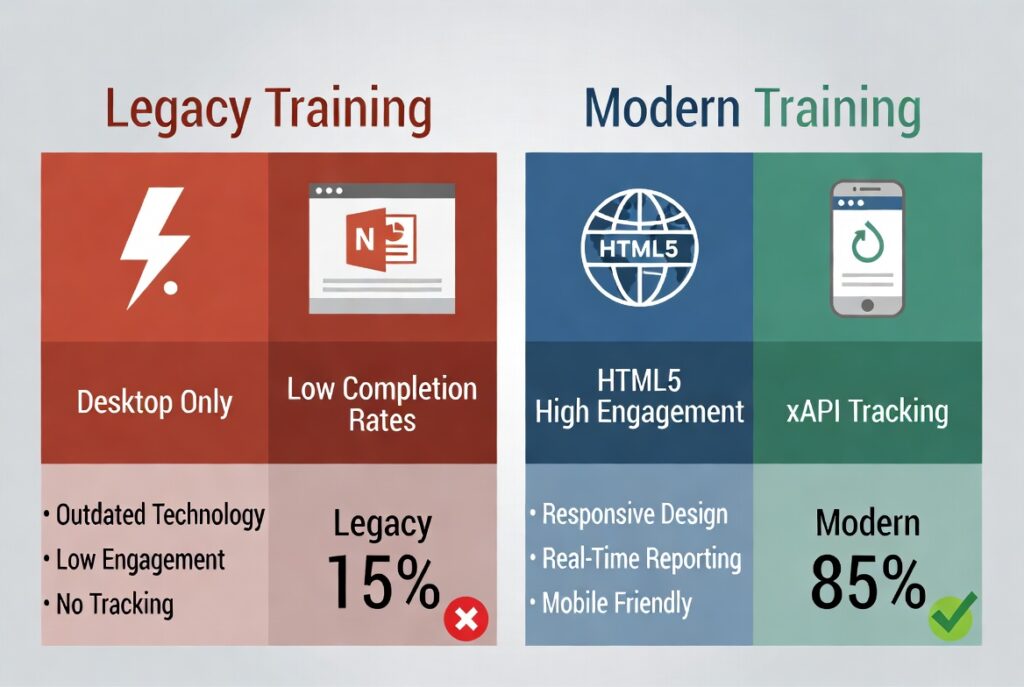
Is your company still running training on old Flash modules? Maybe it is clunky PowerPoint decks, or PDF manuals nobody reads anymore. If so, you are not alone. Across the United States, thousands of organizations are sitting on piles of legacy training content. Much of it no longer loads on modern browsers. Some of it does not work on phones at all. And most of it fails to engage today’s workforce.
Here is the good news. You do not have to throw it all away and start over. Legacy content conversion is not a full rebuild. Instead, it is a smart, affordable process. It takes what your teams already know and trust, then gives it a modern shell that actually works.
In this guide, we will cover what legacy content really is, how to decide what to convert versus retire, and what the conversion process looks like. We will also show how U.S. businesses of any size can modernize their training without blowing the budget.
What Is Legacy Training Content, and Why Is It a Growing Problem
Legacy training content is any eLearning material built on outdated technology. It no longer meets the standards modern learners and systems expect. In the U.S., the most common culprits include Adobe Flash modules, which browsers have blocked since 2021. Others include SCORM 1.2 packages that will not work with newer LMS platforms, outdated PowerPoint slideshows used as standalone training, and lengthy PDF compliance manuals. CD-ROM or locally installed training programs round out the list.
But the problem goes beyond technology. Legacy content often looks dated and feels text-heavy. It is rarely built for how people learn today. American workers are increasingly mobile, hybrid, and short on time. They expect training to be fast, visual, and accessible from any device. Unfortunately, legacy formats simply cannot deliver that experience.
At TheEduAssist, we work with U.S. organizations across corporate, healthcare, vocational, and government sectors. Our team audits, assesses, and modernizes legacy training libraries, so you do not need a complete rebuild from the ground up.
Signs Your Training Content Has Passed Its Expiry Date
Not sure if your content counts as legacy? Here are the warning signs we see most often when working with U.S. clients.
- Employees report that training videos or modules will not load on their laptops or phones.
- Your LMS throws errors when you try to import old SCORM packages.
- Completion rates are unusually low, and learner feedback is consistently negative.
- The visual design looks like it was built in 2008, because it was.
- Your content references products, regulations, or tools that no longer exist in that form.
- There is no mobile-friendly version of any of your training materials.
If any of this sounds familiar, it is time to think seriously about a conversion strategy. The alternative is pushing broken content to your workforce and hoping for the best.
The Real Cost of Doing Nothing
Many U.S. organizations delay legacy content conversion. Often, they assume the process will be expensive and disruptive. Ironically, doing nothing usually costs far more in the long run.
When employees cannot access training, or get stuck sitting through outdated content, the results show up quickly. You see higher failure rates on compliance assessments and slower onboarding for new hires. Risk increases in regulated industries, and overall workforce performance suffers. In sectors like healthcare, trucking, and financial services, a compliance gap caused by broken training can lead to serious regulatory penalties.
We help organizations spot and close that gap before it becomes a real liability. Sometimes, though, the root problem is not the content itself but the platform hosting it. If that sounds like your situation, our guide on zero downtime LMS migration walks through how to move systems without losing learner access along the way.
Convert, Rebuild, or Retire: How to Decide
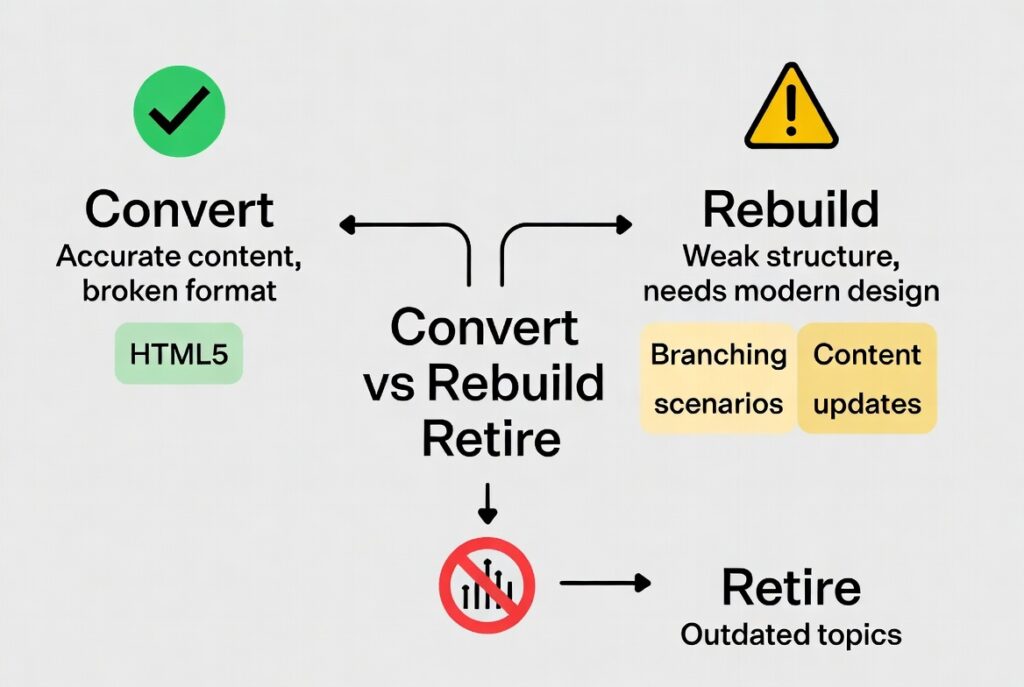
Before starting any conversion project, audit your existing content first. Then make a clear call on each piece: convert it, rebuild it from scratch, or retire it entirely.
Convert
Conversion makes sense when the instructional content is still accurate and relevant, but the technical format is broken or outdated. For example, a well-written compliance course that still covers current regulations is a perfect conversion candidate. The content is sound. Only the delivery mechanism needs updating.
Rebuild
Rebuilding is the better path when the subject matter is accurate, but the structure, visuals, or teaching approach are weak. In these cases, a surface-level conversion will not improve the learner experience. Picture a legacy safety course that is just a ninety-slide PowerPoint with walls of text and no assessments. Converting that to HTML5 without restructuring it will still produce ineffective training.
In these situations, our Custom eLearning Development team works with your subject matter experts to rebuild the course properly. That means modern instructional design, branching scenarios, and embedded knowledge checks. If your team also wants to explore newer teaching approaches during a rebuild, our piece on AI powered learning for upskilling employees is a useful next read.
Retire
Some content should never be updated at all. If a module covers a product line, regulation, or process your organization no longer uses, retire it. Keeping outdated content in your LMS only creates confusion and compliance risk. A clean audit will flag these pieces quickly.
What Legacy Content Conversion Actually Involves
Many L&D managers in the U.S. assume conversion is just an export-and-upload job. In reality, a professional conversion covers several layers.
- HTML5 conversion replaces Flash or outdated SCORM 1.2 files with modern HTML5 packages. These load on any browser and any device, without plugins.
- SCORM 2004 or xAPI upgrades update your tracking standards. As a result, your content reports accurately to your current LMS and captures richer learner data, like time spent and interaction results.
- Mobile-first redesign reformats layouts, font sizes, and navigation. This way, the course works just as well on a smartphone as it does on a desktop.
- Media refresh replaces outdated images, low-resolution video, and missing audio with current assets that match your brand.
- Accessibility compliance updates content to meet WCAG 2.1 and Section 508 standards. These are mandatory for U.S. government contractors and increasingly expected everywhere else.
Our Dashboards and Analytics services also help organizations set up proper xAPI tracking after conversion. That way, you get real visibility into how employees engage with your newly modernized content.
Step by Step: How the Conversion Process Works
So what does a well-run legacy conversion project actually look like, from start to finish? Here is the process, whether you handle it in-house or bring in a partner like TheEduAssist.
- Start with a content audit. List every training asset you own, the format it is in, when it was last updated, and whether the subject matter still holds up.
- Then prioritize. Rank content by business impact, starting with compliance training, onboarding modules, and courses with the highest completion requirements.
- Next, apply the decision matrix. Sort each piece into convert, rebuild, or retire.
- Move into conversion and QA. Convert selected files to HTML5 and the right SCORM or xAPI version, then test across browsers and devices.
- Handle LMS upload and tracking setup. Import the converted packages, configure completion rules, and confirm tracking data flows correctly to your dashboards. And if you have not picked a platform yet, our guide on how to choose the right LMS for your organization is worth reading first.
- Finally, communicate with learners. Let employees know updated training is available, especially if URLs or course assignments have changed.
How to Prioritize Which Content to Convert First
If you have dozens, or even hundreds, of legacy courses, you cannot convert everything at once. Here is a practical prioritization framework used by L&D teams across the United States.
- Compliance and regulatory training comes first, since broken compliance modules create immediate risk.
- High-enrollment courses come next. If five hundred employees take a course each year and it currently loads only half the time, fixing it delivers fast ROI.
- Onboarding content for new hires deserves high priority too. Broken onboarding experiences damage your employer brand and slow down time to productivity.
- Product and sales training ranks high wherever outdated content is actively costing revenue.
- Soft skills courses can wait. Address these in a later phase, or source them as pre-built content from a library.
Affordable Conversion for U.S. Small Businesses
Legacy conversion does not need to be an enterprise-scale project. Even small businesses with modest training libraries can modernize content in phases. Start with the highest-risk courses, then expand from there.
The key is finding a conversion partner who understands your budget and can scope the project accordingly. At TheEduAssist, we offer flexible engagement models built for small and mid-size U.S. businesses. That includes per-course pricing, phased conversion plans, and hybrid approaches, where we convert the shell while your team updates the subject matter internally.
Frequently Asked Questions
Are there eLearning conversion services that support both SCORM and xAPI standards?
Yes, and you want a provider that supports both. A solid eLearning conversion service should handle SCORM 1.2, SCORM 2004, and xAPI, also known as Tin Can API, since different LMS platforms expect different tracking standards. TheEduAssist converts legacy content to whichever standard your LMS requires. We also implement xAPI for richer reporting through our Dashboards and Analytics solutions.
What are affordable legacy training content modernization solutions for small businesses?
Small businesses in the USA do not need to modernize an entire training library all at once. A phased approach, starting with compliance and onboarding content, keeps costs predictable. Partnering with an agency like TheEduAssist, which offers per-course or phased pricing, is often more cost-effective than buying an authoring tool and trying to convert content in-house without instructional design experience.
How long does legacy eLearning conversion usually take?
Timelines vary based on how many courses you have, how complex they are, and whether a rebuild is needed alongside the conversion. A straightforward HTML5 conversion of a standard thirty-minute SCORM course can often be done in one to two weeks. Larger libraries are best handled through a phased schedule. TheEduAssist also offers rapid timelines for organizations facing urgent compliance deadlines.
Will converted eLearning content actually work on mobile devices?
Yes, as long as the conversion includes a mobile-first redesign pass. Simply exporting an old Flash course to HTML5 will not automatically make it mobile-friendly. A proper conversion reformats layouts, adjusts navigation for touch screens, and resizes media assets.
Do I need to replace all my legacy content at once?
No, and most U.S. organizations do not. Prioritize content by compliance risk, enrollment volume, and business impact, then convert in batches. TheEduAssist can help you build a conversion roadmap that fits your timeline and budget, without overwhelming your L&D team or disrupting active training programs.
References
- TheEduAssist Legacy Content Conversion Services
- TheEduAssist Custom eLearning Development
- TheEduAssist Zero Downtime LMS Migration: The Ultimate Guide
- TheEduAssist LMS Integration and Migration Services
- TheEduAssist How to Choose the Right LMS for Your Organization in 2026
- TheEduAssist AI Powered Learning: A Smarter Way to Train and Upskill Employees
- TheEduAssist Dashboards and Analytics
- TheEduAssist Training Solutions
- Adobe Flash End of Life and Implications for eLearning
- xAPI (Tin Can API) Specification Overview
- WCAG 2.1 Accessibility Guidelines
- Section 508 Compliance Standards for U.S. Organizations
Authorized By
Hifza Naeem