Zero downtime LMS migration is the best way to switch your learning platform without stopping training. Many companies fear one thing: what if staff lose access to their courses? With the right plan, that will not happen.
A zero downtime setup runs your old LMS and new LMS at the same time. So, staff keep on learning while your team builds and tests the new system. Furthermore, your records stay safe and your schedule stays on track.This guide walks you through every step of a smooth, safe LMS move.
What Is Zero Downtime LMS Migration?
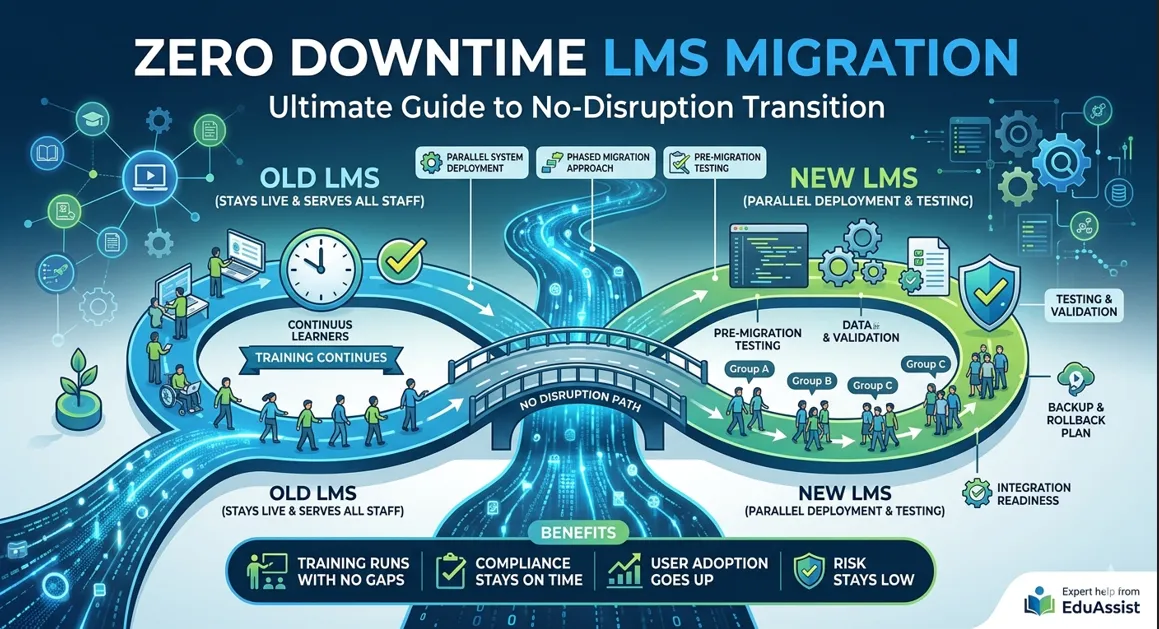
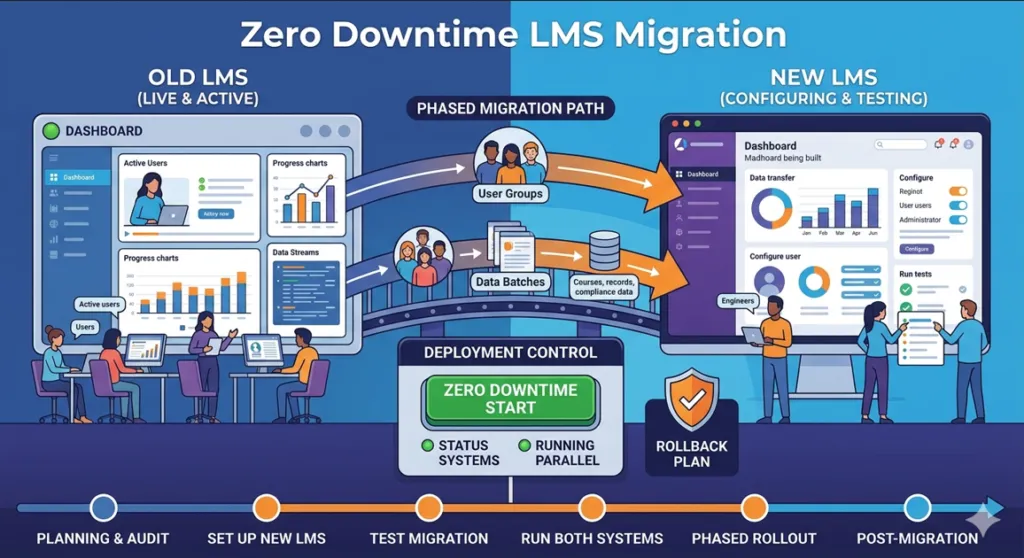
Zero downtime LMS migration means you move from one LMS to a new one. You do this without cutting off user access at any point. Your old LMS stays live and serves all staff. Meanwhile, your new LMS runs beside it, gets set up, and passes all tests before anyone logs in.
Once the new system is ready, you move users in small, set groups. This keeps training going at all times. As a result, staff never see a login error or a missing course during the move.
This method is very different from the big bang switch, where all users move at once. That old method almost always causes downtime. Therefore, large firms now use the step-by-step rollout as the safe and smart new standard.
Why Downtime Happens During LMS Migration
Downtime comes from mistakes that are easy to avoid, not from bad luck. Knowing each cause helps you plan well and keep your firm safe.
- Poor planning: Teams rush in with no clear road map. As a result, dates slip and backup plans fall apart before the move even starts.
- Data delays: Moving all courses, records, and files takes far more time than teams expect. So, the move stalls and access gets cut off.
- Link failures: SSO tools, HR systems, and APIs break when teams skip tests before go-live. Consequently, launch day turns into a crisis.
- No test phase: Bugs only show up when real users log in. Therefore, small errors grow into large, costly outages.
- Full switch at once: Moving all users in one go removes the safety net. In addition, one small bug then becomes a firm-wide failure.
Risks of LMS Downtime for Businesses
LMS downtime hurts firms in ways that are real and easy to measure. Moreover, the harm spreads further than most leaders expect when they first plan a move.
- Training stops: Staff miss key courses. Furthermore, new hire programmes fall apart and slow down whole teams.
- Output drops: Managers deal with complaints instead of doing their real work. As a result, teams lose speed at a key time.
- Compliance gaps grow: Firms in health, finance, and law face fines when training records go missing. In particular, short gaps can trigger audits.
- Staff trust falls: A bad move makes users pull back from the new system. Consequently, adoption stays low long after the tech is fixed.
- Revenue drops: Sales teams miss key training windows. Therefore, their results and customer scores both fall in the weeks that follow.
Zero Downtime LMS Migration Strategy
Parallel System Deployment
Run your old LMS and new LMS at the same time. Your old system keeps serving all users with no break. Meanwhile, your team sets up and tests the new platform fully. Then, once it all passes review, you shift small groups over in set waves.
Phased Migration Approach
Move one team at a time instead of all users at once. If one group hits a problem, it stays contained and does not spread to others. Additionally, each wave gives your team new data on what to fix before the next group moves.
Pre-Migration Testing
Move a small set of real data first. Check that courses show up right, user accounts copy over well, and all records stay intact. Therefore, you catch errors early, when they are still cheap and quick to fix.
Backup and Rollback Plan
Always set up a clear way to roll back. If the new LMS hits a big issue after launch, your team can move users back to the old system fast. Moreover, this backup plan gives leaders peace of mind and keeps the project on track.
Integration Readiness
Test every HR link, SSO tool, and API before go-live day. Run each one on its own first. Then test them all at once under load. Consequently, link failures stop causing surprise outages on launch day.
Step-by-Step Zero Downtime LMS Migration Process
Step 1: Planning and Audit
Start with a full check of your current LMS. Find all active links, user roles, course lists, and compliance data. As a result, your team knows what to move and where the top risks are. Each item gets a clear priority from the start.
Before starting migration, it is important to follow a proper checklist to avoid missing critical steps. You can review our detailed LMS Migration Checklist to prepare a structured migration plan.After completing the checklist, it is important to understand the full rollout schedule. You can follow our LMS Migration Timeline Guide to see how each migration phase is structured from start to finish.
Step 2: Set Up the New LMS
Set up the new system in a test space from scratch. Add roles, course groups, and brand items to match or beat the old setup. Furthermore, connect all links and check every one before any real user touches the new platform.
Step 3: Test Data Migration
Move a small set of real data to the new LMS and check it at every step. Fix all errors now, before the full move runs. Otherwise, small data problems can grow into big issues. That happens once all the data has moved across. Zero downtime LMS migration.
Data transfer is one of the most sensitive parts of LMS migration. To avoid corruption or loss, it is important to follow safe transfer methods. Zero downtime LMS migration. Learn more in our guide on Moving LMS Data Safely During Migration
Step 4: Run Both Systems in Parallel
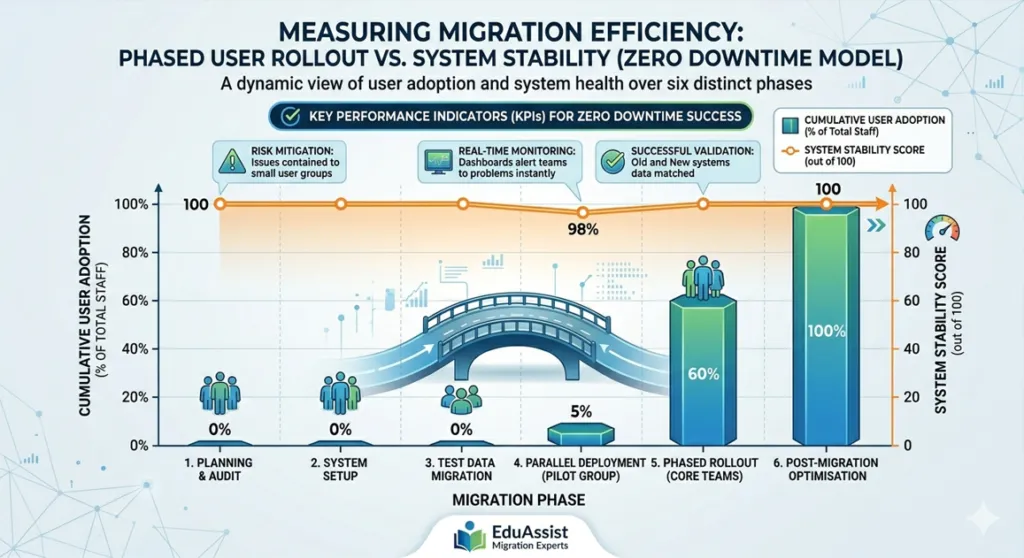
Put a pilot group on the new LMS while all other users stay on the old one. Watch speed, tracking, and user feedback closely. Then, based on what you learn, make all final fixes. Do this before the wider rollout starts.
Step 5: Roll Out in Phases
Move each team on a set, shared schedule. Give support to every wave so users get help fast. Moreover, keep watching system speed between waves so each move runs more smoothly than the one before.
Step 6: Post-Migration Optimisation
Fix all open issues, collect user feedback, and shut down the old LMS. Additionally, confirm all backups and close every open link task. Your new system now serves as the only training platform for your whole firm.
Best Practices to Ensure No Training Disruption
- Never move all users at once. Step-by-step rollouts keep failures small and allow real-time fixes at every stage.
- Share clear news early. Tell staff what will change, when it will happen, and who to call for help.
- Offer live support during the move. A help desk stops small issues from turning into big complaints.
- Watch the system in real time. Use dashboards and alerts so your team spots problems at once, not after users report them.
- Bring in migration experts from the start. Their know-how cuts timelines and stops the most costly mistakes.
Common Mistakes That Cause Downtime
- Skipping tests leads to data errors. Teams find data problems after the fact, not before they cause real harm.
- Leaving links to the last minute causes a chain of failures. Every linked system then breaks on go-live day.
- Starting without a plan forces teams to react. Consequently, key steps fall through the gaps and dates collapse.
- Having no rollback plan removes the only safety net. So, when things break, the team has nowhere to fall back to.
- Moving all data in one go overloads systems and widens the risk window. Instead, moving data in small batches cuts that risk fast.
How Experts Ensure Zero Downtime Migration
Expert teams bring clear steps, proven tools, and deep know-how. They remove guesswork from every part of the project.
- First, they build a full list of all systems and data. As a result, nothing surprises the team during the move. Each step also has a clear owner from day one.
- Next, they use tested scripts to move data right. They catch errors at every step before users are ever affected.
- In addition, they set up rollback plans before the move starts. They do not wait until something breaks and the pressure is already on.
- Furthermore, they check data at each stage. This ensures bad data never reaches live users during any part of the rollout.
- Finally, they run step-by-step rollouts with live support for every user group throughout the whole process.
LMS migration services like those from EduAssist keep training live throughout the whole transition. Their team guards business flow from the first planning call to the final go-live day.
Benefits of Zero Downtime LMS Migration
- Training runs with no gaps. Compliance cycles, new hire tracks, and skills plans all stay on time.
- Output stays high the whole time. Teams focus on their work, not broken login screens or missing courses.
- User adoption goes up fast. Staff arrive at the new platform with no stress, so they start using it sooner.
- Risk stays low from start to end. Parallel systems and rollback plans keep the firm safe at all times.
- Operations run well throughout. Consequently, leaders stay confident that training keeps on backing performance.
References
- Al-Fraihat, D., Joy, M., & Sinclair, J. (2020). Evaluating E-learning systems success: An empirical study. Computers in Human Behavior, 102, 67–86. https://doi.org/10.1016/j.chb.2019.08.004
- Benta, D., Bologa, G., & Dzitac, I. (2014). E-learning platforms in higher education: Case study. Procedia Computer Science, 31, 1170–1176. https://doi.org/10.1016/j.procs.2014.05.373
- Coates, H., James, R., & Baldwin, G. (2005). A critical examination of the effects of learning management systems on university teaching and learning. Tertiary Education and Management, 11(1), 19–36. https://doi.org/10.1080/13583883.2005.9967137
- Islam, A. K. M. N. (2013). Investigating e-learning system usage outcomes in the university context. Computers and Education, 69, 387–399. https://doi.org/10.1016/j.compedu.2013.07.037
- Naveh, G., Tubin, D., & Pliskin, N. (2010). Student LMS use and satisfaction in academic institutions: The organisational perspective. Internet and Higher Education, 13(3), 127–133. https://doi.org/10.1016/j.iheduc.2010.02.004
- Surry, D. W., Ensminger, D. C., & Haab, M. (2005). A model for integrating instructional technology into higher education. British Journal of Educational Technology, 36(2), 327–329. https://doi.org/10.1111/j.1467-8535.2005.00461.x
Conclusion
LMS migration does not need to hurt your business at all. With a step-by-step plan and expert support, you can finish the whole move with no training gap. It works from start to end. Zero downtime LMS migration ensures this smooth transition.
Treat migration as an ongoing business task, not a one-time tech job. Keep both systems live and move users in waves. Test every link before each phase begins. Moreover, always keep a working rollback plan in place until the last user group moves over safely.
Zero downtime LMS migration is not just the safe choice for large firms. It is also the smart one. Your staff keep learning, your records stay clean, and your new platform launches with strong user buy-in from day one.
For a complete understanding of budgeting and planning, see our LMS Migration Cost Guide for Enterprises.
Frequently Asked Questions
Q1: Is zero downtime LMS migration really possible?
Yes, it is. Running both systems side by side keeps the old LMS live. Your team builds and tests the new one at the same time. As a result, users never lose access at any point during the process.
Q2: What is the safest migration method?
Run both systems at the same time and move users in set phases. This method removes the risk of a failed switch. Additionally, it gives teams room to fix issues between each wave. More users can then move over with fewer problems.
Q3: How long does zero downtime migration take?
It depends on your LMS size and the number of links you use. Small firms may finish in a few weeks. Conversely, large firms with complex systems often need a few months. Many users can add more time to the full rollout.
Q4: Do all companies need zero downtime migration?
Yes, above all if you run non-stop or compliance-based training. Even small firms gain from the lower risk, smoother user path, and stronger adoption that this approach always delivers.
Authored by: Laiba Ayaz