More and more companies are switching to new learning platforms. So the need for a solid LMS migration timeline is growing fast. But a poor plan can break employee training and slow down the whole team.
The good news is that a clear LMS transition plan makes the whole process much easier. When you follow a step-by-step LMS migration process, you keep training on track and avoid data loss. In addition, your employees get a smooth experience from start to finish. This guide covers every phase of your LMS rollout plan so you can move forward with confidence.
What Is an LMS Migration Timeline?
An LMS migration timeline is a step-by-step plan for moving from one learning platform to another. Rather than doing everything at once, it breaks the work into clear phases. Each phase has its own tasks, owners, and due dates. So your team always knows what to do next.
Why Timeline Planning Matters in LMS Migration
Without a LMS Migration timeline, things fall through the cracks. Teams miss key steps, and stakeholders get confused about who does what. But when you have a clear plan, everyone stays on the same page. As a result, your training keeps running smoothly throughout the whole switch.
Key Components of an LMS Transition Plan
A good LMS transition plan has several key parts. First, it lists every phase with clear start and end dates. Then it sets deadlines for each task. In addition, it assigns owners so no step is left without someone in charge. It also includes a testing schedule and a full rollout plan for staff.
- Migration phases with start and end dates
- Deadlines and milestones for each task
- Assigned owners for every step
- Testing and approval checkpoints
- A rollout plan for employees and admins
Why Businesses Need a Structured LMS Migration Plan
An LMS migration is not just a tech project. It affects real people your learners, trainers, and admins. So a structured plan is not optional. It is something every business needs to protect its people and its data.
Reducing Training Disruptions
When a migration goes wrong, learners lose access to their courses. As a result, onboarding stops and compliance training falls behind. Employees get frustrated and lose trust in the system. But a phased plan keeps learning available throughout the entire process. So your team never has to pause.
Preventing Data and Content Loss
Your LMS holds years of valuable data. For example, it stores learner records, certificates, SCORM packages, quiz scores, and training reports. If you skip proper planning, all of this can get lost or corrupted. Therefore, every good migration plan includes backup steps to keep your data safe.
Improving LMS Adoption After Launch
A new platform only works if people actually use it. So you need to bring employees along before the launch. When you communicate early and train users in advance, adoption goes up fast. In addition, a well-structured LMS implementation project plan adds change management steps that help your team embrace the new tool.
What to Prepare Before Starting LMS Migration
Good prep work makes the actual migration much smoother. So before you move a single file, take time to get four key things in order. You can also follow our LMS migration checklist guide to make sure nothing is missed during preparation.
Audit Your Current LMS
Start by reviewing everything inside your current platform. Look at all active and inactive courses, user accounts, system integrations, and old reports. This audit shows you what to keep and what to delete. As a result, you only move content that is actually worth migrating.
Identify Training Content and Data for Migration
Not every file in your LMS needs to move. Instead, focus on the items that matter most. For example, keep active learning paths, key certifications, role-based quizzes, progress records, and core training videos. Everything else should be archived or removed before you start.
Set Clear Migration Goals and Success Metrics
Before the project starts, decide what success looks like. Do you want faster course updates? Better mobile access? Less admin work? Once you know your goals, tie each one to a number. For instance, aim for a 20% drop in help-desk tickets within 30 days of launch.
Build the Right LMS Migration Team
You need the right people involved from day one. So build a team that includes L&D managers, IT staff, LMS admins, vendor contacts, and a project manager. Each person should have a clear role in the LMS migration process. That way, no task falls through the cracks or causes delays.
The Ultimate LMS Migration Timeline: Step-by-Step Phases
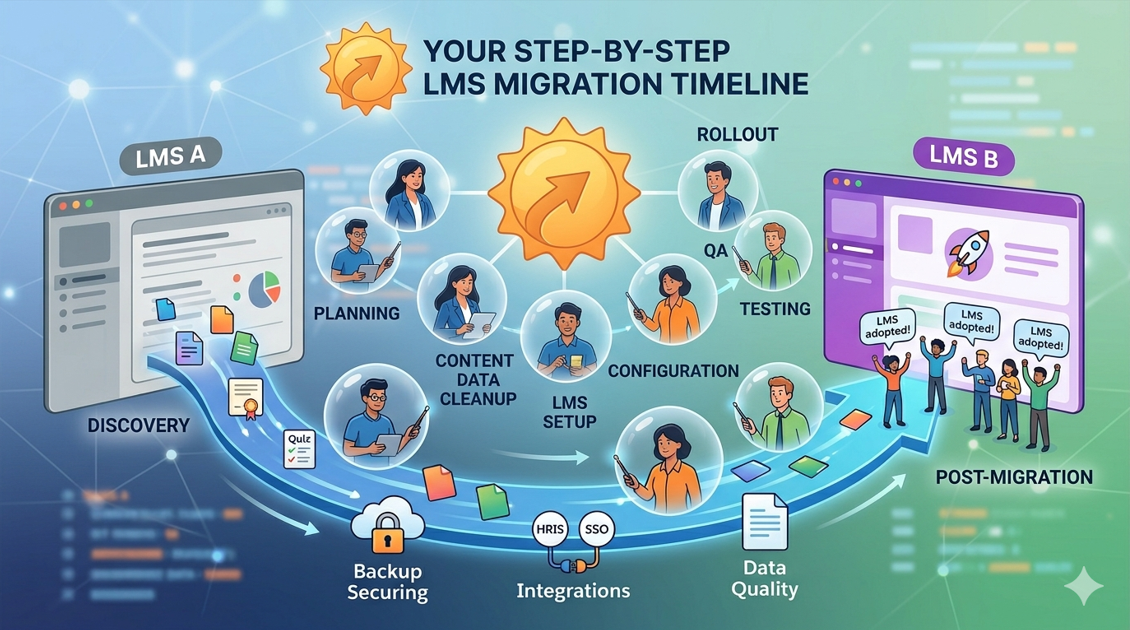
Below are the six key phases of a successful LMS migration timeline. Each phase builds on the one before it. So if you skip or rush a step, you create problems later. Follow them in order for the best results.
Phase 1: Discovery and Migration Planning
First, define the full scope of your project. Hold kick-off meetings with all key stakeholders. Then document your current pain points and agree on your success metrics. Also, pick the right migration tools and set a realistic LMS migration plan. A strong start here saves weeks of rework later. So do not rush this phase.
Phase 2: Content Audit and Data Cleanup
Before you migrate existing training content to a new LMS, review every single asset. Remove old courses and merge any duplicate content. Then organize what remains into a clean folder structure. After that, back up all your LMS data to a safe location. Clean data migrates well messy data causes errors. So take your time with this step.
We’ve already explained the safe process of handling backups and data in our guide on moving LMS data safely. Remove old courses and merge any duplicate content.
Phase 3: LMS Setup and Configuration
Now it is time to build out the new platform. Set up your branding, user roles, and permission levels. Then connect your HR systems, SSO tools, and any third-party apps. Also, build learning paths, automation rules, and email templates. This phase creates the base that every learner will use, so get it right.
Phase 4: Testing and Quality Assurance
Testing is where you catch problems before they reach your team. So run a pilot migration with a small set of courses and users. Check that courses load, videos play, and scores save correctly. Also, test on mobile devices to make sure everything works on all screens. Then fix every error you find before going live. In addition, have real users test the system to catch issues you may have missed.
Phase 5: LMS Rollout and Employee Training
This is the most visible part of your LMS rollout plan. So communicate the launch date early and give employees time to prepare. First, train your admins on the new system. Then roll out access to learners in stages. Also, offer help sessions, quick guides, and a support channel for the first two weeks. A smooth training transition here sets the tone for long-term success.
Phase 6: Post-Migration Monitoring and Optimization
Launch day is not the end it is just the start of a new phase. So track course completions and learner engagement every week. Collect feedback through short surveys. Also, watch for system errors and fix them quickly. Then use what you learn to improve workflows and automation. As a result, your platform keeps getting better over time.

Sample LMS Migration Timeline Example
The table below shows a simple six-week LMS Migration timeline. It works well for small and mid-sized teams. Use it as a base and then adjust it to fit your needs.
| Timeline | Key Tasks |
| Week 1 | Planning meetings, define scope, assign team roles |
| Week 2 | LMS audit, content cleanup, back up all learner data |
| Week 3 | Data migration, LMS setup, branding, and integrations |
| Week 4 | Pilot testing, UAT, fix errors and course issues |
| Week 5 | Admin training, employee onboarding, full launch |
| Week 6 | Monitor results, collect feedback, optimize workflows |
Keep in mind that these timelines will vary. For example, a large company with thousands of courses may need three to six months. But a small team with a simple setup can often finish in four to eight weeks. So always plan based on your own situation.
Best Practices for a Smooth LMS Training Transition
Communicate LMS Changes Early
People resist change when it feels sudden. So tell your employees about the new platform at least four to six weeks before launch. Explain why the change is happening and what will get better. Also, send regular updates as the project moves forward. As a result, your team will feel ready and not caught off guard.
Run a Pilot Migration Before Full Launch
A pilot lets you test the process with a small group first. So you can catch issues before they hit your whole team. In addition, it gives you real data on how the system performs. Teams that run pilots report far fewer problems after the full launch. So always make time for this step.
Keep Backup Copies of LMS Data
Even the best plans can hit unexpected problems. So always keep secure backups of all course files, progress records, and certificates before any data transfer. That way, if something goes wrong, you can restore the old setup quickly. A good rollback plan gives you peace of mind throughout the process.
Train LMS Administrators Before Deployment
Your admins are the first line of support when learners need help. So train them on the new platform before you open it up to everyone else. Cover the key workflows, troubleshooting steps, and user management tools. As a result, they can solve problems fast and keep the learner experience smooth from day one.
Common LMS Migration Mistakes to Avoid
Skipping the Testing Phase
Testing is often the first thing cut when a project runs late. But skipping it almost always leads to problems on launch day. For example, learners may find broken courses, missing data, or login errors. So always protect your testing window, even if it means pushing the go-live date back.
Migrating Outdated or Irrelevant Content
It may feel faster to move everything over at once. But doing so fills your new LMS with old, unused content. Instead, use the migration as a chance to clean house. Delete what is out of date and only move the content your team actually needs. As a result, the new platform feels fresh and easy to use.
Underestimating Migration Timelines
Most teams think the migration will be faster than it is. But content cleanup, data checks, and testing all take more time than expected. In addition, waiting for stakeholder approvals can slow things down. So always add buffer time to each phase. It is better to finish early than to rush and make mistakes.
Ignoring Employee Communication
A great technical setup can still fail if your employees feel left in the dark. So treat communication as a key project task, not an afterthought. Keep your learners updated at every stage from the first announcement to the post-launch support period. As a result, they will feel confident and ready to use the new system.
Failing to Monitor Post-Launch Performance
Many teams move on to the next project right after launch. But the first 30 to 60 days are the most important for catching issues. So track completion rates, system errors, and user feedback every week. Then act on what you find. As a result, your platform will improve steadily after go-live.
How Long Does an LMS Migration Usually Take?
The answer depends on your content volume, the number of integrations, and how fast your team can make decisions. But here are some general benchmarks to help you plan.
Small Business LMS Migration Timelines
Small businesses with fewer than 200 users can usually finish in four to six weeks. Teams are small, so decisions happen fast. In addition, there is less content to clean and fewer integrations to test. So the whole process stays simple and moves quickly.
Mid-Sized Organization Migration Timelines
Mid-sized teams with 200 to 2,000 users should plan for eight to twelve weeks. There are more departments to involve and more content to review. In addition, extra integrations and a bigger user base mean testing takes longer. So build in extra time for each phase.
Enterprise LMS Migration Projects
Large enterprises often need three to six months. They have thousands of users, complex HR integrations, and multi-language content. In addition, legal reviews and stakeholder approvals add layers of time. So a detailed LMS implementation timeline is not just helpful it is essential at this scale.
References
1. Moore, R. L. (2023). Organizational Analysis in Preparation for LMS Change: A Narrative Case Study. TechTrends, 67(1), 133–142. https://link.springer.com/article/10.1007/s11528-022-00784-z
2. Bove, L., & Conklin, S. Using Change Management as an Innovative Approach to Learning Management System. Online Journal of Distance Learning Administration. https://ojdla.com/articles/using-change-management-as-an-innovative-approach-to-learning-management-system
3. Ma, L., Ali, Z., Yin, S., & Nguyen, V. T. T. (2024). Implementation of Learning Management Systems (LMS) in Higher Education Systems. https://www.ncbi.nlm.nih.gov/pmc/articles/PMC10994378/
Final Thoughts
A smooth LMS migration does not happen by luck. It comes from careful, step-by-step planning. When you follow a clear LMS migration timeline, you protect your data, keep training on track, and give your new platform the best possible start.
So use the phases in this guide to build your LMS Migration Timeline. Communicate early, test often, and monitor after launch. Whether you are a small team or a large enterprise, these steps will help you get through the LMS migration process with far less stress. Start strong, and the long-term results will follow.
Frequently Asked Questions
What is an LMS migration timeline?
An LMS migration timeline is a step-by-step schedule for moving your learning content, user data, and settings from one platform to another. It includes phases, deadlines, owners, and testing checkpoints. So your team always knows what to do and when to do it.
How long does LMS migration usually take?
It depends on your team size and content volume. Small businesses can finish in four to six weeks. But larger organizations may need three to six months. So always plan based on your own scope, not a generic estimate.
What causes delays during LMS migration?
The most common causes are messy data, incomplete audits, and integration failures. In addition, waiting for stakeholder sign-offs can push timelines back. So plan early, assign clear owners, and keep communication open throughout the project.
How can organizations avoid training disruption during LMS migration?
Start by communicating early with your employees. Then run a pilot migration before the full launch. Also, keep the old and new platforms running at the same time during the switch. As a result, learners always have access to their courses no matter where the project stands.
What should be included in an LMS rollout plan?
A good LMS rollout plan covers employee communication, admin training, a phased learner onboarding schedule, launch-day support, and a post-launch monitoring plan. So every person on your team knows what to expect and where to go for help.
Authored by: Laiba Ayaz