Building a SCORM course used to mean hiring a developer. Today, that is no longer true. Thanks to modern authoring tools, anyone on an L&D team can build a SCORM-compliant course without writing a single line of code. This guide walks you through the entire process, step by step, so you can publish a working course faster than you think.
If you are part of a USA-based company, school, or training agency, this guide is for you. We will keep things simple, practical, and easy to follow.
What Is SCORM and Why Does It Matter?
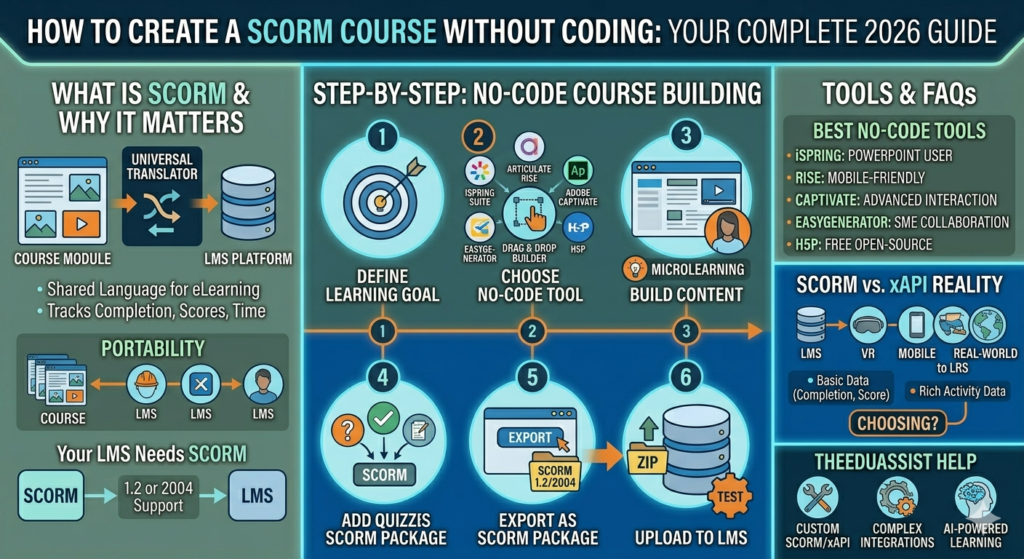
SCORM stands for Sharable Content Object Reference Model. In simple terms, it is a technical standard that allows eLearning content to talk to a Learning Management System, or LMS. Because of SCORM, your course can track completion, quiz scores, and time spent learning.
Without SCORM, your LMS would not know if a learner finished a course or passed a quiz. That is why most corporate and educational platforms still rely on it. SCORM packages are also portable. You can build a course once and use it across many different LMS platforms without rebuilding anything.
What Is SCORM and Why Does My LMS Need It?
Your LMS needs SCORM because it acts as a universal language between your course and your platform. Without this shared language, your LMS cannot record scores, track progress, or confirm that a learner actually completed a module.
Most LMS platforms today support SCORM 1.2 or SCORM 2004. Some newer systems also support xAPI, which we will explain shortly. Before you choose an LMS, it helps to understand which standards it supports. For more guidance on this, check out our detailed breakdown on
how to choose the right LMS for your organization, which covers compatibility, pricing, and scalability.
Step by Step: How to Create a SCORM Course Without Coding
Now let us get into the practical part. Here is how to create a SCORM course using no-code tools.
Step 1: Define Your Learning Goal
Before opening any tool, write down what learners should know by the end. A clear goal keeps your course focused. As a result, you avoid adding unnecessary slides or content that confuses learners.
Step 2: Choose a No-Code Authoring Tool
Next, pick a tool that exports SCORM packages automatically. Popular no-code options include iSpring Suite, Articulate Rise, Adobe Captivate, Easygenerator, and H5P. Each tool offers templates, drag and drop builders, and built-in quiz features.
Therefore, you do not need to understand HTML, JavaScript, or any backend logic. You simply drag elements onto a slide, add your content, and the tool handles the technical packaging behind the scenes.
Step 3: Build Your Content
Once you choose a tool, start adding your slides. Most platforms let you insert text, images, videos, and interactive elements with a few clicks. Keep each slide short. Short slides are easier to read and help learners stay engaged.
Additionally, break long topics into smaller modules. This approach, often called microlearning, improves retention and keeps learners motivated.
Step 4: Add Quizzes and Assessments
Quizzes are where SCORM really shines. Add multiple choice questions, drag and drop activities, or scenario based questions. Your authoring tool will automatically track scores and pass or fail status, then send that data to your LMS through SCORM.
Step 5: Export as a SCORM Package
After building your course, look for an export or publish button. Choose SCORM 1.2 or SCORM 2004, depending on what your LMS supports. The tool will then generate a ZIP file. This file is your finished SCORM package.
Step 6: Upload to Your LMS
Finally, log into your LMS and upload the ZIP file. Most platforms have a dedicated SCORM upload feature. Once uploaded, test the course yourself before sharing it with learners. Check that quizzes save scores and that progress tracking works correctly.
Best No-Code Tools to Create SCORM-Compliant eLearning Courses
Choosing the right tool depends on your budget, team size, and design needs. Below are some of the most reliable options used across the USA and beyond.
- iSpring Suite: Great for PowerPoint users who want a familiar interface with powerful SCORM export options.
- Articulate Rise: Ideal for responsive, mobile-friendly courses with minimal design effort.
- Adobe Captivate: Strong choice for interactive simulations and advanced branching scenarios.
- Easygenerator: Built for collaboration, so subject matter experts can co-create content easily.
- H5P: A free, open-source option that works well for quizzes and interactive content blocks.
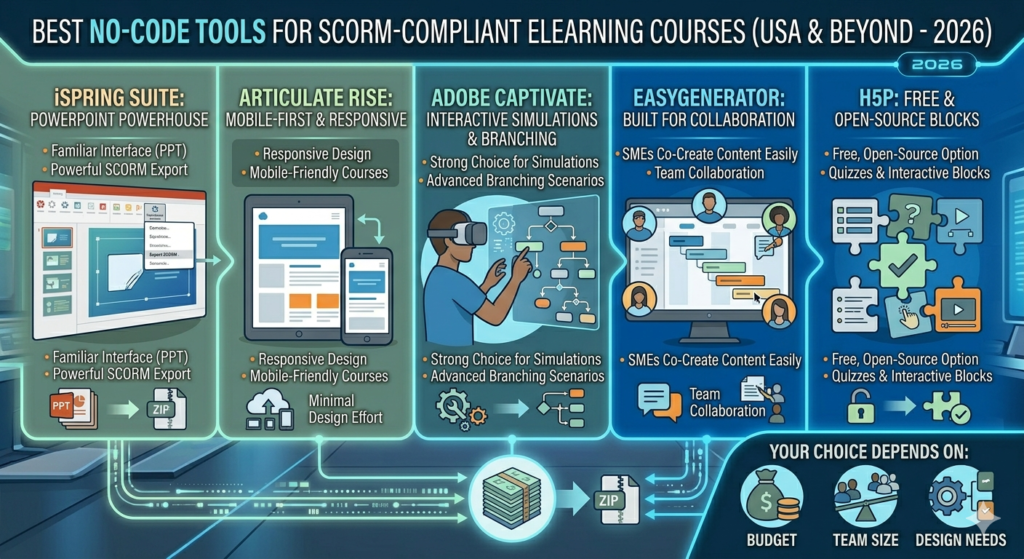
Each of these tools removes the need for coding. However, the right choice depends on your goals. If you need something fast and simple, Rise or Easygenerator may work best. If you want advanced interactivity, Captivate is a stronger fit.
What’s the Difference Between SCORM and xAPI Really?
This is one of the most common questions among L&D teams. SCORM tracks basic data, such as completion status, score, and time spent. It works well inside a single LMS environment.
xAPI, on the other hand, tracks almost any learning activity, even outside the LMS. For example, xAPI can record that someone watched a video on YouTube or practiced a skill in a simulator. In short, xAPI offers more flexibility, while SCORM offers simplicity and wide compatibility.
Should I Choose xAPI or SCORM for Tracking Learner Progress in My LMS?
The answer depends on your needs. If your training happens mostly inside your LMS, SCORM is usually enough. It is simpler, well supported, and easier to set up.
However, if you want to track learning across multiple platforms, mobile apps, or real-world activities, xAPI is the better choice. Many USA based organizations use both standards together, depending on the specific course.
If you are unsure which path fits your organization, our article on
AI vs traditional instructional design explains how modern design approaches affect tracking and course structure decisions.
Which SCORM Authoring Tool Is Easiest for Beginners?
For most beginners, iSpring Suite and Articulate Rise are the easiest starting points. Both tools use simple drag and drop interfaces. In addition, they offer ready-made templates, so you do not need design experience.
Easygenerator is also beginner friendly, especially for teams who want to collaborate without technical training. Whichever tool you pick, start with a short pilot course first. This helps you learn the tool before building something larger.
Common Mistakes to Avoid
Even with no-code tools, a few mistakes can hurt your course quality. Avoid these common issues.
- Skipping a clear learning objective before building content
- Adding too much text on a single slide
- Forgetting to test the SCORM package before publishing
- Choosing the wrong SCORM version for your LMS
- Ignoring mobile responsiveness during design
By avoiding these mistakes, your course will run smoothly and provide a better experience for learners.
Why Some Teams Still Need Expert Help
No-code tools work well for simple to moderately complex courses. However, some projects need more advanced features, such as custom interactivity, branching scenarios, or integration with multiple systems. In these cases, working with experienced developers saves time and avoids costly errors.
This is where TheEduAssist can help. Our team builds custom SCORM and xAPI courses, handles complex LMS integrations, and ensures your content works perfectly across devices. Whether you need a single course or a full training library, we can support your project from start to finish.
If you want to explore how artificial intelligence is shaping modern training programs, take a look at our article on
AI-powered learning and smarter ways to train and upskill employees. It explains how AI tools are changing the way teams design and deliver training.
Final Thoughts
Creating a SCORM course without coding is easier than most people expect. With the right authoring tool, you can build, test, and publish a fully functional course in a short amount of time. Start small, test often, and choose a tool that matches your team’s skill level.
And if your project grows beyond what no-code tools can handle, TheEduAssist is ready to help you build something more advanced, reliable, and tailored to your goals.
Frequently Asked Questions
What’s the Difference Between SCORM and xAPI Really?
SCORM tracks basic learning data inside an LMS, such as completion and score. xAPI tracks a wider range of activities, even outside the LMS, making it more flexible for complex tracking needs.
Should I Choose xAPI or SCORM for Tracking Learner Progress in My LMS?
Choose SCORM if your training stays within one LMS. Choose xAPI if you need to track learning across multiple platforms, devices, or real-world activities.
Which SCORM Authoring Tool Is Easiest for Beginners?
iSpring Suite and Articulate Rise are considered the easiest tools for beginners, thanks to their simple drag and drop design and ready-made templates.
Best No-Code Tools to Create SCORM-Compliant eLearning Courses
Some of the best options include iSpring Suite, Articulate Rise, Adobe Captivate, Easygenerator, and H5P. Each tool supports SCORM export without requiring any coding knowledge.
What Is SCORM and Why Does My LMS Need It?
SCORM allows your LMS to communicate with your course content. Without it, your LMS cannot track completion, scores, or learner progress accurately.
Can I Edit a SCORM Course After Publishing It?
Yes. Most authoring tools let you edit the original project file, then re-export a new SCORM package. After that, simply upload the updated version to your LMS.
References
SCORM Standard Overview, SCORM.com: https://scorm.com/scorm-explained/
xAPI Adopters and Case Studies, ADL Initiative: https://www.adlnet.gov/projects/xapi-adopters/
Articulate Rise 360 Features: https://www.articulate.com/360/rise/
iSpring Suite Authoring Tool: https://www.ispringsolutions.com/ispring-suite
H5P Open-Source Content Tool: https://h5p.org/