LMS VR integration is changing how companies teach their staff, transforming traditional training into immersive experiences. But most teams run into the same wall. The simulation works great, and we know that AR and VR actually improve learning outcomes significantly when done right. Yet no one can track what was learned inside the headset.
Consequently, that is the core problem LMS VR integration solves. In short, this technology links your VR training directly to your Learning Management System. Therefore, instead of guessing, your team gets real, actionable data on every learner.
What is LMS VR integration?
LMS VR integration means connecting VR training apps to your Learning Management System. As a result, all VR data flows into the same place where you track every other course.
Because of this, L&D teams can do four key things at once:
- Track learner steps inside VR
- Store all scores in one dashboard
- Give out certs based on VR results
- Measure real behavior, not just test scores
Why Old E-Learning Tracking Is No Longer Enough
Most LMS tools were built for slide decks and short quizzes. In contrast, VR is a completely different beast, as it tracks body motion, reaction speed, and choices made under stress.
SCORM, therefore, simply cannot handle this kind of data. That is why xAPI has become the new go-to standard for VR learning today.
Why Organizations Need LMS VR Integration
Before you invest in VR, you need a clear reason to link it to your LMS. Without that link, all your training data just vanishes.
However, when you do connect them, the results are hard to ignore. Here are verified stats from major research bodies:
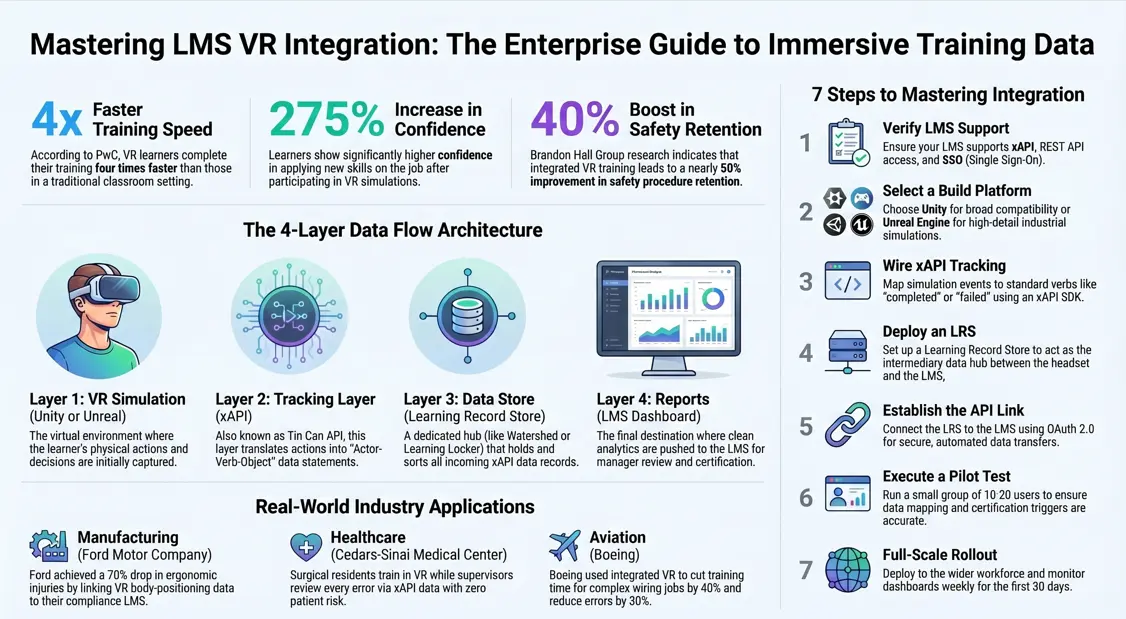
- PwC’s 2023 VR Soft Skills Study found VR learners train 4x faster than those in a classroom. (Source)
- Moreover, VR learners showed 275% more confidence in using new skills on the job.
- Walmart trained over 1 million staff with VR headsets ahead of the 2020 holiday rush. (Source)
- In addition, UPS cut forklift accident rates by more than 50% after rolling out LMS-linked VR safety sims.
- A Brandon Hall Group study also found a 40% boost in safety procedure retention after integrated VR training. (Source)
As a result of all this, teams that tie VR to their LMS pull far ahead in workforce performance.
How VR Training Data Flows into an LMS
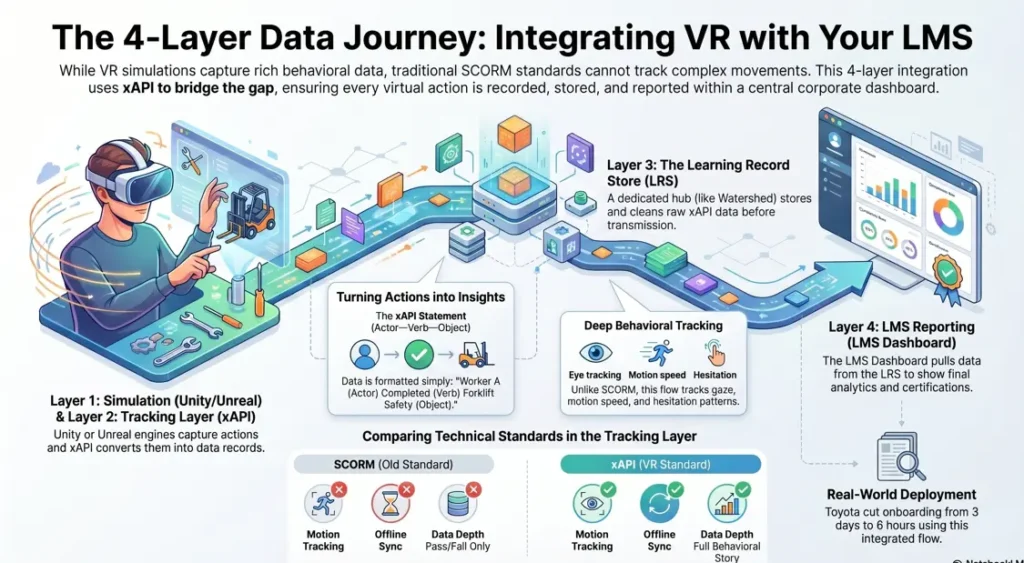
To truly grasp LMS VR integration, you need to see the full data path first. In fact, four key layers move learning data from headset to dashboard. Specifically, each layer plays a distinct role in ensuring data travels smoothly from the virtual environment to your reporting system. To build this pipeline, many teams look for custom AR & VR solutions that inherently support data-tracking protocols out of the box.
| Layer | Tool | What It Does |
|---|---|---|
| VR Simulation | Unity or Unreal Engine | Captures every learner action |
| Tracking Layer | xAPI (Tin Can API) | Turns actions into data records |
| Data Store | Learning Record Store (LRS) | Holds and sorts all xAPI data |
| Reports | LMS Dashboard | Shows analytics to your L&D team |
Step-by-Step Real Example: Forklift Safety Training
To make this more real, picture a logistics firm using VR forklift sims. Here is exactly what happens from start to finish:
- First, a worker puts on a Meta Quest 3 headset at their site.
- Next, they go through a virtual forklift cert module.
- Meanwhile, the VR app logs every move and sends xAPI records in real time.
- For instance, one record says, “Employee A finished Forklift Turn Radius Check Score 87/100, Time 14 mins.”
- Those records then go to an LRS like Watershed or Learning Locker.
- After that, the LRS pushes clean data into the firm’s LMS, such as SAP SuccessFactors.
- Finally, the L&D manager sees a live compliance board with full staff records.
So this is what integrating VR forklift sims into an LMS looks like in real life, not just on paper.
Why SCORM Fails for VR Training
SCORM was built in 2001. Back then, no one was training in VR. So it makes sense that SCORM cannot keep up with what VR demands today.
Specifically, SCORM has three hard limits:
- SCORM only logs pass, fail, or done.
- Tracking body motion, eye gaze, or hand paths is impossible with old frameworks.
- Operating without an active internet link will cause the system to fail.
Because of these gaps, xAPI and cmi5 have taken over as the smarter options. Both were built from the ground up for modern learning tools.
SCORM vs xAPI vs cmi5: Full Side-by-Side
| Feature | SCORM | xAPI | cmi5 |
|---|---|---|---|
| VR Tracking | Limited | Excellent | Excellent |
| Offline Use | No | Yes | Yes |
| Deep Behavior Data | No | Yes | Yes |
| Motion Tracking | No | Yes | Yes |
| LMS Support | High | Growing | Growing |
| Real-Time Sync | No | Yes | Yes |
| Runs Without Browser | No | Yes | Yes |
In short, SCORM gives you a yes or no answer. xAPI, on the other hand, gives you the full story of how someone learned.
Understanding xAPI for VR Training
xAPI, also known as Tin Can API, was first built by Rustici Software for the US Department of Defense. It was made to track learning on any device, in any place, including inside a VR headset.
How xAPI Statements Work
Each xAPI record uses a simple three-part format:
Actor-Verb-Object
Here is a live healthcare example to show exactly what that means in practice:
- Actor: Nurse Sarah, Staff ID 4821
- Verb: Completed
- Object: IV Line Insertion Sim-Score 94/100, Errors: 1, Time: 8 mins
As a result, that one line tells you far more than any old SCORM result ever could.
What xAPI Tracks That SCORM Cannot
Because xAPI was built for real-world learning, it captures data SCORM misses entirely. For example, it records:
- Where the learner looked during the sim
- How the controller moved and at what speed
- Time spent in each task zone
- How many errors came before a right move
- Pause and hesitation patterns in high-stress scenes
- How often a step was repeated before mastery was reached
Step-by-Step Guide: How to Integrate VR Training with Your LMS
Now that the tech is clear, let us walk through the setup. Based on real enterprise rollouts, there are seven steps to follow. Go through them in order for the best outcome.
Step 1: Check If Your LMS Supports xAPI
Before anything else, confirm that your LMS can handle xAPI data. Look for three things in particular:
- A built-in LRS or a plug-in connector for one
- REST API access so outside tools can push data in
- SSO support, since VR login depends on it being smooth
LMS tools with solid xAPI support include, for instance, Cornerstone OnDemand, Docebo, SAP SuccessFactors, TalentLMS, and Moodle with an xAPI add-on.
Step 2: Pick a VR Build Platform
Two tools lead the market for enterprise VR right now. However, each one fits a different need, so you should pick based on your specific use case.
Unity is the most used option on the market. For instance, it has built-in xAPI libs and works well with the Mixed Reality Toolkit. Therefore, as a direct result, Unity VR training sims connect easily to enterprise LMS tools across all major sectors, consequently saving development time during deployment.
Unreal Engine, In contrast, it shines for high-detail visual builds. Specifically, it is best for factory or engineering sims where exact spatial data matters most.
Step 3: Set Up xAPI Tracking in the VR App
Once your platform is chosen, the next step is to wire up the tracking. Every key learner action must fire an xAPI record. To do that successfully, your dev team needs to follow these steps:
- Add an xAPI SDK to the project, such as TinCan.NET for Unity
- Map each sim event to a standard verb, such as “completed,” “passed,” or “failed.”
- Set the LRS endpoint URL in the app’s config file
Step 4: Deploy a Learning Record Store
Your LRS sits right between the VR app and the LMS. Specifically, you can think of it as the hub that takes raw xAPI data and turns it into clean reports your LMS can read.
| LRS Tool | Best For | Cost |
|---|---|---|
| Watershed | Big enterprise teams | Per user/month |
| Learning Locker | Teams on a tight budget | Free, self-hosted |
| Yet Analytics | Schools and research teams | Custom |
| SCORM Cloud | Fast pilot setups | Pay per use |
Step 5: Link the LRS to Your LMS
After the LRS is live, connect it to your LMS through a REST API. At this point, set up three things:
- The LRS URL in your LMS settings panel
- Auth tokens using OAuth 2.0 for safe data transfer
- Field maps between xAPI actor data and LMS user profile IDs
Step 6: Test With a Small Group First
Before you go wide, run a test with 10 to 20 users. During the test, you should specifically check three things:
- Are xAPI records landing in the LRS correctly?
- Do those records match the right LMS user profiles?
- Do certs fire at the right score thresholds?
Step 7: Roll Out and Scale Up
Once the test group confirms all data is clean, push to your full team. After launch, check dashboards once a week for the first 30 days. Also, adjust score thresholds based on what real data shows you, not what you assumed before the test.
Best Practices for Integrating VR Simulations into LMS Platforms
Ultimately, years of real enterprise rollouts have produced a short list of best practices for LMS VR integration. Therefore, you should follow these closely to avoid the most costly mistakes.
First, set your learning goals before writing a single line of code. Without clear goals, you will not know which actions to track inside the sim.
Second, track what learners do, not just whether they finished. A pass or fail tells you almost nothing useful. Behavioral data, on the other hand, shows you exactly where someone got stuck and why.
Third, turn on offline caching. Factory floors and remote sites often have weak Wi-Fi. To solve this, you can store xAPI records directly on the device and then sync them to the LRS as soon as a link is found.
Fourth, use a standard xAPI verb set. Stick with the ADL xAPI vocab list rather than custom terms. Otherwise, your data will be messy and nearly useless across multiple sims.
Fifth, protect biometric data from day one. Eye-tracking and motion data fall under GDPR in Europe. Therefore, set a data retention policy and get learner sign-off before any tracking begins.
Sixth, always do a 30-day pilot before full launch. Find and fix data mapping bugs early, because fixing them post-launch means touching thousands of records at once.
Real Industry Use Cases
To show how this all plays out in the real world, here are five verified examples from five different sectors.
Manufacturing: Ford Motor Company
Ford trains assembly workers on safe body positions using VR sims. After linking xAPI-tracked VR data to their compliance LMS, Ford reported a 70% drop in ergonomic injuries at trained sites.
Healthcare: Cedars-Sinai Medical Center
Cedars-Sinai uses VR for surgical resident training. Because all SIM data flows into their LMS through xAPI, supervisors can review every error a resident made with zero patient risk.
Aviation: Boeing
Boeing trains aircraft mechanics on complex wiring jobs using VR. Specifically, their sims cut training time by 40% and reduced procedural errors by 30% versus old classroom methods.
Retail: Walmart
Walmart’s Academy trained more than 1 million staff with Oculus Go headsets for service and compliance training. Furthermore, xAPI tracked all sim results across hundreds of store sites at the same time.
Logistics: Toyota Material Handling
Toyota Material Handling rolled out VR forklift certs across 12 sites. Consequently, by linking xAPI sims to their LMS, they cut new-hire onboarding from three full days down to just six hours per person.
Security and Compliance Considerations
When you build your LMS VR integration, security must be part of the plan from the start. In fact, because biometric data is involved, the rules are stricter than for any standard e-learning setup. Therefore, cover each of these areas before you go live.
| Risk Area | Recommended Fix |
|---|---|
| GDPR and Privacy | Mask biometric data and set clear retention rules |
| Data in Transit | Use TLS 1.3 for all xAPI data transfers |
| Login Security | Set up SSO via SAML 2.0 or OAuth 2.0 |
| API Safety | Use signed tokens and refresh keys every 90 days |
| Biometric Consent | Get written learner consent before any tracking starts |
Common LMS VR Integration Problems and Fixes
Even the best-planned rollouts hit snags. However, most problems have clear and fast fixes. Here are the five most common issues and what to do about each one.
| Problem | Root Cause | Fix |
|---|---|---|
| xAPI records missing from LMS | LRS not linked to LMS right | Re-check API endpoint URL and auth token |
| VR app drops data on weak Wi-Fi | No local cache set up | Add SQLite cache to app; auto-sync on reconnect |
| Login fails inside the headset | SSO not set for that device type | Use SAML-based SSO through your MDM system |
| Report data is inconsistent | No standard verb set across sims | Switch to ADL xAPI vocabulary for all content |
| Dashboard shows empty after launch | Wrong field mapping in LRS-to-LMS link | Map xAPI actor email to LMS user ID field directly |
Pre-Launch LMS VR Integration Checklist
Before you go live, work through every item below. Missing even one can break your cert tracking or leave your dashboards blank.
- LMS confirmed to support xAPI natively or through an LRS plug-in
- LRS set up, configured, and fully tested
- VR app fires xAPI records on all key learning actions
- Offline cache turned on and tested in low-signal areas
- SSO login working on all headset models in use
- GDPR and privacy review done and on record
- xAPI fields mapped to the right LMS user profile fields
- Pilot run with 10 to 20 real users
- Dashboard data checked and confirmed accurate
- Cert triggers tested and verified at correct score thresholds
Future Trends in LMS VR Integration
The next few years will shift how VR and LMS tools work side by side. In particular, four trends are already taking shape right now.
AI-driven adaptive VR will let sims change their difficulty live, based on data already in your LMS. As a result, each person will get a training path built just for them.
Digital twin training is also moving fast. For example, Siemens now links VR training to live factory digital twins. So workers practice on a virtual copy of the exact machine they will use on the floor.
Mixed reality on the job is growing too. Microsoft HoloLens 2, for instance, lets workers get AR step cues on a real machine while the LMS logs each task as it is done.
Predictive skill gap tools will soon use VR performance data to flag who needs reskilling before a safety breach or compliance gap occurs. This means L&D teams can act early rather than react late.
For more on where immersive learning is going, also read The Rise of Immersive Learning Technologies in Higher Education on TheEduAssist.
Sources and References
- PwC VR Soft Skills Study 2023
- Walmart VR Training Program
- Brandon Hall Group L&D Research
- Ford Ergonomics VR Case
- Cedars-Sinai VR Medical Training
- Boeing AR and VR Training
- Toyota VR Forklift Training
- ADL xAPI Specification v1.0.3
Conclusion
LMS VR integration is no longer a nice-to-have. It is, in fact, a core part of any serious workforce training plan today.
The tools are ready, and the standards are set. Moreover, the results are proven across health, retail, aviation, and logistics.
As a result, the real question is not whether to connect your VR to your LMS. Instead, it is how fast you can start. To begin, pick just one use case, such as safety certs, new hire onboarding, or equipment training, and run a pilot. Once you check the data, you can scale up from there.
Ultimately, successful LMS VR integration takes time, but teams that act now will see a clear, measurable edge in training outcomes within 12 months.
Frequently Asked Questions
Can VR training be tracked in an LMS?
Yes. VR apps send xAPI records to a Learning Record Store. The LRS then pushes all that data into your LMS on its own.
How do you integrate VR training with your LMS?
To ensure a smooth setup, start by checking that your LMS supports xAPI. Once that is confirmed, set up an LRS and subsequently add xAPI tracking to your VR app. Afterwards, link the LRS to the LMS via API. Finally, be sure to test the whole chain before going live.
Is SCORM compatible with VR training?
SCORM works poorly with VR. It cannot track motion, body data, or offline use. xAPI is, therefore, the right standard for all VR tracking today.
What LMS platforms support VR training?
Cornerstone OnDemand, Docebo, SAP SuccessFactors, TalentLMS, and Moodle with an xAPI plug-in, for instance, all work well with VR training data.
What is an LRS in VR learning?
An LRS is a Learning Record Store. It takes in xAPI records from your VR app, stores them safely, and then sends clean data to your LMS.
Can VR training work without Wi-Fi?
Yes. With a local cache built into the app, xAPI records are saved on the device first. Consequently, they sync to the LRS as soon as a Wi-Fi link comes back.
How much does LMS VR integration cost?
Learning Locker is free and open source. Meanwhile, paid LRS tools run from $3 to $15 per user each month. VR sim builds, however, often cost between $25,000 and $200,000 per module, depending on depth and detail.
Authored by: Laiba Ayaz