Starting an online business is easier than ever, but choosing the right platform can feel overwhelming. New entrepreneurs often need a website, payment processing, email marketing, course hosting, community management, and sales tools before they can sell their first product.
The challenge is that most platforms require multiple integrations, technical setup, and ongoing maintenance.
This is where Podia has gained attention among creators, coaches, consultants, and educators.
Marketed as an all-in-one platform, Podia combines website creation, online course hosting, digital product sales, memberships, coaching, and email marketing under one roof. For beginners, the promise is simple: spend less time managing technology and more time growing your business.
But is Podia actually good for beginners in 2026?
In this guide, we’ll examine what Podia is used for, how easy it is to use, its pricing structure, advantages, disadvantages, alternatives, and whether it’s worth investing in as you start your online business.
Why Starting an Online Business Is Difficult for Beginners
Many aspiring entrepreneurs and course creators assume that creating content or building a product is the hardest part of launching an online business.
In reality, technology often becomes the biggest obstacle.
A typical online business may require:
- Website hosting
- Landing page builders
- Email marketing software
- Course platforms
- Checkout systems
- CRM tools
- Community software
Managing multiple platforms increases costs and complexity.
Research consistently shows that usability plays a critical role in technology adoption. Platforms with simpler interfaces and fewer technical barriers typically achieve higher user satisfaction and engagement rates because users can focus on accomplishing goals rather than learning software.
For beginners, reducing complexity can significantly improve the chances of successfully launching and growing an online business.
This is precisely the problem Podia aims to solve.
What Is Podia Used For?
Podia is a creator-focused platform designed to help entrepreneurs sell digital products and services online.
Users can create and sell:
- Online courses
- Memberships
- Digital downloads
- Coaching programs
- Webinars
- Workshops
- Communities
- Subscription-based products
The platform also includes:
- Website hosting
- Landing page creation
- Email marketing
- Sales pages
- Payment processing integrations
- Analytics
Unlike traditional website builders, Podia focuses specifically on digital entrepreneurship.
This makes it particularly attractive for:
- Course creators
- Coaches
- Consultants
- Authors
- Membership site owners
- Educators
- Digital product sellers
Some businesses have even used Podia to deliver software development training and educational content for real estate investors, demonstrating the platform’s flexibility across industries.
Is Podia Good for Beginners?
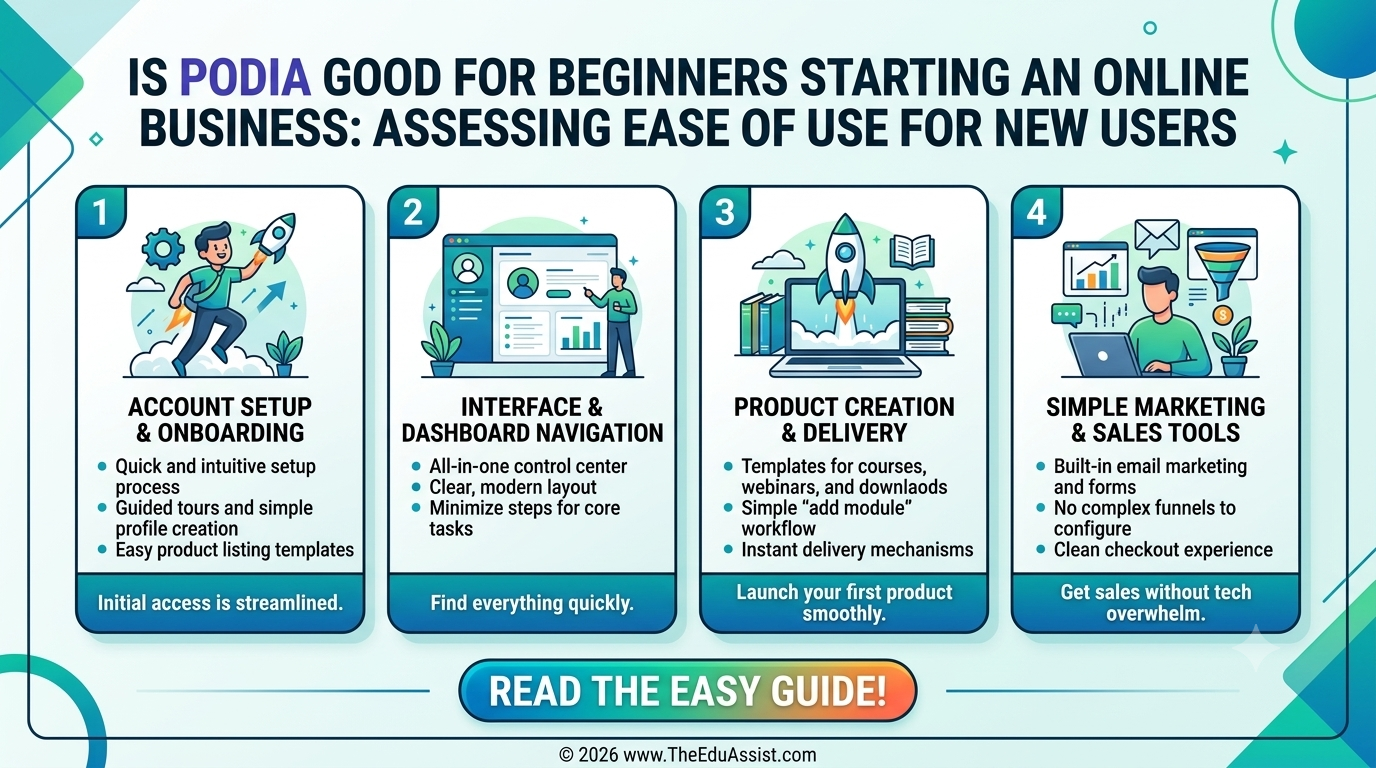
For most beginners, the answer is yes.
Podia’s strongest advantage is its ease of use.
Rather than overwhelming users with hundreds of settings and advanced configurations, Podia prioritizes simplicity and accessibility.
New users benefit from:
- Intuitive navigation
- Guided setup processes
- Minimal technical requirements
- Built-in templates
- Centralized business management
Most users can build a website, upload products, connect payments, and begin selling without hiring developers or learning complicated software systems.
This ease of use is one reason Podia remains a popular choice among first-time entrepreneurs.
However, ease of use comes with certain trade-offs that we’ll discuss later in this guide.
Features That Make Podia Beginner-Friendly
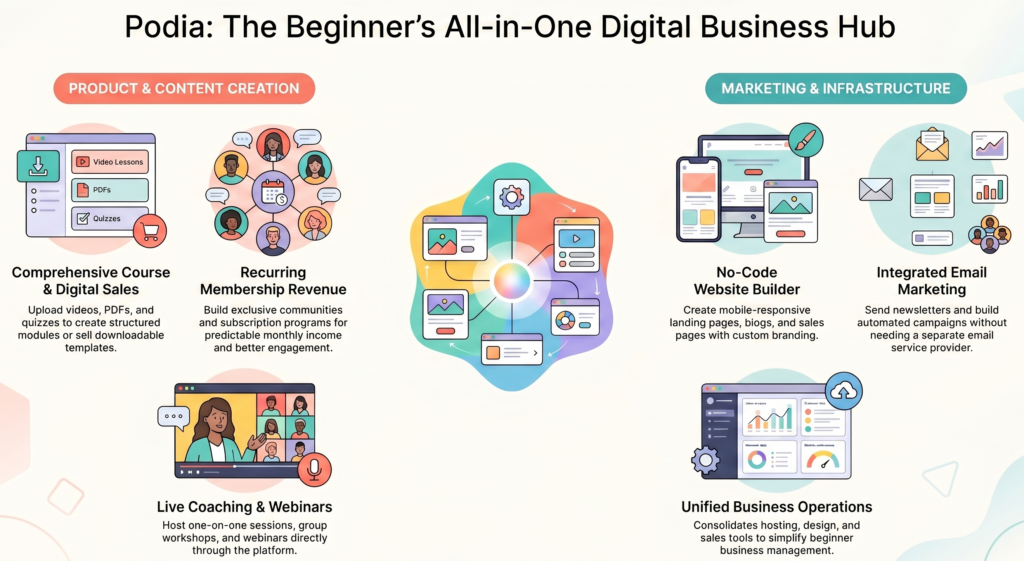
Website Builder
One of the most common questions is: Can you build a website with Podia? Yes.
Podia includes a built-in website builder that allows users to create professional websites without coding experience.
Features include:
- Mobile-responsive designs
- Landing pages
- Sales pages
- Blog functionality
- Custom branding
- Navigation menus
For beginners, this eliminates the need for separate website hosting and design platforms.
Online Course Creation
Course creation remains one of Podia’s core strengths.
Users can upload:
- Video lessons
- PDFs
- Audio files
- Downloads
- Worksheets
- Quizzes
Content can be organized into modules and lessons, creating a structured learning experience for students.
Digital Product Sales
Podia supports a wide range of digital products, including:
- Ebooks
- Templates
- Guides
- Resource libraries
- Spreadsheets
- Training materials
This flexibility allows creators to diversify revenue streams without needing multiple platforms.
Memberships and Communities
Recurring revenue has become increasingly important for online businesses.
Podia allows users to create membership programs where subscribers gain access to exclusive content and communities.
Benefits include:
- Predictable monthly revenue
- Improved customer retention
- Greater audience engagement
Coaching and Webinars
Coaches can use Podia to offer:
- One-on-one coaching
- Group coaching
- Webinars
- Workshops
These features reduce the need for multiple third-party tools.
Email Marketing
Does Podia include email marketing? Yes.
Podia includes built-in email marketing functionality, allowing users to:
- Send newsletters
- Build email lists
- Create automated campaigns
- Segment subscribers
For beginners, having email marketing integrated into the platform can significantly simplify business operations.
Podia Pricing Explained: Which Plan Should You Choose?
Pricing is one of the biggest considerations for new entrepreneurs.
Podia offers multiple plans designed for different business stages.
Free Plan
Suitable for:
- Testing the platform
- Exploring features
- Validating ideas
Limitations: Reduced functionality and branding restrictions.
Mover Plan
Best for:
- New creators
- Small businesses
- First-time course sellers
This plan typically provides the essential tools needed to launch an online business.
Shaker Plan
Ideal for:
- Growing businesses
- Established creators
- Membership operators
Additional features often include advanced marketing capabilities and greater customization options.
Recommendation: For most beginners, starting with the lowest paid plan is usually the most practical option because it balances affordability with functionality. Read our Podia pricing article to learn more.
Is Podia Better Than Kajabi?
One of the most frequently searched comparisons is Podia versus Kajabi.
The answer depends on your business goals.
Podia Strengths
- Easier to learn
- Lower cost
- Simpler setup
- Beginner-friendly interface
- Faster implementation
Kajabi Strengths
- Advanced automation
- More sophisticated funnels
- Greater customization
- Enhanced marketing features
- Larger enterprise capabilities
For beginners launching their first online business, Podia often feels less intimidating.
For established businesses focused heavily on automation and scaling, Kajabi may offer more advanced capabilities.
What Are the Disadvantages of Podia?
No platform is perfect.
While Podia excels at simplicity, there are limitations to consider.
- Limited Design Flexibility — Compared to platforms such as WordPress or Webflow, Podia offers fewer customization options.
- Fewer Advanced Marketing Features — Lacks some of the advanced automation and funnel-building capabilities available on higher-end platforms.
- Less Suitable for Large Enterprises — Businesses with complex operational requirements may eventually outgrow the platform.
- Basic Analytics — Some users may prefer deeper reporting and analytics functionality.
These disadvantages are not necessarily deal-breakers, but they are important considerations when evaluating long-term business growth.
Industry Use Cases
Course Creators
Podia works exceptionally well for creators selling educational content (course hosting, student management, digital downloads, email marketing).
Coaches
Coaches benefit from booking functionality, membership options, community features, and coaching products.
Consultants
Consultants can use Podia to generate leads, sell resources, offer training, and build authority.
Other Niches
- Software Development Education
- Real Estate Investors
Is Podia Worth It in 2026?
For beginners, Podia offers excellent value.
Its combination of website creation, email marketing, course hosting, membership management, and digital product sales reduces the need for multiple subscriptions.
For entrepreneurs who prioritize simplicity, Podia remains one of the strongest all-in-one solutions available in 2026.
7 Best Podia Alternatives for Course Creators in 2026
- Kajabi — Best for advanced marketing and automation.
- Thinkific — Excellent for course-focused businesses.
- Teachable — Popular among educators and course creators.
- LearnWorlds — Strong interactive learning features.
- Mighty Networks — Ideal for community-based businesses.
- Systeme.io — Affordable all-in-one business platform.
- Skool — Growing platform focused on courses and communities.
Quick Comparison Table
| Feature | Podia | Kajabi |
|---|---|---|
| Ease of Use | Excellent | Moderate |
| Website Builder | Included | Included |
| Email Marketing | Included | Included |
| Online Courses | Included | Included |
| Communities | Included | Included |
| Advanced Automation | Limited | Strong |
| Learning Curve | Low | Higher |
| Pricing | Lower | Higher |
| Beginner Friendly | Excellent | Good |
Cost Reality Check
Many new creators underestimate the true cost of launching an online business. Podia’s value proposition lies in consolidation — reducing both software expenses and technical complexity.
Final Verdict
If you’re starting an online business for the first time, Podia is one of the easiest platforms to learn and implement.
It offers enough functionality to launch courses, memberships, coaching programs, digital products, and communities without overwhelming new users.
For creators who value ease of use over endless customization, Podia remains a compelling choice in 2026.
References
- https://www.mightynetworks.com/resources/podia-vs-kajabi
- https://www.podia.com/pricing
- https://www.podia.com/podia-vs-kajabi
- https://www.podia.com/articles/online-course-platform-buyers-guide
Frequently Asked Questions
What is Podia used for? Podia is used to create and sell online courses, memberships, digital products, coaching services, webinars, and communities.
Is Podia better than Kajabi? For beginners, Podia is generally easier to learn and more affordable. Kajabi offers more advanced marketing and automation features.
Does Podia include email marketing? Yes. Podia includes built-in email marketing tools, including newsletters, broadcasts, and automation capabilities.
Can you build a website with Podia? Yes. Podia includes a website builder that allows users to create websites, landing pages, blogs, and sales pages.
What are the disadvantages of Podia? Some disadvantages include limited customization, fewer advanced marketing features, and less robust analytics compared to enterprise-level platforms.
How much does Podia cost? Podia offers multiple plans ranging from free options to paid subscriptions with expanded features. Pricing varies depending on the plan selected.
Call to Action
Choosing the right platform is only the first step toward building a successful online business. Strategic implementation matters just as much as the software itself.
At TheEduAssist, we help creators, educators, coaches, and businesses build scalable digital learning ecosystems through custom elearning solutions, content development, instructional design, and consulting services.
Visit TheEduAssist.com to explore our L&D, course development, and theeduassist consulting services.
Authored By: Sofia Arif (https://www.linkedin.com/in/sofia-arif-47b5a0197/)