Creating engaging online courses often feels overwhelming for instructional designers and L&D professionals. Tight deadlines, high drop-off rates, and technical hurdles make it hard to prove real results or scale training effectively.Teachable solves this by offering an intuitive platform to build, launch, and monetize courses without coding, empowering you to focus on impactful content creation.
What is Teachable or Teachable Definition:
Teachable is a leading online course platform where creators build and sell courses, coaching, memberships, and digital downloads. It supports videos, quizzes, drip content, and mobile apps, serving over 100 million students across 180 countries.
Key features:
- Drag-and-drop course builder
- AI-powered content generation
- Built-in payment processing
- Mobile apps for students
- Global tax handling
The platform handles payments, taxes, and global VAT automatically, freeing educators from admin tasks. With AI tools like course builders and quiz generators, it’s ideal for beginners turning expertise into scalable businesses.
Over 150,000 creators use it to earn $10B+, including language teachers and fitness pros.
Kajabi vs Teachable: Which One Is Better?
If you only want to create and sell online courses, Teachable is simpler, cheaper, and beginner-friendly.
If you want an all-in-one business platform with marketing, funnels, email automation, coaching, and community features, Kajabi is the stronger option.
| Feature | Kajabi | Teachable |
|---|---|---|
| Best For | Scaling a knowledge business | Simple course creation |
| Pricing | Higher | More affordable |
| Course Builder | Advanced | Easy & clean |
| Email Marketing | Built-in automation | Basic |
| Sales Funnels | Native funnels | Limited |
| Community | Built-in | Requires integrations |
| Coaching | Native coaching tools | Limited |
| Website Builder | Full website + blog | Basic pages |
| Ease of Use | Moderate learning curve | Beginner-friendly |
Choose Kajabi if:
- You want an all-in-one creator business platform
- You need funnels, automations, memberships, and coaching
- You want fewer third-party tools
Choose Teachable if:
- You mainly sell courses
- You want a lower-cost option
- You prefer simplicity over advanced marketing tools
Many creators feel Kajabi is more powerful for scaling, while Teachable is easier for beginners starting their first online course business.
How to Create an Account on Teachable
Step 1: Visit teachable.com and click “Start free trial” for a 7-day no-risk test.
Step 2: Enter your name, email, and password. Confirm via email.
Step 3: Set up your school name and customize your subdomain (e.g., yourschool.teachable.com).
Step 4: Choose a plan during onboarding Starter at $39/mo suits beginners with basic tools.
Quick setup checklist:
- Verify email immediately
- Skip advanced settings initially
- Explore the dashboard for quick navigation
Real example: Freelance ID started her L&D course school in under 5 minutes, avoiding complex setups like on Kajabi.
How to Create a Course on Teachable
Step 1: From your dashboard, go to “Courses” > “New Course.” Name it and add a description.
Step 2: Outline using AI: Enter a prompt like “Instructional design basics for beginners,” and it generates sections, lessons, and sample content.
Three creation options:
- Start from scratch: Add sections manually
- Bulk upload: Teachable creates lessons per file
- Copy from existing courses
Pro tip for L&D managers: Add quizzes for Kirkpatrick Level 1 evaluation right away.
Example: Corporate trainer created a “Remote Team Engagement” course with 5 AI-generated modules, saving hours on ADDIE analysis.
How to Upload Course Content (Videos, PDFs)
Step 1: In the course editor, add lessons under sections. Click “Add Lesson”.
Step 2: Upload from computer, Google Drive, Dropbox, or URL.
Supported formats:
- Videos: MP4 up to 2GB recommended; auto-subtitles available on higher plans
- PDFs: Direct upload for downloads
- Images/Audio: Embed seamlessly
Best practices:
- Organize files as “Section1-Lesson1.mp4” for bulk imports
- Preview on mobile for accessibility
Pro tip for educators: Use drip content to release videos weekly, boosting retention by 35% in one coach’s experience.
Example: Upload a PDF workbook on microlearning hacks alongside a 10-min video—students download instantly.
How to Set Teachable Pricing for Your Course?
Step 1: Navigate to “Pricing” in course settings.
Pricing options:
- One-time fee
- Subscriptions
- Payment plans
- Free previews
Transaction fees:
- Starter plan: 7.5% transaction fee
- Builder/Growth: 0% with teachable:pay
Pricing strategies:
Test this: Course creators report doubled conversions at $49 entry price.
Compare plans:
| Plan | Monthly (Annual) | Products | Transaction Fee | Best For |
|---|---|---|---|---|
| Starter | $39 ($29) | 5 | 7.5% | Beginners |
| Builder | $89 ($69) | 10 | 0% | Growing creators |
| Growth | $189 ($139) | 50 | 0% | Pros |
How to Publish and Launch Your Course
Step 1: Preview curriculum check flow, quizzes, and mobile view under “Curriculum.”
Step 2: Set live toggle “Published” in settings.
Step 3: Customize sales page with templates, testimonials, and urgency timers.
Launch checklist:
- Email beta testers via built-in tools
- Share link on LinkedIn/Facebook
- Use abandoned cart recovery
For institute owners: Pilot with 50 users for compliance testing.
Success example: Coach launched “Leadership Mastery” to 200 sign-ups in week 1 via free module teaser.
How to Get Paid on Teachable
Step 1: Connect Stripe/PayPal in “Settings > Payments.”
Payout details:
- Weekly/monthly payouts
- First payout takes 7-14 days
- Minimum payout: $30
- Pro plans: Instant bank withdrawal
Key benefits:
teachable:payhandles global taxes automatically- No fees on higher plans
- Real-time earnings dashboard
Real result: One solopreneur earned $5K first month, paid out seamlessly.
Tips to Succeed on Teachable
Optimize for your audience:
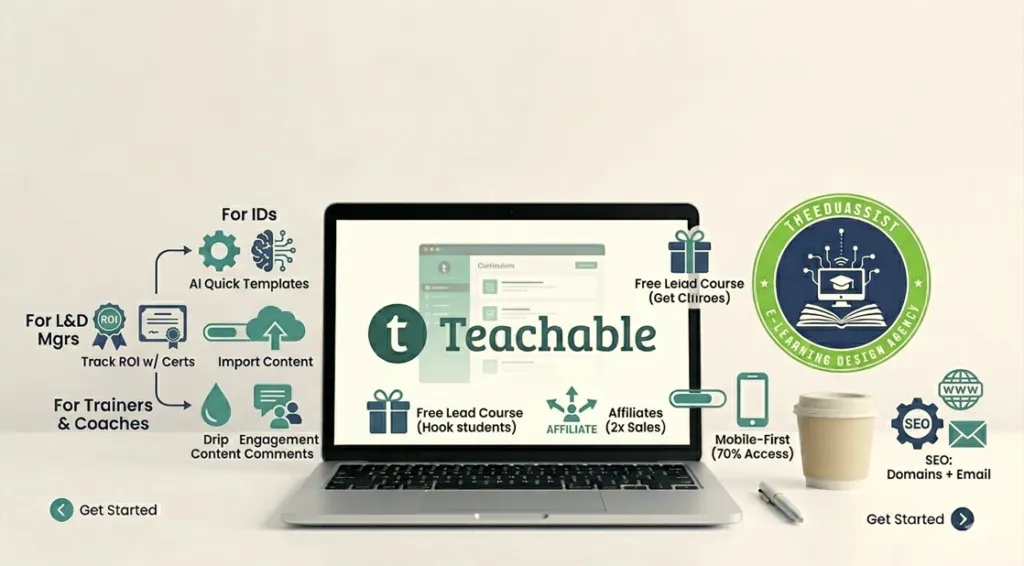
For Instructional Designers (IDs):
- Use AI for quick templates
- Add branching quizzes
For L&D Managers:
- Track ROI with certificates
- Import existing content
For Trainers & Coaches:
- Drip content + comments for engagement
General success strategies:
- Free lead course hooks 40% more students
- Affiliates boost sales 2x
- Mobile-first: 70% access via apps
- SEO: Custom domains + email integrations
Proven result: Trainer cut drop-offs 35% with personality quizzes.
Pros and Cons of Teachable:
Teachable excels for beginners with ease and scalability.
Pros:
- No transaction fees on paid plans
- AI tools save time
- Global tax handling
- Unlimited students post-$10K sales
Cons:
- Starter fee 7.5%
- Product limits on lower plans
- No free plan forever
Quick comparison:
| Aspect | Pro | Con |
|---|---|---|
| Ease | Drag-drop builder | Learning curve for advanced |
| Pricing | Annual discounts | Monthly higher |
| Features | AI, apps | Custom needs Enterprise |
Is Teachable Worth It for Beginners?
Yes, especially for L&D pros proving ROI fast.
Why it works:
- 7-day trial + 30-day guarantee minimizes risk
- Beginners launch in days (unlike complex alternatives)
- Creators report 10x growth via built-in marketing
Perfect for TheEduAssist users: Outperforms Thinkific in tax ease and beginner-friendliness.
The Teachable Affiliate Program allows creators, bloggers, educators, and marketers to earn recurring commissions by referring users to the platform. Affiliates can earn up to 30% recurring commission for eligible referrals, making it a popular choice in the creator economy and SaaS affiliate space. The program is commonly used by YouTubers, course creators, EdTech bloggers, and online business influencers who promote tutorials, platform comparisons, and online course strategies. Teachable also provides tracking dashboards, promotional resources, and affiliate management support through partner platforms, making it easier for affiliates to monitor conversions and revenue growth over time.
Conclusion: Start Building with Teachable Today
Teachable eliminates technical barriers, letting instructional designers, L&D managers, and course creators focus on what matters impactful learning experiences. From account setup to first payout, every step prioritizes speed and results.
Key takeaways for TheEduAssist creators:
- Launch professional courses in hours, not weeks
- Proven ROI through quizzes, certificates, and analytics
- Global scalability with automatic tax handling
- Perfect for tight deadlines and budget-conscious teams
References:
Teachable. (n.d.). Checkout page. Teachable Help Center. Retrieved May 6, 2026, from https://support.teachable.com/en/articles/11682503-checkout-page
Teachable. (2025, June 11). 7 proven UX tips to boost course sales page conversions. https://www.teachable.com/blog/course-sales-page-conversions
Teachable. (2025, December 9). Getting started with Teachable’s product detail pages. Teachable Help Center.https://support.teachable.com/en/articles/11682450-getting-started-with-teachable-s-product-detail-pages
Web Articles & Blog Posts
- FreshLearn. (2025). Unfiltered user reviews of Teachable. https://freshlearn.com/blog/teachable-review/
- Mighty Networks. (n.d.). What is Teachable? https://www.mightynetworks.com/encyclopedia/teachable
- Ecommerce Platforms. (2026). Teachable pricing plans 2026: Which one is best for you? https://ecommerce-platforms.com/compare/teachable-pricing-plans
- Teachable. (2020a). Getting started on Teachable: Create and publish your course. https://www.teachable.com/blog/create-and-publish-your-course
- Teachable. (2020b). Teachable payment gateways: Set up & start getting paid. https://www.teachable.com/blog/set-up-your-payments-and-start-getting-paid
- Teachable. (2026). Teachable Build & sell courses, coaching, memberships & more. https://teachable.com
Support Documentation
- Teachable Support. (2025). Create and set up your course. https://support.teachable.com/hc/en-us/articles/11682451-Create-and-Set-Up-Your-Course
Video Tutorials
- Teachable Tutorials. (2024). How to sign up or create Teachable account [Video]. YouTube. https://www.youtube.com/watch?v=IqbPv8k2IGs
- Teachable Tutorials. (2026). How to publish a course on Teachable [2026 full guide] [Video]. YouTube. https://www.youtube.com/watch?v=KQE2ROJj3Cw
Social Media
- Teachable. (2018). Teachable company page. LinkedIn. https://th.linkedin.com/company/teachable
Frequently Asked Questions (Teachable Course)
What do I get when I enroll?
You get instant access to all course materials, including lessons, downloadable resources, and any bonuses listed on the page.
Is this course beginner-friendly?
Yes. The course is designed step-by-step, making it easy to follow even if you’re starting from zero.
How long will I have access?
Access depends on the plan you choose. Check the pricing section for full details before enrolling.
Will this work on mobile?
Yes. The course is fully optimized for mobile, so you can learn anytime, anywhere.
Can I preview the course before buying?
Yes. If previews are enabled, you can explore parts of the curriculum before making a purchase.
Do you offer refunds?
Refund policies are clearly mentioned on the sales or checkout page please review them before enrolling.
Can I pay in installments?
If installment options are available, they will be shown in the pricing section at checkout.
How do I access the course after payment?
Once you complete your purchase, you’ll receive instant access through your account along with a confirmation email.
Call to Action
Ready to turn your expertise into a high-performing online course?
- Audit your current course strategy
- Optimize your instructional design
- Automate your delivery and sales systems
TheEduAssist helps educators, coaches, and creators build scalable, revenue-generating learning products.
Authored By: Atiqa Sajid http://www.linkedin.com/in/atiqa-sajid-747b57137