If you’re researching Adobe Captivate cost in 2026, you’re probably asking a bigger question:
“Is Adobe Captivate actually worth the investment for modern course creators?”
That’s a valid concern.
The eLearning market has changed dramatically. Today’s course creators, instructional designers, and L&D teams are no longer impressed by feature-heavy software alone. They want:
- Faster production
- AI-assisted workflows
- Better LMS compatibility
- Lower content development costs
- Faster ROI
And that creates a serious dilemma.
Because while Adobe Captivate remains one of the most recognized eLearning authoring tools, it’s also considered:
- Expensive for beginners
- Complex to learn
- Slower than newer AI-first tools
So before paying for an Adobe Captivate subscription, it’s important to understand:
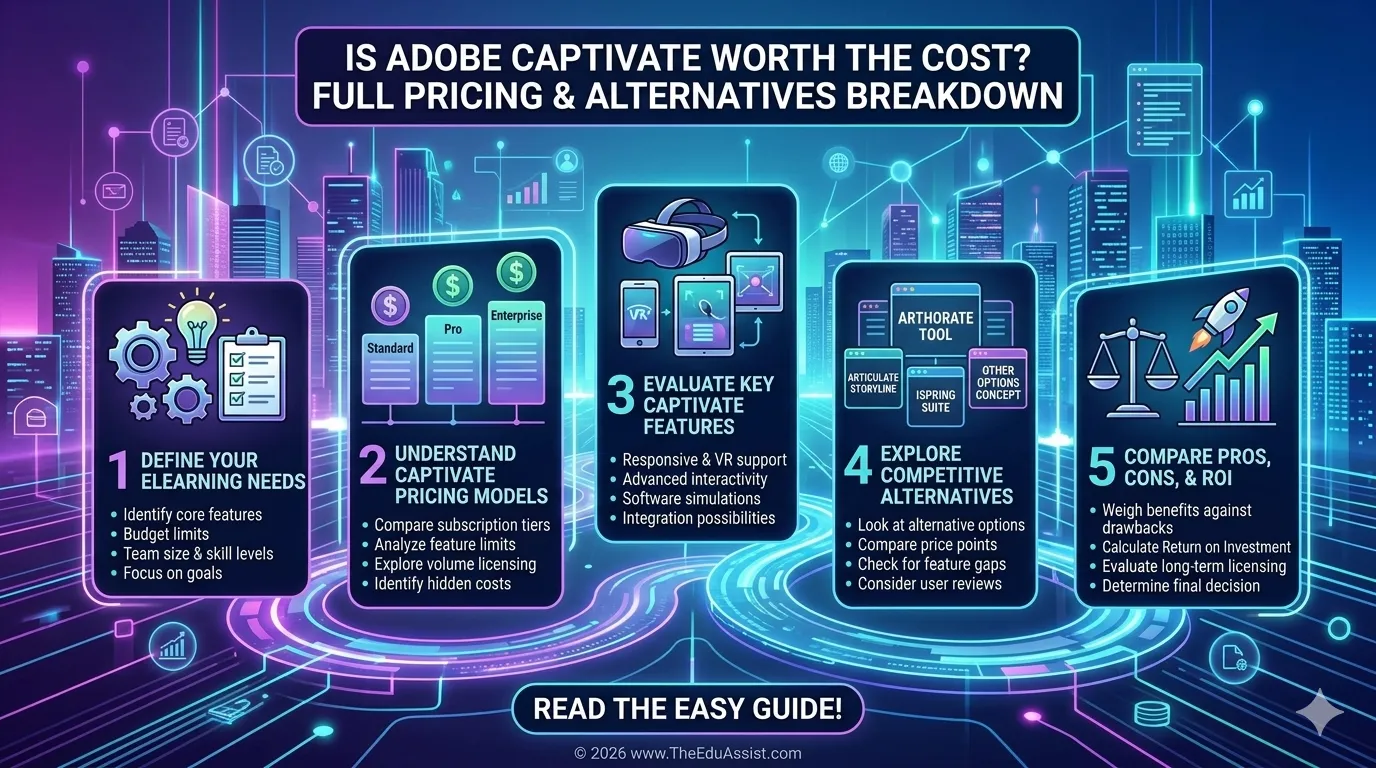
- How much Adobe Captivate costs
- What you actually get
- The hidden costs most people ignore
- Whether alternatives like Articulate Storyline 360 or Rise 360 deliver better ROI
How Much Does Adobe Captivate Cost in 2026?
The current Adobe Captivate subscription cost for individuals is approximately $33.99–$39.99/month, depending on region and billing structure.
Adobe currently offers:
- Individual subscriptions
- Team/business licensing
- Enterprise agreements
- Education pricing
- Free trial access
According to Adobe’s official buying guide, subscriptions include:
- Adobe Captivate
- Captivate Classic
- Cloud storage
- Generative AI credits
- Ongoing updates
Adobe Captivate Subscription vs Perpetual License
Older versions of Adobe Captivate offered perpetual licenses.
Historically:
- Perpetual license pricing ranged around $1,299
- Upgrade pricing ranged around $499
However, Adobe has shifted heavily toward subscriptions. That means:
- You stop paying → you lose access
- Long-term costs increase over time
- Annual renewals become part of your production budget
For many instructional designers, this changes the ROI equation significantly.
What Do You Actually Get With Adobe Captivate?
To be fair, Adobe Captivate is still an extremely capable platform.
Its strengths include:
Responsive eLearning Design
Courses automatically adapt across devices.
SCORM and xAPI Support
Strong support for:
- SCORM 1.2
- SCORM 2004
- xAPI/Tin Can
This matters for organizations using enterprise-level LMS ecosystems.
Software Simulations
One of Captivate’s biggest advantages. You can build:
- Click simulations
- Guided walkthroughs
- Interactive software training
This remains valuable for:
- Compliance training
- SaaS onboarding
- Technical certification programs
VR and Interactive Learning
Captivate supports immersive learning workflows and scenario-based experiences.
AI Features in 2026
Adobe has integrated generative AI features and Firefly-powered content tools into newer subscriptions.
Hidden Costs Most Course Creators Ignore
This is where many creators underestimate the real investment. The actual Adobe Captivate cost goes far beyond the monthly subscription.
- Steep Learning Curve
Adobe Captivate is not beginner-friendly. Many solo creators spend:
- Weeks learning workflows
- Hours troubleshooting interactions
- Additional money on tutorials or training This creates hidden productivity costs.
- Longer Development Time
Compared to modern rapid authoring tools:
- Captivate projects often take longer
- Advanced interactions require planning
- QA/testing cycles increase That affects client deadlines, training launch speed, and team efficiency.
- Voiceover & Asset Production
Most professional courses require narration, video editing, motion graphics, and branded templates. Creators often pay for freelancers, AI voice tools, stock assets, or additional Adobe products. - LMS Integration Costs
SCORM compatibility doesn’t guarantee seamless deployment. Many organizations spend money on LMS testing, SCORM troubleshooting, API integrations, and LMS consulting services. - Team Onboarding Costs
For corporate teams, onboarding new instructional designers into Captivate workflows can become expensive; especially in large L&D departments operating across California, Texas, and Florida.
Is Adobe Captivate Worth It for Different Types of Users?
For Solo Course Creators
Usually only worth it if you create advanced simulations, sell technical training, or need SCORM-heavy workflows. Otherwise, faster tools may offer better ROI.
For Corporate L&D Teams
Captivate performs well for compliance training, enterprise LMS integration, and complex onboarding systems.
For Instructional Designers
Experienced designers appreciate advanced control, variables, interactions, and simulation depth. Beginners may struggle significantly.
For Training Companies
Training providers handling software walkthroughs, technical certifications, and regulated training can justify the subscription cost more easily.
For Coaches Selling Online Courses
Often overkill. Most coaching businesses don’t need advanced SCORM logic, enterprise simulations, or technical branching systems.
Adobe Captivate Pros and Cons
| Pros | Cons |
|---|---|
| Advanced simulations | Steep learning curve |
| Strong SCORM support | Expensive for beginners |
| Enterprise-ready | Complex UI |
| LMS integrations | Slower production workflows |
| Responsive learning | Higher onboarding costs |
| Powerful interactions | Requires technical mindset |
Best Adobe Captivate Alternatives in 2026
- Articulate Storyline 360: Best for interactive learning, corporate training, and enterprise instructional design. Generally considered easier than Captivate while remaining powerful.
- Rise 360: Faster, simpler, and more beginner-friendly. Excellent for microlearning, rapid course creation, and mobile-first learning (but less customizable).
- Synthesia: AI avatars + rapid video generation. Ideal for fast content development and AI-first workflows.
- Canva: Great for visual course assets, lightweight modules, and social learning content.
- iSpring Suite: Strong middle ground for beginners and PowerPoint users.
Adobe Captivate vs Articulate Storyline: Which Offers Better ROI?
| Feature | Adobe Captivate | Storyline 360 |
|---|---|---|
| Pricing | Moderate–High | High |
| Ease of Use | Difficult | Easier |
| Simulations | Excellent | Strong |
| AI Workflow Speed | Moderate | Improving |
| Enterprise Readiness | Excellent | Excellent |
| Development Speed | Slower | Faster |
| Beginner Friendly | No | More approachable |
When Adobe Captivate Is NOT Worth the Cost
Captivate may not be ideal for beginners, budget-conscious creators, simple coaching programs, AI-first workflows, or rapid microlearning production.
When Adobe Captivate IS Worth the Investment
Captivate becomes valuable for enterprise compliance training, complex software simulations, technical walkthroughs, SCORM-heavy ecosystems, and large L&D departments.
Final Verdict: Should Course Creators Pay for Adobe Captivate in 2026?
Adobe Captivate is still a powerful eLearning authoring tool.
But in 2026, the real question is:
“Does the ROI justify the production complexity and long-term subscription cost?”
- Yes for enterprise training teams, technical instructional designers, and simulation-heavy environments.
- No for solo course creators, coaches, AI-first creators, and fast-moving content businesses — modern alternatives often provide faster production, lower costs, and better scalability.
References
- Adobe Captivate. (2026). Adobe Captivate Pricing 2026: Hidden Costs & Total ROI Revealed. Itqlick.com. https://www.itqlick.com/adobe-captivate/pricing?
- Adobe Captivate. (2026, April 27). ELearning Industry. https://elearningindustry.com/directory/elearning-software/adobe-captivate/pricing?
- Adobe Captivate – buying guide. (n.d.). Www.adobe.com. https://www.adobe.com/products/captivate/buying-guide.html
- Lewandowski, D. (2026). Google Scholar as a Tool for Discovering Journal Articles in Library and Information Science. ArXiv.org. https://arxiv.org/abs/1511.05809
- Martin-Martin, A., Orduna-Malea, E., Harzing, A.-W., & Delgado López-Cózar, E. (2017). Can we use Google Scholar to identify highly-cited documents? Journal of Informetrics, 11(1), 152–163. https://doi.org/10.1016/j.joi.2016.11.008
- Software Finder. (2026, March 25). How much is adobe captivate cost: Quick pricing overview. Softwarefinder.com. https://softwarefinder.com/resources/how-much-is-adobe-captivate
FAQs
Is Adobe Captivate subscription-based?
Yes. Adobe primarily offers Captivate through subscription licensing.
How much does Adobe Captivate cost per month?
Typically around $33.99–$39.99/month depending on region and plan.
Does Adobe Captivate still offer a perpetual license?
Older perpetual licenses existed, but Adobe now focuses mainly on subscriptions.
Is Adobe Captivate better than Articulate Storyline?
It depends. Captivate excels in simulations, while Storyline is often easier and faster.
What is the best Adobe Captivate alternative for beginners?
Rise 360 and iSpring Suite are usually more beginner-friendly.
Is Adobe Captivate good for SCORM courses?
Yes. SCORM support is one of its strongest capabilities.
Can Adobe Captivate be used without coding?
Yes, though advanced workflows may still require technical thinking.
Is Adobe Captivate worth it for solo course creators?
Usually only if advanced simulations are necessary.
Does Adobe Captivate work with LMS platforms?
Yes. It supports major LMS systems and SCORM standards.
What hidden costs should course creators expect with Adobe Captivate?
Training, onboarding, voiceovers, LMS troubleshooting, and asset production.
Is Adobe Captivate difficult to learn?
Compared to newer tools, yes.
Which is cheaper: Adobe Captivate or Storyline 360?
Captivate’s monthly pricing can appear cheaper initially, but total workflow costs vary.
Can AI tools replace Adobe Captivate workflows?
Partially. AI tools accelerate video and rapid course creation but may not fully replace advanced simulations.
Does Adobe Captivate support responsive learning?
Yes. Modern versions support responsive course design.
Is Adobe Captivate good for corporate training?
Yes, especially for enterprise-level compliance and technical training.
Call-to-Action
Need help choosing the right eLearning authoring stack for your business?
Whether you’re evaluating Adobe Captivate, Storyline, SCORM workflows, AI video tools, or LMS integrations, strategic instructional design decisions can dramatically reduce production costs and improve learning outcomes.
Explore smarter content development, custom elearning, and AI-powered L&D workflows with TheEduAssist.
Authored by: Sofia Arif