Moving to a new learning system sounds easy. However, the bills often add up fast. In fact, LMS migration cost is one of the most confusing items in any tech budget. Specifically, many teams find their first estimate was off by 30–60%. Typically, that gap shows up once the real work begins.
Why does this happen? Essentially, because migration is not just one task. Instead, it covers data transfer, system setup, tool links, and staff training. Therefore, each layer adds more cost. Yet, many vendors only quote the easy parts up front.
That is why budget planning is so key. To start, a solid plan guards your timeline. Additionally, it cuts surprise fees and helps your new platform earn its keep fast. In this guide, you will find clear LMS pricing for enterprises. Moreover, you will find main cost drivers, a full pricing comparison, hidden fees to watch for, and a ready checklist.
What Is LMS Migration Cost?
Strictly speaking, LMS migration cost is the total money needed to move your learning content, user data, and settings from one LMS to another. Actually, it is rarely just one number. Instead, it is the sum of many work areas. Consequently, each area has its own price tag.
What Does LMS Migration Include?
A full migration covers more than just copying files. For example, here is what a full project includes:
- Data migration: Moving user records, course results, and profiles from the old system to the new one safely and correctly.
- Content migration: Transferring SCORM files, videos, PDFs, and tests. Often these need re-formatting for the new platform.
- System setup: Setting up roles, permissions, alerts, and reports on the new system from scratch.
- Tool links: Connecting the new LMS to HR tools, CRM platforms, and login systems.
- Testing: Checking that every course, user, and link works before go-live.
- Training: Getting admins, teachers, and learners ready to use the new system well.
- Post-launch help: Fixing bugs and tuning the system in the first weeks after launch.
Why LMS Migration Cost Varies Across Enterprises
Because no two migrations are the same, costs can differ by ten times between a small firm and a global one. Indeed, several things drive this gap. These include data volume, tool links, regional rules, and how fast leaders want the switch done.
Furthermore, firms with old or custom systems pay more. This is because their data is rarely clean or ready to export. On top of that, regulated fields like health, finance, or government need checks at every step. So, their costs grow even more.
Average LMS Migration Cost in Enterprises (2026)
Clearly, costs shift based on firm size, data volume, and method chosen. Below are real price ranges from 2025–2026 vendor data and market reports.
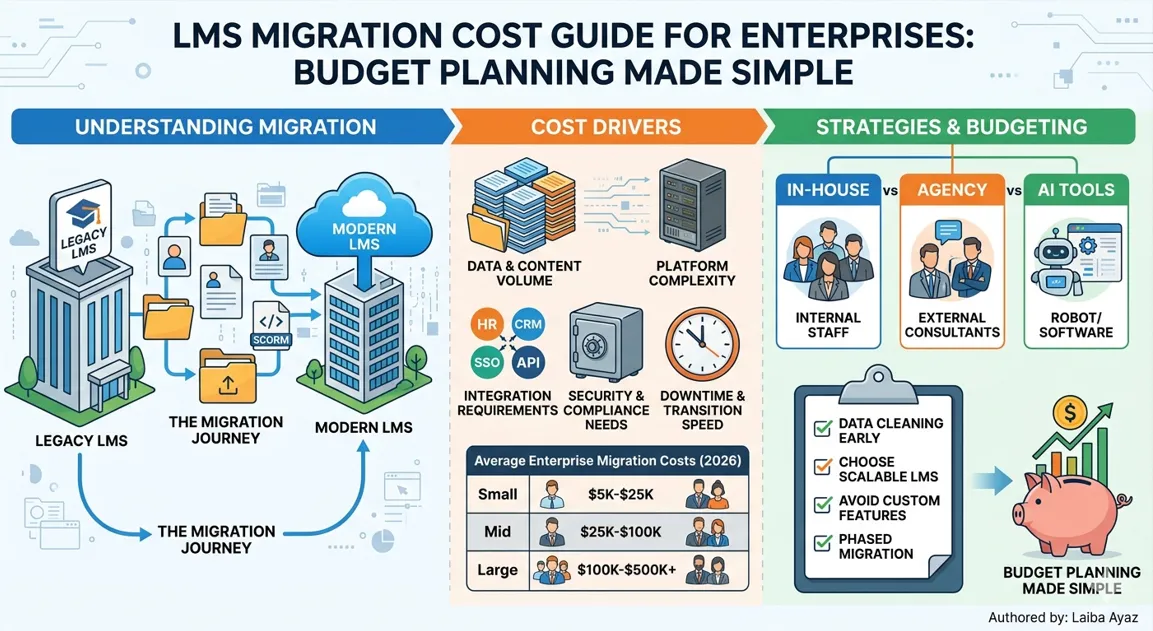
Small Enterprise LMS Migration Cost
Small firms with 100–1,000 staff often have the lowest costs. For instance, their data is small, links are few, and rules are basic. As a result, projects move fast and stay cheap.
- Cost range: $5,000 – $25,000
- Timeline: 4–8 weeks
- Key drivers: content re-format, basic HR link, admin training
Mid-Size Enterprise LMS Migration Cost
In contrast, mid-size firms with 1,000–10,000 staff face more work. Specifically, running more than one LMS is common at this size. Consequently, deeper links to payroll, compliance, and HR tools are often required. Therefore, costs rise and timelines grow.
- Cost range: $25,000 – $100,000
- Timeline: 8–20 weeks
- Key drivers: multi-system data work, API links, phased rollout
Large Enterprise LMS Migration Cost
Meanwhile, large global firms face the hardest migrations. For example, multi-language content, regional laws, and deep ERP links all push scope up fast. Therefore, these projects need the most time and the biggest budgets.
- Cost range: $100,000 – $500,000+
- Timeline: 5–18 months
- Key drivers: global data work, compliance checks, custom builds, change programs
| Enterprise Size | Staff Count | Cost Range | Timeline | Key Cost Driver |
|---|---|---|---|---|
| Small | 100 – 1,000 | $5,000 – $25,000 | 4 – 8 weeks | Content re-format |
| Mid-Size | 1,000 – 10,000 | $25,000 – $100,000 | 8 – 20 weeks | Multi-system links |
| Large | 10,000 – 50,000 | $100,000 – $300,000 | 6 – 12 months | Compliance + global rollout |
| Global Enterprise | 50,000+ | $300,000 – $500,000+ | 12 – 18 months | Custom dev + change program |
LMS Pricing Models for Enterprises
Before you sign a deal, you need to know LMS pricing models for enterprises. Specifically, vendors price their work in very different ways. So, the model you pick will affect your total spend for years not just today.
Subscription-Based Pricing
Most cloud LMS tools charge a monthly or yearly fee. Typically, prices often tie to active users or plan level. On the plus side, this gives you steady costs. Furthermore, it covers hosting, updates, and support in one bill.
However, this fee comes on top of migration costs. Therefore, always count both the one-time migration spend and the ongoing fee. Together, they show your true total cost.
- Typical range: $3 – $12 per active user per month
- Best for: firms that prefer monthly costs over large one-time spend
One-Time Migration Pricing
Alternatively, some agencies charge one flat fee for the whole job. Clearly, this covers data work, setup, and post-launch help. As a result, you get a fixed budget target. Consequently, that makes internal sign-off much easier.
Nevertheless, scope creep is still a risk. So, always make sure your contract lists all tasks clearly. Also, confirm that any add-ons go through a formal change process so costs stay in view.
- Typical range: $10,000 – $200,000+ based on scope
- Best for: teams with a clear, fixed project scope
Custom Enterprise Pricing Model
Lastly, large firms often build a fully custom deal. Specifically, these may bundle a set team, SLA support, and build hours. In addition, multi-year care is often included too. While less clear up front, these deals often give the best long-term value. Still, always get at least three quotes before you commit.
Key Factors That Affect LMS Migration Cost
Several things shape your final bill. Specifically, knowing them early helps you build a better budget. As a result, you dodge surprises later too.
Size of Data and Content
To begin with, more data means more cost. This specifically covers user records, course results, files, and SCORM packs. Beyond that, big content libraries need more QA time after the transfer. So, the larger your archive, the higher your bill will be.
Platform Complexity of the Old LMS System
In addition, old or custom LMS tools are harder to pull data from. Specifically, non-standard formats need custom scripts. Furthermore, outdated SCORM files often need re-packing. As a result, the more complex your old system, the more labor hours the migration will use.
Integration Requirements (HR, CRM, APIs)
Moreover, linking your new LMS to other tools is often the biggest cost. Indeed, each link needs build time, testing, and a write-up. Whether it is HR tools, a CRM, or a private API. Consequently, more links mean more cost often by a large amount.
Security and Compliance Needs
Furthermore, regulated fields face extra steps. For example, health and finance firms must prove their new LMS meets GDPR, HIPAA, or SOC 2 rules. Beyond compliance, ensuring you are moving data safely is critical for maintaining integrity during the export-import process. In addition, audits add doc work and sometimes custom security builds. So, both push costs up further.
Downtime and Transition Speed
Also, speed costs money. For instance, running both systems at once needs extra staff. On the other hand, a phased plan spreads costs over time. Even so, a phased plan also adds complexity. So, pick your pace carefully and price both paths before you decide.
LMS Migration Services Pricing Comparison
When you compare AI LMS migration services pricing, three main paths emerge. Specifically, each one has different trade-offs between cost, speed, control, and risk. Therefore, knowing these helps you pick the right fit for your team.
In-House vs Agency Migration Cost
First, in-house work uses your own IT and L&D staff. While direct costs are lower, indirect costs, such as staff time and error risk, add up fast. Conversely, agency work costs more up front. In return, though, it is faster, better documented, and far less risky overall.

AI-Powered Migration Tools Pricing
Nowadays, many AI tools take over big parts of the migration. For instance, they map data fields, flag format issues, and check transfers. Because of this, they can cut total project cost by 20–40% versus manual work.
Typically, pricing runs from $2,000 for small projects to $50,000+ for large enterprise use. Also, most are sold as a short-term SaaS plan tied to the migration window only.
Freelancers vs Enterprise Vendors
On the other hand, freelancers charge the least per hour. Still, they carry the most project risk. In contrast, enterprise vendors charge more. In return, they give structured project plans, SLAs, and post-launch cover. Therefore, for high-stakes migrations, vendors almost always offer better value in the end.
| Approach | Typical Cost Range | Speed | Risk Level | Best For |
|---|---|---|---|---|
| In-House Team | $5,000 – $40,000 (labor) | Slow | Medium–High | Simple jobs, strong IT team |
| Freelancer | $3,000 – $30,000 | Medium | High | Small firms, limited scope |
| AI Migration Tool | $2,000 – $50,000 | Fast | Low–Medium | Data-heavy, repeated migrations |
| Agency / Consulting Firm | $20,000 – $200,000+ | Fast–Medium | Low | Mid-to-large enterprises |
| Enterprise LMS Vendor | $50,000 – $500,000+ | Structured | Very Low | Large global enterprises |
Hidden Costs in LMS Migration
Even the best project scopes miss certain costs. Specifically, these hidden fees cause most budget problems in LMS migration projects. Therefore, knowing them early gives you a real edge in planning.
Data Cleaning and Preparation Cost
Before any data moves, it must be clean. Specifically, duplicate accounts, broken files, and messy records all need manual fixes. Indeed, this step alone can add $3,000 – $30,000 to your bill. Generally, the worse your old data, the higher this cost will be.
Training and Onboarding Cost
A new LMS only works if your team knows how to use it. For instance, admin sessions, teacher workshops, and learner guides all take time. Furthermore, they often need outside help too. So, plan to budget $2,000 – $15,000 for this layer, based on your team size.
Downtime Business Impact
System downtime stops learning programs cold. As a result, compliance deadlines can slip. Also, new hire programs may stall. Therefore, always measure this risk in real dollars before migration starts. Then, plan your cutover window to keep the impact small.
Post-Migration Support Cost
The first 60–90 days after launch are always the busiest for help requests. Clearly, users run into issues. Similarly, links need fine-tuning. So, budget for one to three months of set support. Expect $1,500 – $10,000 per month for this phase.
How to Reduce LMS Migration Cost
Fortunately, you can control spend without cutting quality. Actually, several proven steps bring LMS migration cost down while keeping results high. Also, check our LMS migration timeline guide to match these steps to your schedule.
Plan Migration in Phases
Rather than moving all at once, break the job into stages. First, start with the most vital user groups or content. This way, you cut risk. Additionally, you also spread cost over time. Moreover, your team gets to learn before taking on the full scope.
Clean and Organize Data Early
Similarly, start your data audit three to six months before migration day. By removing copies, archiving old users, and tidying content, you cut labor sharply. Moreover, it stops costly post-launch fixes that tend to arrive at the worst time.
Choose a Scalable LMS Platform
Furthermore, picking a platform that grows with you avoids a future re-migration. Before you decide, check vendor road maps and API options. Also, look at tool link support. While a scalable platform may cost a bit more now, even so, it saves a lot over five years.
Avoid Unnecessary Custom Features
Finally, custom builds are pricey and hard to keep up. So, before asking for one, check if the new LMS can handle the need through built-in settings. If it can, use those instead. Consequently, each custom build adds dev time, test cycles, and long-term risk.
LMS Migration Budget Planning Checklist
Run through this list before you lock in your migration budget. Clearly, it captures every cost layer and sets your project up on solid ground. For the full version, visit our LMS migration checklist resource.
Define Project Scope
- List all systems: current LMS, target LMS, and linked tools
- Name every content type and format that needs to move
- Map user roles, rights, and report needs
- Record all rules: GDPR, HIPAA, SOC 2, and others
- Set your go-live date and lock in key steps
Estimate Data Volume
- Count all user records and course results
- List every course, module, and media file with file sizes
- Flag data quality issues that need fixing before the move
- Estimate how long export and import will take
Choose Migration Method
- Compare in-house, agency, AI tool, and vendor-led options
- Get itemized quotes from at least three providers
- Check SLAs, cover, and what post-migration help is included
- Look at AI tools to see if automation can save you money
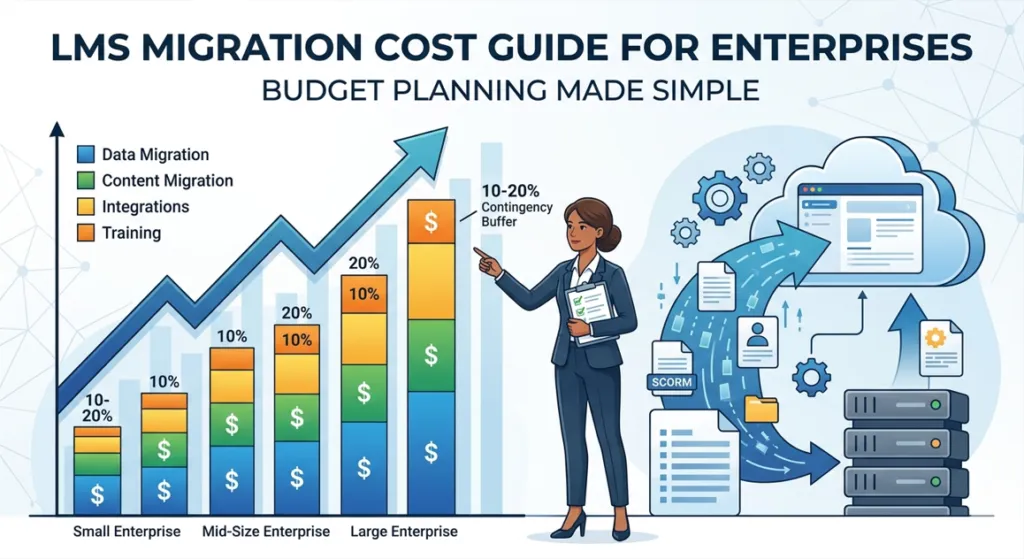
Set Contingency Budget (10–20%)
Pro Tip: Always add a 10–20% buffer to your final LMS migration cost estimate. Because scope changes, data surprises, and link delays are common, a buffer keeps the project moving without emergency approvals.
- Use 10% for well-defined, low-risk projects
- Use 15–20% for complex or global migrations
- Write down what triggers the buffer and who can approve its use
LMS Migration Cost Estimation Example
Indeed, numbers make budgets real. Below are two example cases. Specifically, one is a small firm and the other is a large global one. Together, they show how each cost layer adds up to a final total.
| Cost Item | Small Firm (800 users) | Large Firm (25,000 users) |
|---|---|---|
| Data pull and cleanup | $2,500 | $25,000 |
| Content move and re-format | $3,000 | $40,000 |
| Platform setup | $2,000 | $30,000 |
| Tool links (HR, SSO, CRM) | $1,500 | $60,000 |
| Testing and QA | $1,000 | $20,000 |
| Training and onboarding | $2,000 | $15,000 |
| Post-launch help (90 days) | $1,500 | $25,000 |
| Buffer (15%) | $2,025 | $32,250 |
| Total Estimate | ~$15,525 | ~$247,250 |
References
- Learning Management Systems and e-Learning ResearchGate Academic review of LMS structure, adoption factors, and integration issues.
- Scholars Crossing. (2026). A qualitative case study on leadership and organizational readiness. https://digitalcommons.liberty.edu/cgi/viewcontent.cgi?article=9357&context=doctoral
- MDPI. (2026). Towards Inclusive Learning Management Systems Integration. https://www.mdpi.com/2227-7102/16/3/358
- NORMA@NCI. (2025). A cost-benefit analysis of AWS and Alibaba services for cloud migration. https://norma.ncirl.ie/8145/1/anbuarivuselviraviselvam.pdf
- Infonomics Society. (2017). Critical Success Factors for Cloud Migration in Higher Education Institutions. https://infonomics-society.org/wp-content/uploads/ijicr/published-papers/volume-8-2017/Critical-Success-Factors-for-Cloud-Migration-in-Higher-Education-Institutions-A-Conceptual-Framework.pdf
- ERIC. (2012). Learning Management System Migration: An Analysis of Stakeholder Perspectives. https://files.eric.ed.gov/fulltext/EJ979676.pdf
- Frontiers in Education. (2026). Crisis management in distance education in the age of artificial intelligence. https://www.frontiersin.org/journals/education/articles/10.3389/feduc.2026.1791475/full
Final Thoughts
To conclude, an LMS migration is a major undertaking where costs vary based on data volume, integrations, and compliance. Consequently, thorough planning and early data cleanup are the most effective ways to prevent budget overruns. Ultimately, by scoping your project early and comparing multiple vendor quotes, you ensure a smoother, more cost-effective transition.
FAQs About LMS Migration Cost
What is LMS migration cost?
Basically, LMS migration cost is the full amount needed to move learning data, content, and tool links from one platform to another. Specifically, direct fees like vendor charges are included. Beyond that, indirect costs like staff time and downtime are part of the total too.
Why is LMS migration so expensive for enterprises?
Because large migrations involve big data sets, complex tool links, strict rules, multi-language content, and thorough pre-launch testing. Consequently, each layer adds labor and risk costs. As a result, the total price can grow far beyond what teams first expect.
How much does enterprise LMS migration cost in 2026?
In 2026, costs range from about $5,000 for small firms to $500,000 or more for global ones. Typically, mid-size firms spend $25,000 – $100,000. These numbers include data work, tool links, testing, and training. Moreover, post-launch help is also part of that total.
Can LMS migration be done for free?
While some platforms include basic move tools that cut direct costs, even so, a truly free migration does not exist. Specifically, staff time, data cleanup, testing, and training all cost money. In addition, rushing a “free” migration raises the risk of data loss.
What factors affect LMS pricing the most?
Indeed, data size, platform age, number of tool links, compliance needs, and move speed are the biggest drivers. Specifically, firms with clean, simple data pay far less. In contrast, those with years of messy records pay a lot more.
Should I use an AI-powered migration tool or hire an agency?
Actually, AI tools work best for data-heavy jobs where auto-mapping saves labor. Conversely, agencies suit complex work needing human judgment. Therefore, many enterprises use both for the best results.
How long does enterprise LMS migration take?
Generally, small projects wrap up in 4–8 weeks. Meanwhile, mid-size ones take 2–5 months. Also, large global rollouts can run 6–18 months, especially when multi-language content and audits are involved.
Authored by: Laiba Ayaz