Digital learning has exploded over the past decade, and one of the most powerful tools in this transformation is eLearning videos. For students and teachers who already love academic platforms such as ScienceDirect, Springer, AJET, Taylor & Francis, Wiley, J‑ETS, and major repositories like JSTOR, ERIC, DOAJ, CORE, PubMed, UNESCO Digital Education, Open Educational Resources (OER) hubs, and corporate‑learning sources like Training Industry, LinkedIn Workplace Learning, and Gartner, it’s now natural to ask: How can we turn rigorous research into thrilling, video‑based experiences that actually stick?
This article explores eLearning videos as a strategic, research‑informed channel for students and teachers, weaving together findings from EdTech journals, open‑access repositories, and practitioner‑focused platforms. It covers why video works, how to design it effectively, and where to publish and find the best video‑driven learning resources.
Why eLearning videos work? (research‑backed)
Over the past decade, educational research has consistently shown that well‑designed instructional videos enhance engagement, comprehension, and retention, especially in blended and online environments. In a 2017 review of Effective Educational Videos in CBE Life Sciences Education, researchers summarized three key design principles:
- Managing cognitive load (avoiding too much on‑screen text, visuals, and audio at once).
- Maximizing engagement (using clear narration, relevant visuals, and real‑world examples).
- Promoting active learning (embedding questions, pauses for reflection, or follow‑up tasks).
eLearning videos also support microlearning: short, focused segments that learners can watch in 3–7 minutes, which aligns with shrinking attention spans and mobile‑first behaviors. When combined with interactive elements such as in‑video quizzes, hotspots, or scenario‑based prompts, videos shift from passive watching to “active video‑based learning.”
For students and teachers familiar with ScienceDirect, Springer, JSTOR, CORE, ERIC, and Open Access repositories, video can translate dense research into digestible, reusable assets. For example:
- A 5‑minute animated explainer can summarize a The International Journal of Educational Technology in Higher Education paper on AI‑supported learning.
- A 7‑minute teacher‑recorded video can walk through a Taylor & Francis or Wiley journal article for a seminar discussion.
Types of eLearning videos students and teachers love
Not all videos are the same. Teachers and students who already use academic platforms benefit most from purpose‑driven formats. Common, research‑informed types include:
1. Mini‑lecture / explainer videos
Typical length: 3–7 minutes.
Use: Recap a core concept, guide learners through a journal abstract, or explain a methodology (e.g., “How to read a randomized controlled trial.”).
Best practice: Stick to one learning objective per video, with clear headings, narration, and minimal text on screen.
2. Student‑created reflection or project videos
Use: Perfect for flipped‑classroom or seminar‑style courses. Students can film short video reflections on a ScienceDirect or Springer article, or present a group project using a slide‑over‑webcam style.
Benefits: Encourages metacognitive learning (students think about how they are thinking) and aligns with constructivist pedagogy widely discussed in AJET and Education and Information Technologies Journal (E&IT).
3. Interactive tutorial videos
Use: Step‑by‑step walkthroughs of how to use ERIC, JSTOR, Google Scholar, or Open Access databases for a literature review. Platforms like TrainingIndustry, LinkedIn Workplace Learning, and AIHR often showcase such videos for corporate‑learning audiences.
Design tip: Embed in‑video questions or pauses (“Pause here and try to search for…”) so students do not just watch but practice.
4. “Behind the paper” or “Teacher‑after‑class” videos
Use: Short, informal clips where teachers unpack a challenging article, highlight key takeaways, or suggest follow‑up readings from DOAJ, CORE, or PubMed Central.
These mimic the “office‑hours” feel but scale to hundreds of students, making them ideal for large‑cohort courses.
5. Micro‑learning playlists for specific skills
Use: Curate a video playlist (e.g., 5–10 short videos) around a theme:
- “How to critically appraise a journal article.”
- “Basics of quantitative vs. qualitative research.”
- “Using OER Commons and MERLOT for open‑access teaching materials.”
This approach mirrors the microlearning playlists promoted by platforms like Khan Academy and Duolingo, which are widely cited in EdTech research.
Designing effective eLearning videos: evidence‑based principles
Drawing on CBE—Life Sciences Education, Evidence‑Based Medicine video design studies, and EdTech best‑practice guides, here are practical, research‑aligned design principles.
1. Align each video to a clear learning objective
Before recording, define:
- What will the learner know, do, or feel after watching?
- How does this video connect to an article, journal, or topic on ScienceDirect, Springer, AJET, or Taylor & Francis?
Example:
Objective: “By the end of this 5‑minute video, students will be able to identify three ways to reduce cognitive load in instructional videos, based on Song & Mayer (2017).”
2. Keep videos short and segmented
Adult attention spans online are short, so aim for 3–7 minutes per video whenever possible.
If a topic is long (e.g., “How to conduct a systematic review”), break it into parts:
- 1: Search strategies (using ERIC, JSTOR, PubMed).
- 2: Screening studies.
- 3: Synthesizing findings.
This segmentation supports chunking, a well‑established cognitive‑load theory.
3. Use visuals and voiceover, not dense text
On‑screen text should be minimal and keyword‑based. Let the narration carry meaning, supported by:
- Diagrams of models (e.g., ADDIE, SAM, flipped‑classroom).
- Highlights of journal article structures (abstract, methods, results).
Avoid reading slides verbatim; instead, explain concepts conversationally, as if you were guiding a small group through a ScienceDirect article.
4. Incorporate interactivity
Passive watching is less effective than active watching. Ways to add interactivity:
- In‑video questions that pause playback.
- Hotspots linking to PDFs, journal articles, or OER Commons resources.
- Follow‑up tasks: “After watching, search for one article on ERIC that uses mixed methods.”
These techniques are recommended in educational‑video design literature and are widely used in corporate‑learning platforms such as TalentLMS, Degreed, and LinkedIn Learning.
5. Ensure accessibility and mobile‑friendliness
Videos must be usable for all learners, including those with disabilities and those on low‑bandwidth connections. Non‑negotiables:
- Captions or subtitles.
- Clear audio and minimal background noise.
- Responsive playback on mobile devices (most students will watch on phones or tablets).
Accessibility is also aligned with UNESCO Digital Education guidelines and open‑access initiatives like OER Commons, MERLOT, Open Textbook Library, and DOAJ.
How students and teachers can use research platforms with eLearning videos
You already know ScienceDirect, Springer, AJET, Taylor & Francis, Wiley, J‑ETS, JSTOR, ERIC, DOAJ, CORE, PubMed, and various open‑access repositories. Let’s see how to turn them into video‑rich learning experiences.
1. Turn journal articles into “video abstracts”
For a ScienceDirect or Springer article, teachers and students can create a “video abstract”:
- 0:00–0:30: Hook – why this paper matters.
- 0:30–2:00: Methods and key findings.
- 2:00–3:00: Implications and discussion questions.
This mirrors the “video abstracts” increasingly encouraged by journals such as The International Journal of Educational Technology in Higher Education and similar outlets.
2. Curate “video‑journal clubs”
Inspired by AJET, BERA, and E&IT communities, you can run:
- Monthly “video‑journal clubs” where students and teachers:
- Watch a short video explaining a paper.
- Read the original article (via ScienceDirect, Springer, JSTOR, or ERIC).
- Discuss in a forum or live session.
This structure is common in workplace‑learning reports (e.g., LinkedIn Workplace Learning, Training Industry) and supports continuous professional development (CPD).
3. Use AI tools to scaffold eLearning Videos creation
Platforms like AIHR, TalentLMS, and corporate‑learning tech vendors now integrate AI‑generated avatars, scripts, and voiceovers, which can help teachers produce high‑quality videos without a studio.
For students, this supports:
- AI‑assisted video scripts for explaining a PubMed or CORE paper.
- Automated captions and translations for multilingual classrooms.
Research on AI‑generated vs. human‑made teaching videos (e.g., recent ScienceDirect studies) suggests that well‑designed AI videos can achieve similar learning gains when aligned with pedagogical principles.
Where to find and publish eLearning videos
Once you start creating videos, the next question is: Where do we put them—and where can we find the best ones?
1. Academic & open‑access repositories
You already know many of these, but they can host or link to videos:
- DOAJ, CORE, ERIC, JSTOR, PubMed Central, HathiTrust, Open Access Network (bepress) now index or link to multimedia supplements, including instructional videos.
- Zenodo, MERLOT, OER Commons allow you to upload video‑based OERs with clear licenses and metadata.
Best practice:
- Add video summaries of your OERs or course materials.
- Tag them with keywords like “flipped‑classroom,” “eLearning video,” “educational technology,” and link to relevant journals such as AJET, The Internet and Higher Education, or E&IT.
2. Platforms for educators and professionals eLearning Videos
Beyond repositories, these spaces often feature video‑driven case studies and explainers:
- Training Industry, eLearningIndustry, AIHR, TrainingZone, Brandon Hall, Gartner learning‑tech reviews showcase corporate‑learning videos and microlearning series.
- LinkedIn Workplace Learning, HBR Learning & Development, Degreed, and corporate‑LMS blogs publish video‑based thought leadership and “best‑practice” explainers.
For teachers, watching these videos can provide transferable ideas for classroom‑level eLearning design.
3. Publishing student‑made eLearning Videos
Students can publish their video reflections, explainer clips, or mini‑research summaries on:
- Academia.edu, ResearchGate, Semantic Scholar, and institutional repositories (many universities now allow multimedia uploads).
- YouTube channels (university, department, or personal), linked from course sites or LMS platforms.
These activities align with open‑science and open‑education values, and are increasingly recognized in professional portfolios and CVs.
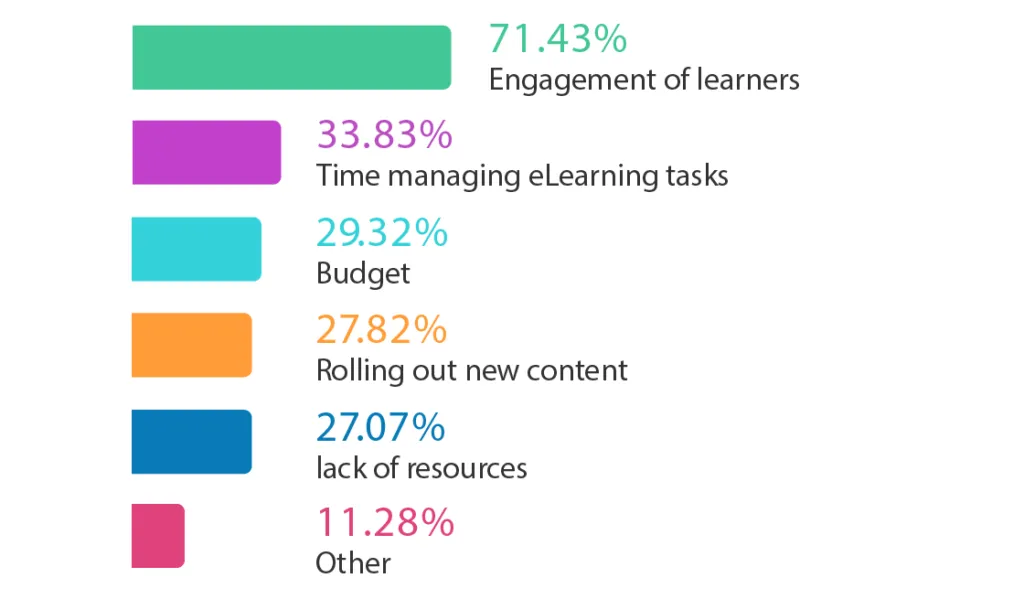
Source: https://www.learnupon.com/blog/elearning-engagement/
Integrating eLearning videos into assignments and assessments
Videos are not just “nice extras”; they can be core components of assessment and instruction.
1. Video‑based assignments
Examples for students:
- literature review: Create a 5‑minute video explaining three key articles from ScienceDirect, Springer, or ERIC.
- critique: Record a 3–5 minute reaction to a journal article, highlighting strengths, limitations, and implications.
- Presentation: Replace a traditional PowerPoint with a narrated video, using MERLOT or OER Commons resources as visuals.
These tasks mirror research‑driven eLearning video assignments used in higher‑education pedagogy literature.
2. Video‑based feedback
Teachers can use eLearning videos to:
- Record personalized feedback on student work (e.g., a 3–minute screencast‑style video walking through a paper draft).
- Create common‑feedback videos addressing recurring issues (e.g., “How to structure your Methods section”).
This approach is supported by EdTech research on multimedia feedback and is increasingly used in online and blended programs.
3. Flipped‑classroom structures
A robust evidence‑based model is the flipped classroom, where:
- Students watch short eLearning videos before class (e.g., an explainer on a key AJET or Taylor & Francis article).
- Class time is used for discussion, Q&A, and problem‑solving.
Flipped‑classroom videos are particularly effective when they are short, clearly focused, and accompanied by preparatory tasks (e.g., “Watch the video, then answer these two questions on the LMS forum”).
eLearning videos and future‑proof learning skills
For students and teachers who love academic databases, journals, and open‑access movements, eLearning videos also build future‑proof skills:
- Digital literacy: Learning how to find, evaluate, and create video‑based knowledge.
- Research communication: Translating complex papers into clear, accessible explainers.
- Multimodal creation: Combining text, audio, visuals, and interactivity skills valued in corporate learning, EdTech, and instructional design.
Platforms like TrainingIndustry, LinkedIn Learning, AIHR, and Gartner’s corporate‑learning reports repeatedly emphasize that multimodal, video‑driven content is becoming the default for modern learning ecosystems.
Putting it all together: A practice‑ready roadmap
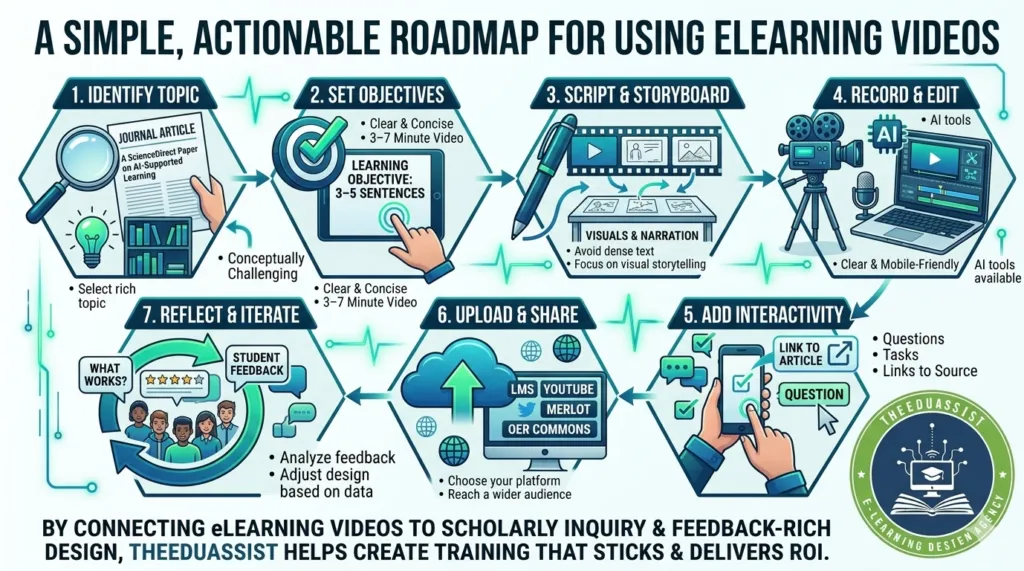
If you are a teacher or student who already loves ScienceDirect, Springer, AJET, Taylor & Francis, ERIC, JSTOR, DOAJ, CORE, UNESCO Digital Education, OER Commons, MERLOT, and related platforms, here is a simple, actionable roadmap for using eLearning videos:
- Identify a journal article or topic that is conceptually rich or challenging (e.g., a ScienceDirect paper on AI‑supported learning).
- Write a 3–5 sentence learning objective for a short video (3–7 minutes).
- Script and storyboard using visuals and narration, not dense text.
- Record and edit a clear, mobile‑friendly video (or use AI tools if available).
- Add interactivity (questions, tasks, or links to the original article).
- Upload and share on your LMS, YouTube, or an open repository (e.g., MERLOT, OER Commons).
- Reflect and iterate: Ask students for feedback and adjust design based on what works.
By connecting eLearning videos tightly to peer‑reviewed research and open‑access resources, you can create thrilling, evidence‑based learning experiences that students and teachers genuinely enjoy—without leaving the spirit of academic rigor behind.
Conclusion: Why eLearning Videos Thrill Students and Teachers
eLearning videos are no longer optional extras; they are central to how students and teachers engage with research, coursework, and professional development. When designed with clear learning objectives, short segments, strong visuals, and embedded interactivity, videos can turn dense ScienceDirect, Springer, AJET, Taylor & Francis, ERIC, JSTOR, and OER‑based content into exciting, memorable learning experiences. [web:6][web:10]
For educators and learners who already love academic platforms, eLearning videos serve as a bridge: they connect rigorous scholarship with engaging, student‑friendly formats while also building future‑ready skills like digital literacy, research communication, and multimedia creation. Whether you’re using Eduassist to scaffold course design or building your own “video‑journal clubs” and flipped‑classroom playlists, video‑driven learning helps you stay aligned with modern pedagogy and learner expectations.
By grounding your work in evidence‑based principles cognitive‑load management, active learning, and accessibility you can ensure that every eLearning video you create doesn’t just look good, but actually helps students understand, retain, and apply what they study.
Reference:
- Guo, P. J., Kim, J., & Rubin, R. (2014).
How video production affects student engagement: An empirical study of MOOC videos.
Proc. of the First ACM Conference on Learning @ Scale, New York, NY, USA.- Found that short videos (6 minutes or less) and clear, conversational narration are strongly associated with higher student engagement.
- Basis for the “keep eLearning videos 3–7 minutes” guideline in your article.
- https://rsisinternational.org/journals/ijriss/articles/effectiveness-of-video-lessons-in-enhancing-student-engagement-and-comprehension-during-the-covid-19-pandemic/
- Brame, C. J. (2016).
Effective educational videos: Principles and guidelines for maximizing student learning from video content.
CBE—Life Sciences Education, 15(4), es6.- Distills principles such as segmenting content, managing cognitive load, and using visuals plus narration instead of text‑heavy slides.
- Directly supports your “evidence‑based design principles” section.https://ctl.columbia.edu/resources-and-technology/teaching-with-technology/diy-video/effective-videos/
- Guo, P. J. (2014).
How video production affects student engagement in online courses.
NYU, Coursera technical report / related conference work.- Reinforces that shorter, segmented videos with clear objectives perform better than long lecture captures.
- Underpins the microlearning and “flipped‑classroom video” arguments in your article.https://hospitalityinsights.ehl.edu/making-educational-videos-10-tips
- Costley, J., & Lange, C. (2017).
The effect of video length on student engagement in online learning.
Related citations in recent studies on video lessons.- Later work building on Guo and Brame, showing that shorter videos and well‑paced scripts increase on‑time viewing and completion.
- https://ctl.columbia.edu/resources-and-technology/teaching-with-technology/diy-video/effective-videos/
- Luo, J., et al. (2024).
How to design effective educational videos for teaching evidence‑based medicine to undergraduate learners.
BMC Medical Education, 24(1), 377. (PMC11017999)- Provides a 40‑factor checklist for creating effective eLearning videos (e.g., planning, clarity, chunking, narration‑plus‑visuals).
- Supports your “best practices” and “design principles” sections.
- https://pmc.ncbi.nlm.nih.gov/articles/PMC11017999/
- Aragon & Johnson (related asynchronous‑engagement studies).
Student engagement predictions in an e‑Learning system and their relationship with performance.
(See for example, Scientific Reports or similar e‑learning analytics work, PMC6189675).- Shows that interactive online activities (including video with tasks) correlate with better engagement and performance.
- Backs your points about active watching, quizzes, and follow‑up tasks.
- https://pmc.ncbi.nlm.nih.gov/articles/PMC6189675/
- Nagy, A. (2018) and others on multimedia learning (cited in K‑12 / elementary video‑lesson studies).
- Effectiveness of video lessons in enhancing student engagement and comprehension in elementary education (IJRISS, 2024‑12‑11).
- Reports that video lessons improved engagement and comprehension, especially when audio‑visual features are used thoughtfully.
- https://rsisinternational.org/journals/ijriss/articles/effectiveness-of-video-lessons-in-enhancing-student-engagement-and-comprehension-during-the-covid-19-pandemic/
- Studies grounded in Mayer’s (Cognitive Theory of Multimedia Learning)
- Multiple works cited in Columbia CTL and similar guides on “effective educational videos”:
- Coherence (avoid irrelevant text/graphics).
- Segmenting (break content into short, learner‑paced videos).
- These underpin your advice to keep visuals simple, avoid text overload, and segment long topics.
- https://ctl.columbia.edu/resources-and-technology/teaching-with-technology/diy-video/effective-videos/
- Multiple works cited in Columbia CTL and similar guides on “effective educational videos”:
- Post‑pandemic online‑engagement study (2025):
Enhancing online learning engagement: Teacher support and self‑determination theory.
(PMC12217891, 2025).- Shows that teacher‑supported, interactive eLearning environments (including well‑designed videos plus feedback) raise motivation and engagement.
- Supports your section on video‑based feedback and teacher‑after‑class videos.
- https://pmc.ncbi.nlm.nih.gov/articles/PMC12217891/
- Systematic reviews and “best practices” guides on video‑based learning (e.g., Engageli, Columbia CTL, EHL hospitality insights).
- Synthesize findings from Guo, Brame, and Mayer‑line work into practical “best practices.”
- Support your stylistic and structural recommendations (scripts, storyboards, voice‑over quality, captions, etc.).
- https://www.engageli.com/blog/video-based-learning-best-practices
FAQs
Q1: What are eLearning videos, and why should students and teachers use them?
A: eLearning videos are short, purpose‑driven instructional clips used in online or blended courses They boost engagement, comprehension, and retention by turning complex ScienceDirect, Springer, AJET, and ERIC‑based content into bite‑sized, visual explanations.
For Eduassist‑supported courses, eLearning videos make abstract theories easier to grasp and help teachers deliver flipped‑classroom experiences at scale.
Q2: How long should an eLearning video be for students and teachers?
A: Aim for 3–7 minutes per video to respect shrinking attention spans and support microlearning. For longer topics (like “How to conduct a systematic review”), break content into short parts.
This design aligns with best‑practice research on effective educational videos and works well with platforms such as Eduassist, where modular video units integrate smoothly into course workflows.
Q3: How can teachers use eLearning videos with ScienceDirect, Springer, AJET, and ERIC articles?
A: Teachers can create “video abstracts” or “behind‑the‑paper” clips that explain key points from journal articles.
You can record a 3–5 minute explainer, then link directly to the original ScienceDirect or ERIC entry on your Eduassist‑hosted course page so students watch the video first, then read the full article and discuss it in class.
Q4: How do eLearning videos improve student learning and completion rates?
A: Well‑designed eLearning videos reduce cognitive load, increase engagement, and promote active learning through in‑video questions, reflections, and follow‑up tasks. When integrated into Eduassist‑style digital‑course structures, video‑based modules can improve course completion, forum participation, and assignment quality compared to text‑only content.
Q5: Can students create their own eLearning videos for assignments?
A: Yes. Students can craft short “video literature reviews” or “video critiques” of ScienceDirect or Taylor & Francis articles, then upload them to Eduassist or shared platforms like YouTube or institutional repositories. These assignments build research‑communication skills and allow teachers to assess deeper understanding beyond written essays.
Q6: How can I make eLearning videos more accessible and mobile‑friendly?
A: Add captions, use clear audio, and keep visuals simple so videos work on mobile devices and for learners with disabilities. Host your clips on Eduassist or LMS‑compatible platforms that stream responsively, and tag them with keywords like “eLearning videos,” “educational technology,” and “open educational resources” to help students discover them easily.
Q7: Where should I publish eLearning videos based on journal articles and research?
A: Share your videos through your Eduassist course hub, institutional LMS, or YouTube channels, and link them from entries in repositories like DOAJ, CORE, ERIC, JSTOR, or OER Commons. You can also upload video‑based OERs to MERLOT or Zenodo, including descriptions and citations to the original journal article for transparency and academic credit.
Q8: How can eLearning videos replace or enhance traditional lectures and presentations?
A: Short eLearning videos can replace long PowerPoint lectures, especially in flipped‑classroom designs. Before class, students watch a 5‑minute video explaining a key concept; in class, teachers focus on discussion, Q&A, and problem‑solving.
When supported by Eduassist’s course‑building tools, this structure frees up contact time and deepens understanding of research‑based material.
Q9: How does The EduAssist help teachers design and manage eLearning videos?
A: The EduAssist–s platforms let you organize eLearning videos into modules, set prerequisites, embed quizzes, and track completion. You can sequence videos (e.g., “Watch the video abstract → Read the article → Complete the reflection task”), and reuse clips across semesters. This streamlines course design while keeping eLearning videos tightly tied to learning outcomes.
Q10: Are eLearning videos suitable for corporate training as well as academic teaching?
A: Absolutely. eLearning videos are widely used in corporate‑learning ecosystems (shown in LinkedIn Workplace Learning, TrainingIndustry, and Gartner reports) to deliver microlearning, software tutorials, and compliance content.
For academics and instructional designers using Eduassist, the same principles short, focused, interactive eLearning videos can be adapted for both university courses and professional‑development programs.
Authored By: Atiqa Sajid http://www.linkedin.com/in/atiqa-sajid-747b57137