Building a Kajabi site from scratch takes time. First, you need to pick layouts, set up pages, and test everything on mobile. So, that’s where Kajabi templates come in.
Basically, a template gives you a ready-made starting point. Then, you add your content and branding, and you’re done. In this guide, we’ll cover what Kajabi templates are, the types you can choose from, their benefits, and how to pick the best one for your business.
What Are Kajabi Templates?
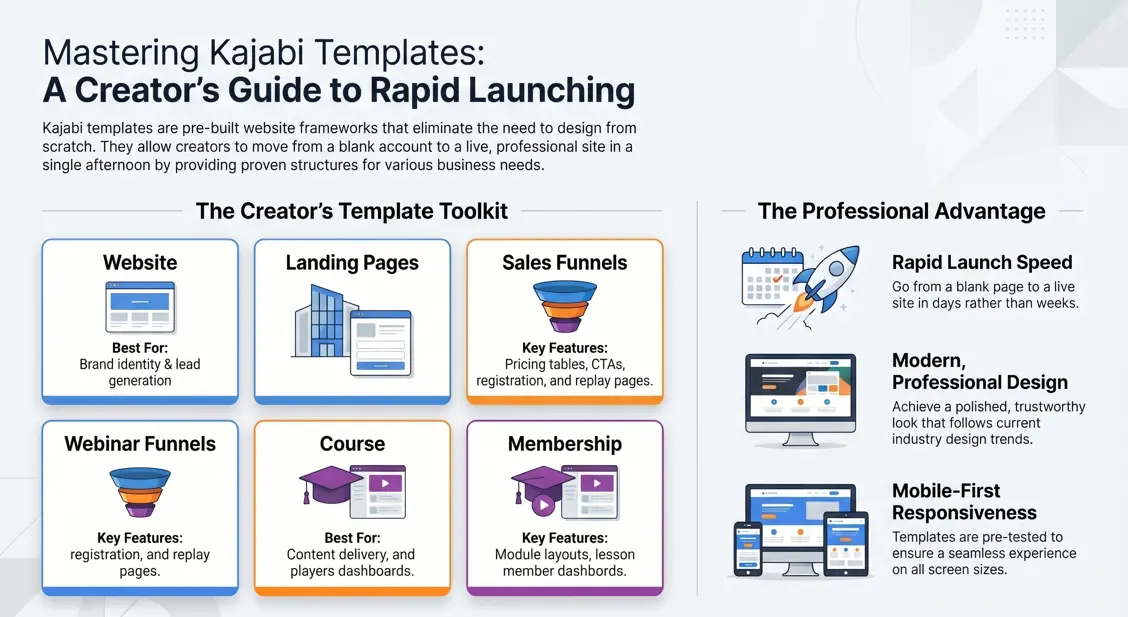
A Kajabi template is a pre-built website design made for the Kajabi platform. Already, it has the layout and structure in place. So, you just add your own text, images, and colors.
| Term | Definition |
|---|---|
| Kajabi Template | Pre-designed website framework |
| Landing Page Template | Built for lead generation |
| Course Template | Designed for online courses |
Overall, templates give you a strong starting point. As a result, you spend less time on design and more time on your content.
Why Kajabi Templates Matter for Online Businesses
Kajabi templates help you build websites, landing pages, and course portals fast. Also, they save time, keep your design consistent, and make launching easier.
The Challenge of Building From Scratch
To begin with, building a site from zero takes more than creativity. For instance, you need to know layout, color, mobile design, and what makes people click “buy.” Because of this, many creators spend weeks getting it right.
Meanwhile, every hour spent on design is an hour you don’t spend on your course or your clients. For most creators, therefore, that trade isn’t worth it.
How Templates Speed Up Website Creation
Instead, a template does the hard work for you. Already, the layout is set, and the spacing is set too. So, you don’t start with a blank page.
In fact, you can go from a blank account to a live page in one afternoon. Compared to building it all by hand, that’s a big jump.
Why Templates Are Popular Among Creators
Above all, templates remove the guesswork. Since the design choices are already made, you can focus on your message and your offer.
Also, templates follow proven design styles. Therefore, even creators with no design skills end up with a site that looks polished and trustworthy.
Takeaway: Overall, building from scratch is slow and hard. Templates, however, remove that friction so you can launch faster.
Types of Kajabi Templates
Generally, Kajabi templates come in different types. Each one, however, serves a different purpose.
Website Templates
Basically, these cover your whole site: homepage, about page, blog, and menu. So, use these if you want a full online presence.
If you want your template to look like a high-end digital campus, consider looking into professional Kajabi website design and branding services to maximize impact.
Landing Page Templates
Instead, these do one job: get sign-ups. Typically, they have a headline, a sign-up form, and little else.
Sales Page Templates
On the other hand, these help turn visitors into buyers. Usually, they include benefits, reviews, pricing, and a strong call to action.
Course Templates
Course templates inside the platform give you a structured shell for your lessons. However, to keep completion rates high, you need to align your layout with proper Kajabi course design principles that reduce cognitive overwhelm.
Membership Templates
Similarly, these support ongoing access to content. For example, they include member dashboards and content libraries.
Webinar Funnel Templates
Webinar funnel templates guide prospects through registration, thank-you, and replay pages smoothly. Since webinars convert exceptionally well, these layouts are engineered to maximize your sign-up rates.
To get the best results from these pre-built designs, map them out as part of a complete Kajabi sales funnel setup to consistently scale your student enrollments.
| Template Type | Best For | Key Features |
|---|---|---|
| Website Templates | Full online presence | Homepage, navigation, blog |
| Landing Page Templates | Lead generation | Opt-in forms, simple layout |
| Sales Page Templates | Conversions | Testimonials, pricing, CTAs |
| Course Templates | Online courses | Module layout, lesson player |
| Membership Templates | Recurring content access | Dashboards, content libraries |
| Webinar Funnel Templates | Webinar sign-ups | Registration and replay pages |
Takeaway: Ultimately, pick the template type based on your goal: build a brand, get leads, or sell.
Common Uses of Kajabi Templates
Generally, creators use Kajabi templates in many ways. Below are the most common.
Online Course Businesses
For example, course creators use templates to build clean, easy-to-follow course portals. Since the layout is done, they can focus on the lessons.
Coaching Businesses
Likewise, coaches use landing and sales page templates to win new clients. Because a clean page builds trust fast, this matters a lot.
Membership Communities
In the same way, membership templates help owners organize content and manage access from day one.
Digital Product Stores
Meanwhile, sellers of ebooks and digital downloads use sales page templates to show their offers clearly, with checkout built in.
Personal Brands
Finally, personal brands use website templates to keep their look the same across every page.
Takeaway: Clearly, there’s a Kajabi template for almost every type of online business.
Key Benefits of Using Kajabi Templates
Beyond speed, templates offer more. Below, here’s what else they bring.
Faster Launch Times
Since most of the design is done for you, you can launch in days, not weeks.
Professional Design
Because templates follow current design trends, even beginners get a site that looks modern and trustworthy.
Better User Experience
Also, good templates guide visitors through the page. As a result, this keeps people on your site longer.
Marketing Optimization
In addition, templates often include spots for reviews, calls to action, and sign-up forms. Typically, these are placed where they tend to work best.
Lower Development Costs
Since hiring a designer can be costly, templates cut that cost, as the hard work is already done.
Takeaway: In short, templates save time, cut costs, and look professional from day one.
Why Many Businesses Buy Premium Kajabi Templates
Specifically, premium Kajabi templates offer better design, more features, and stronger support. For many businesses, therefore, that’s worth the cost.
Higher Conversion Potential
Because premium templates are often built using real data, buttons, colors, and layout are placed to drive action.
Better Mobile Experience
Since most traffic comes from phones, premium templates are tested on more screen sizes. As a result, they look sharp everywhere.
Advanced Design Features
Often, premium templates include extra sections, animations, and styles. This, in turn, helps your site stand out.
Reduced Design Work
Because more is built in, you adjust less. So, you can spend more time on your content.
Access to Expert Support
Also, many premium templates come with guides or direct support. Therefore, help is close by if something looks off.
Takeaway: Although premium templates cost more, they often save time and boost results.
Kajabi Templates vs Building a Site From Scratch
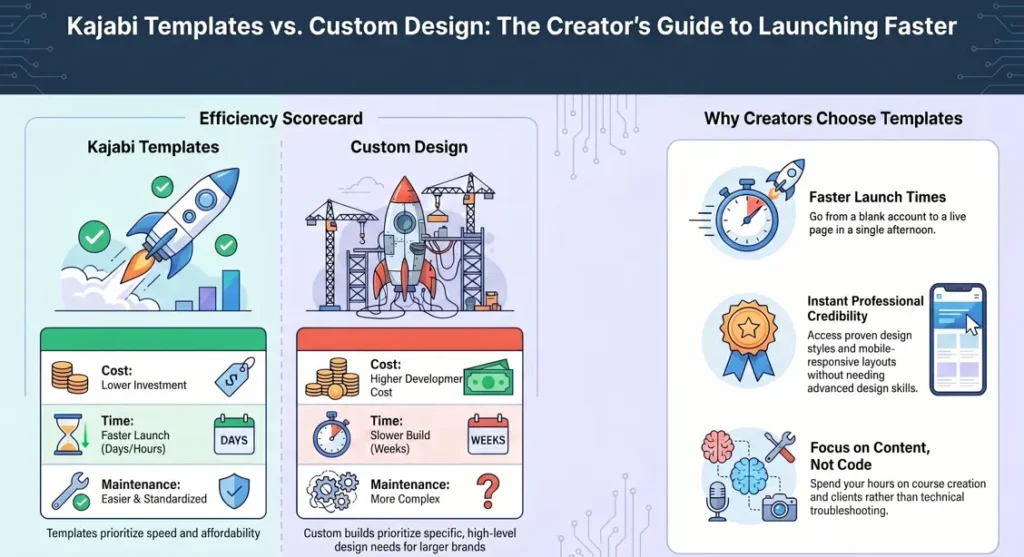
Below, here’s how templates compare to custom builds.
| Feature | Kajabi Templates | Custom Design |
|---|---|---|
| Cost | Lower | Higher |
| Time | Faster | Slower |
| Maintenance | Easier | More Complex |
Generally, templates work well for creators who want to launch fast without high costs. On the other hand, custom builds may suit larger brands with special design needs.
Takeaway: For most creators, ultimately, templates offer the best mix of cost, speed, and quality.
How to Choose the Right Kajabi Template
Above all, picking the right template isn’t just about looks. Instead, it’s about fit.
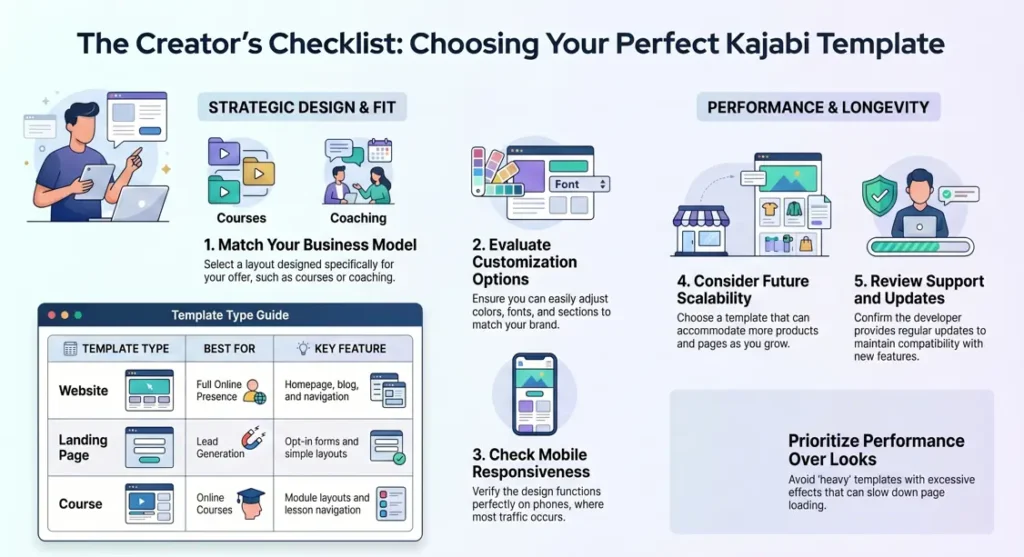
Match the Template to Your Business Model
First, think about what you sell. Since a course creator needs different features than a coach, know your offer before you pick a layout.
Evaluate Customization Options
Next, check how easy it is to change colors, fonts, and sections. Because your brand is unique, flexibility matters.
Check Mobile Responsiveness
Then, test the template on a phone. Since most visitors browse on mobile, this step matters a lot.
Consider Future Scalability
Also, think ahead. If you plan to add more pages or products, pick a template that can grow with you.
Review Support and Updates
Finally, check if the template gets updates. So, templates that stay updated work better with new Kajabi features.
Takeaway: In the end, the right template fits your needs now and can grow with you later.
Mistakes to Avoid When Choosing a Kajabi Template
Below, watch out for these common mistakes.
Choosing Based Only on Appearance
Sometimes, a template can look great but not fit your business. Therefore, function matters as much as looks.
Ignoring Mobile Design
Often, templates look great on desktop but feel cramped on phones. Since most visitors use phones, this matters.
Overlooking Performance
Also, heavy templates with lots of effects can slow your page. Consequently, slow pages can hurt both visitors and rankings.
Buying Without Clear Goals
Without a clear goal, it’s easy to pick the wrong template. So, know what you need the page to do before you buy.
Takeaway: Overall, avoid these mistakes to save time, money, and stress.
Are Kajabi Templates Worth It?
For most creators, yes. Indeed, templates save time, cut design stress, and look professional from day one.
Generally, templates work best for creators who want to launch fast without hiring a designer. On the other hand, big brands with special design needs may prefer custom builds.
Often, the time you save covers the cost, especially with premium templates. So, if you want speed and ease, Kajabi templates are a smart pick.
Features to Look for in a High-Quality Kajabi Template
| Feature | Why It Matters |
|---|---|
| Responsive Design | Mobile usability |
| Fast Loading Speed | SEO |
| Custom Sections | Flexibility |
| Conversion Elements | More leads |
| Easy Navigation | User experience |
Together, these features shape how visitors use your site and how many of them convert.
References
Kajabi Help Center: Website Templates Overview
The Official Kajabi Template Store
Kajabi Help Center: Landing Page Templates Guide
Conclusion
Building from scratch can feel like a massive time-suck, but Kajabi templates give you that shortcut to look professional on day one. The key is picking a design that actually fits your business goal, whether that’s selling a course or collecting leads, and making sure it looks great on a phone. By letting a template handle the heavy lifting, you get to skip the design stress and get straight to what you actually care about: sharing your knowledge and growing your business.
FAQ
How do Kajabi templates work?
Basically, you get a pre-built page or site inside your Kajabi account. Then, you replace the text, images, and colors with your own.
Can I customize a Kajabi template?
Yes. In fact, you can change colors, fonts, images, and layouts to fit your brand.
For many creators, yes. Often, they have better design and more features than free templates.
Which Kajabi template is best for online courses?
Generally, templates made for the course player work best. Since they include module layouts and lesson navigation, they fit courses well.
Do Kajabi templates affect SEO?
Yes, in part. Specifically, fast, mobile-friendly templates tend to rank better than slow, cluttered ones.
Can beginners use Kajabi templates?
Yes. Especially for beginners, templates are great, since the design work is already done.
What is the difference between a Kajabi template and a custom website?
Simply, a template is ready to use and edit. A custom site, however, is built from scratch to your exact specs.
How much do Kajabi templates typically cost?
Generally, prices vary. Some are free, while premium ones can cost from around $50 to a few hundred dollars.
Can I switch Kajabi templates later?
Yes, in most cases. However, you may need to rebuild some pages if the new template is very different.
What should I look for before purchasing a Kajabi template?
Overall, check mobile design, customization, page speed, and whether it fits your business model.
Authored by: Laiba Ayaz