Every growing business needs a smarter way to train its team. A LifterLMS employee training portal lets you deliver consistent, scalable training right inside WordPress. Moreover, it cuts onboarding time and keeps employees engaged from day one.
In this guide, you will learn how to plan, build, and launch a complete employee training LMS. Furthermore, you will discover which features matter most and how to avoid common mistakes.
What Is LifterLMS Employee Training Portal?
A LifterLMS employee training portal is an online hub built on WordPress for staff learning. In this system, employees log in, take structured courses, and earn automated certificates. Essentially, it functions as a dedicated learning management system tailored specifically for your team’s development.
Moreover, businesses use this WordPress-based platform to replace slow, costly classroom training. As a result, staff can learn at their own pace. In addition, they can train from any device, at any time, using powerful LifterLMS features built right into your website.
Key Features of an Employee Training Portal
- Online courses with video, PDFs, and short lessons
- Learning paths by role or department
- Quizzes to test what staff have learned
- Progress reports for managers and HR teams
- Certificates sent out on course completion
Benefits for Businesses and Employees
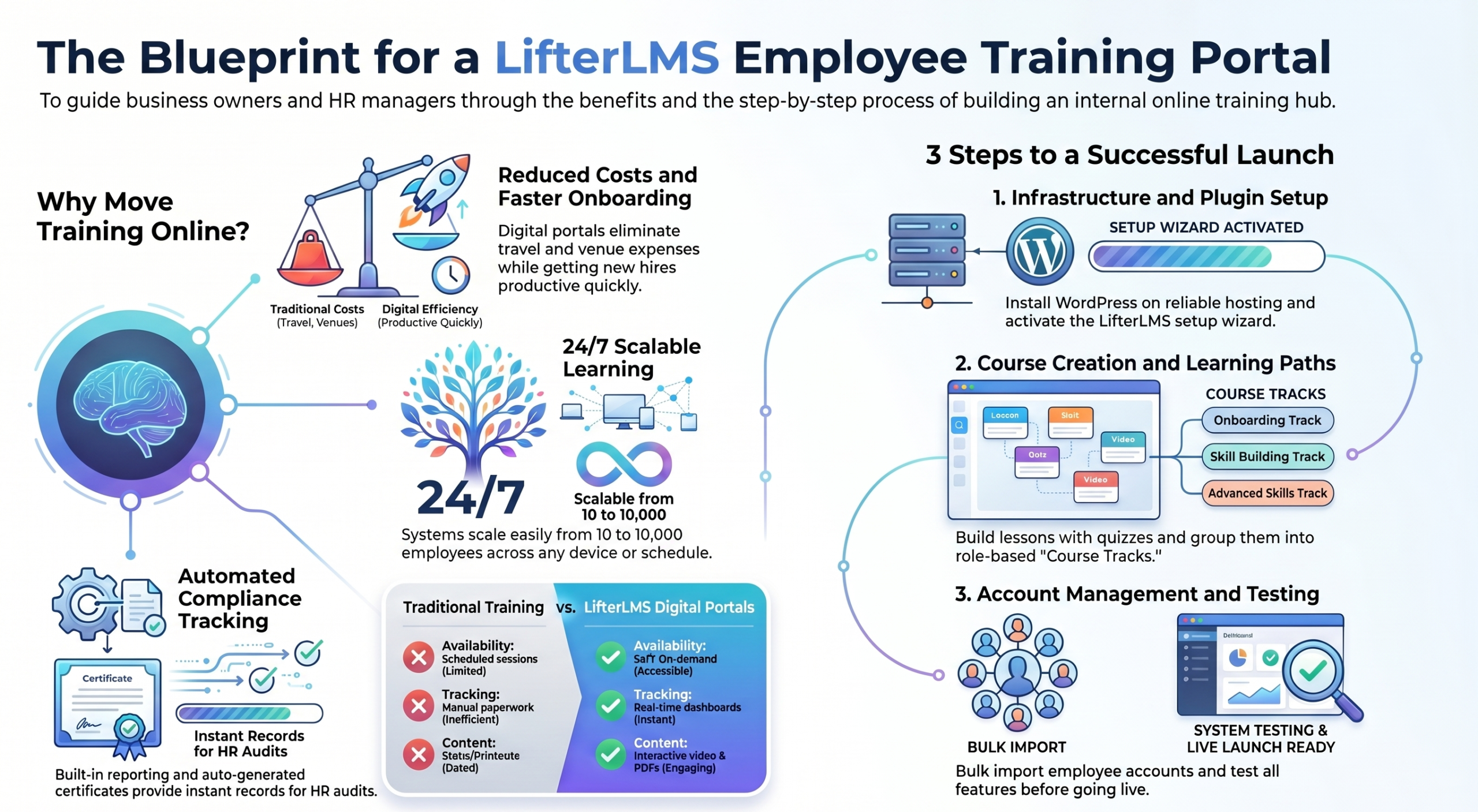
- New hires get up to speed much faster
- All staff get the same core training
- Compliance records are easy to track
- Training costs drop without in-person sessions
- Employees grow their skills and stay longer
Why Choose LifterLMS for Employee Training?
LifterLMS is one of the best free LMS plugins for WordPress. Therefore, it is a smart choice if you already use WordPress. In addition, you do not need a costly third-party platform.
A LifterLMS employee training portal gives you full control. Specifically, you own your data, your content, and your design. Furthermore, you can brand it to match your company’s style.
Core LifterLMS Features
- Easy drag-and-drop course builder
- Built-in quizzes with many question types
- Auto-generated certificates on completion
- Clear student reports and progress dashboards
- Membership controls for different teams
Advantages Over Traditional Training
- Staff learn at their own pace and schedule
- Scales from 10 to 10,000 employees with ease
- No venue, travel, or print costs involved
- Training is live 24/7 from any device
Planning Your Employee Training Portal Before Setup
Good planning saves time and avoids rework. Before setup, decide what your team needs to learn. Also, set clear goals so you can measure results later.
Define Training Objectives
Ask these three questions first:
- What do new hires need to know on day one?
- Which topics are required for legal compliance?
- What skills help staff grow in their roles?
Identify Employee Learning Paths
Not every employee needs the same courses. Instead, build paths based on role or department. For example, your sales team needs different training than your IT staff.
Role-based paths keep content relevant. In addition, they also stop staff from wasting time on courses that do not apply to them.
Organize Your Training Content
- Short videos under five minutes each
- PDF guides and quick-reference sheets
- Short quizzes after each lesson section
- Real-world examples and simple case studies
Step-by-Step Guide to Building a LifterLMS Employee Training Portal
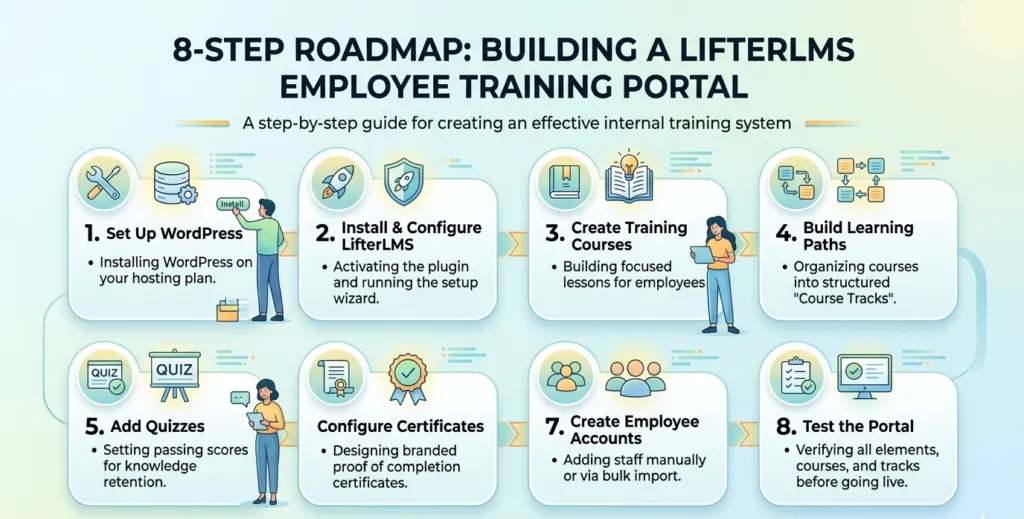
Step 1: Set Up WordPress
First, install WordPress on a good hosting plan. Choose a host that supports PHP 7.4 or higher. Also, make sure it can handle your number of users.
Step 2: Install and Configure LifterLMS
Go to your WordPress dashboard. Then click Plugins, then Add New, and search for LifterLMS. After that, install and activate it. Finally, run the setup wizard to get started.
Before diving into the setup, you can read our detailed breakdown on LifterLMS: Is It Still the Best WordPress LMS? to understand why it’s the ideal choice for corporate training.
Step 3: Create Employee Training Courses
Go to LifterLMS, then Courses, then Add New. Add a title, short description, and a cover image. Then build your lessons inside the course editor. Keep each lesson focused on one clear topic.
Step 4: Build Learning Paths
LifterLMS calls learning paths Course Tracks. You can group related courses into a set order. For instance, create an onboarding track with five courses new hires must finish first.
Step 5: Add Quizzes and Assessments
Quizzes help staff retain what they learn. Therefore, add at least one quiz per course section. Also, set a minimum pass score so you know staff truly understand the content.
Step 6: Configure Certificates and Achievements
Go to LifterLMS Engagements to set up certificates. Add your company logo and brand colors. Staff value a real certificate as proof of what they have learned.
Step 7: Create Employee Accounts
You can add staff manually or allow self-sign-up. For large teams, use the bulk import tool instead. Then assign each person to the right learning path for their role.
Step 8: Test the Training Portal
Always test before going live. Enroll yourself in every course and finish all lessons, quizzes, and certificates. Then fix any issues you find. Only launch once everything works well.
Essential Features to Include in Your Employee Training Portal
Progress Tracking
Progress tracking shows you where each staff member is in their training. Moreover, managers can spot gaps early and offer help before problems grow.
Automated Certificates
Certificates push staff to complete their courses. They also create records for compliance audits. LifterLMS sends certificates by email as soon as a course is done.
Employee Reporting
The LifterLMS dashboard shows completion rates, quiz scores, and time per course. As a result, you can make better decisions about your staff training program.
Mobile-Friendly Learning
Most staff use phones for everything. Therefore, your online employee training portal must work well on mobile. LifterLMS themes are built to be mobile-ready by default.
Course Completion Rules
Set rules so staff must watch videos and pass quizzes before moving on. Consequently, you ensure a basic standard of training across your whole team.
Best Practices for Employee Training Portal Success
Keep Courses Short and Focused
Short courses get finished more often. Therefore, aim for lessons that take five to ten minutes. Cover just one topic per lesson so staff stay on track.
Use Interactive Learning Elements
Videos, quizzes, and downloads boost staff engagement. In contrast, long text-only lessons cause learners to lose focus fast. Mix content types to keep training fresh.
Update Training Content Regularly
Old content creates compliance risks. Consequently, review all courses at least twice a year. Furthermore, update them whenever your rules or processes change.
Monitor Employee Progress
Check your training data each month. Look for courses with low finish rates. Then find out why staff are dropping out and fix those lessons right away.
Common Challenges and How to Solve Them
Low Course Completion Rates
Short, fun lessons fix most drop-off problems. However, also send auto email reminders for unfinished courses. LifterLMS supports this through built-in engagement triggers.
Employee Engagement Issues
Try adding points, badges, and leaderboards to your portal. Moreover, celebrate staff who finish their learning paths. Public praise goes a long way in corporate training.
Managing Large Teams
Use LifterLMS groups to sort staff by team or location. As a result, each manager sees only their team’s progress. Also, bulk enrollment saves hours of admin time.
Keeping Content Current
Assign one person to own your LMS content. Their job is to review and refresh courses on a set schedule. Consequently, your training stays accurate and up to date.
LifterLMS Employee Training Portal Integrations
The best digital training platforms connect with tools your team already uses. Therefore, here are the top integrations to set up first.
WooCommerce
Sell courses to outside clients while keeping staff training free. In addition, WooCommerce works smoothly with LifterLMS for payments and access control.
Zoom
Add live virtual sessions right inside your courses. Furthermore, the Zoom link lets staff join training without leaving the portal. Sessions are also recorded for later review.
Email Marketing Tools
Link MailChimp or ActiveCampaign to send training reminders. Additionally, sort staff by course status to send the right follow-up message to each group.
HR and Workforce Management Systems
Sync staff data from your HR tool to cut manual entry. Moreover, auto account creation speeds up onboarding for every new hire.
Measuring Employee Training Portal Effectiveness
Building the portal is just the start. Therefore, you must track results to know if training is working. Here are the four key metrics to watch.
Completion Rates
A healthy rate is above 80%. However, if yours is lower, find which courses staff are leaving. Then fix those lessons first before anything else.
Assessment Scores
Low quiz scores show gaps in your course content. Additionally, check which questions most staff get wrong. Fix those sections right away to close the gap.
Employee Performance Improvements
Compare staff results before and after training. For example, track sales numbers, error rates, or service scores. Subsequently, you can show the direct impact of your training program.
Training ROI
Divide your performance gains by your training costs. Furthermore, count savings from faster onboarding and fewer compliance issues. Most businesses see a return within six months.
LifterLMS Employee Training Portal Checklist
| Task | Completed |
| Install WordPress and a reliable hosting plan | ✓ |
| Install and activate LifterLMS plugin | ✓ |
| Define training goals and learning paths | ✓ |
| Create all employee training courses | ✓ |
| Add quizzes and set pass score rules | ✓ |
| Set up auto certificates and achievements | ✓ |
| Create and assign employee user accounts | ✓ |
| Set up key integrations (Zoom, email, HR) | ✓ |
| Test all courses, quizzes, and certificates | ✓ |
| Launch portal and track completion rates | ✓ |
References
These peer-reviewed studies support the value of LMS-based employee training:
Learning Management Systems in the Workplace: A Literature Review (ERIC) covers LMS usability and adoption in workplace settings
The Implications of LMS on Education Quality (ERIC / Journal of Social Studies Education Research) examines LMS advantages and challenges in structured learning environments
Evaluation of a Workplace Training Course Delivered Online vs Face-to-Face (PubMed) compares online and in-person training effectiveness for organizations
Conclusion
A LifterLMS employee training portal is one of the best tools you can give your team. Moreover, WordPress makes it easy to set up and run without a developer.
To ensure success, start with clear goals. Then build your courses, add quizzes, and test everything before launch. Consequently, you will have a solid lifterlms employee training platform that your staff will actually use.
Your team deserves great training. Therefore, in addition, start building your LifterLMS employee training portal today and give your workforce the edge they need to grow
Frequently Asked Questions
What is an employee training portal?
It is an online platform where staff take courses, track progress, and earn certificates. Furthermore, it keeps all your workplace learning in one easy-to-manage place.
Can LifterLMS be used for employee training?
Yes. A LifterLMS employee training portal supports courses, quizzes, paths, and certificates. Therefore, it covers all the basics a corporate training platform needs.
How much does it cost to build a LifterLMS employee training portal?
The core plugin is free. However, paid add-ons cost between $99 and $299 per year. Also, WordPress hosting runs about $10 to $30 per month.
Can I track employee progress in LifterLMS?
Yes. Progress tracking is built in. Managers can see finish rates, quiz scores, and time per course. Moreover, the dashboard updates in real time.
Is LifterLMS suitable for large organizations?
Absolutely. The employee training LMS scales to thousands of users. Furthermore, bulk enrollment and group reports make it easy to manage large teams.
Authored by: Laiba Ayaz