Kajabi CRM Integration is now a must for coaches, creators, and online business owners. So, if you want to grow your sales system, you need to know how this works. Kajabi has built-in email and contact tools. But many businesses still need more. They need an external CRM for better lead tracking, email flows, and sales pipelines.
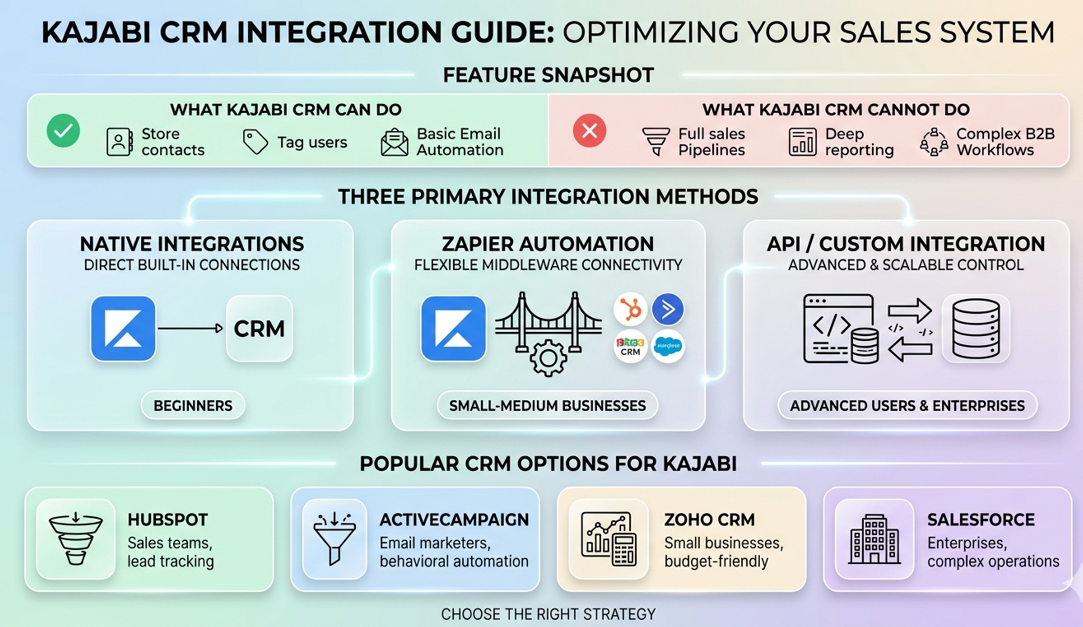
There are three main ways to connect a CRM to Kajabi:
- Native integrations: simple and easy to set up
- Automation tools like Zapier: flexible and popular
- API or custom integrations: advanced and scalable
Popular CRM tools used with Kajabi include HubSpot, ActiveCampaign, Zoho CRM, and Salesforce. However, the best method depends on your business size and your goals. In this guide, you will learn everything about Kajabi CRM Integration. Additionally, you will find out which setup works best for you right now.
Does Kajabi Have a CRM?
Yes, Kajabi does have built-in CRM features. But it is not a full CRM system.
This is one of the most common questions people ask. And the answer is a bit mixed. Kajabi gives you tools to manage contacts and send emails. But if you need a real sales pipeline or deep reports, you will hit its limits fast.
These tools are often enough for a basic Kajabi online course setup, especially for creators who are just getting started.
Here is what Kajabi CRM can do:
- Store contacts and leads in one place
- Tag users based on their actions
- Send auto emails and follow-ups
- Track purchases and course activity
- Manage basic contact groups
Here is what Kajabi CRM cannot do:
- Build sales pipelines with deal stages
- Create deep report dashboards
- Handle multi-step deal tracking for teams
- Support complex B2B sales workflows
So, is Kajabi a CRM? In short, it handles the basics well. However, it is primarily a course platform with built-in CRM features. For many creators, those features are enough to manage contacts and customers. However, if you run a team or manage a large sales funnel, you may need a dedicated CRM. As a result, Kajabi CRM Integration becomes important for businesses that want to grow and automate their processes.
Why Businesses Use Kajabi CRM Integration
Connecting a CRM to Kajabi helps businesses build a stronger marketing system. In fact, most growing businesses find that Kajabi alone is not enough. They need more tools to manage their full customer journey.
Here are the key reasons why businesses invest in Kajabi CRM Integration:
Centralized data across platforms. When you connect a CRM, all your data lives in one place. As a result, your team always knows what is going on with every lead.
Better lead tracking and segmentation. A CRM lets you track where leads come from and how they act. So, you can send the right message to the right person at the right time.
Auto email and follow-up sequences. Instead of sending follow-ups by hand, automation does it for you. So, your marketing keeps running even when you step away.
Improved sales pipeline view. With a connected CRM, you can see where each lead is in your sales process. This makes it much easier to close deals and plan your next move.
Higher conversion through personal messages. When you know what your users want, you can tailor your messages to them. Consequently, your conversion rates go up without spending more on ads.
In short, Kajabi alone is strong for course delivery. But Kajabi CRM Integration makes it strong for growing your whole business, too.
Choosing the Right Kajabi CRM Integration Method
Before you connect anything, you need to pick the right method. There are three main ways to link a CRM with Kajabi. And each one suits a different type of user.
1. Native Integrations
Native integrations are built right into Kajabi. They are the easiest option because you do not need any extra tools. You just connect your accounts inside Kajabi. Then, data starts syncing right away.
But native integrations have limited options. They only work with a small number of CRM tools. Also, the triggers and actions you get are quite basic. So, this option works best for beginners who want a fast setup with no tech work at all.
Best for: Beginners who want quick setup without technical tools.
2. Zapier Automation
Zapier is the most popular method for Kajabi CRM Integration. In fact, it connects Kajabi with hundreds of CRM tools. Additionally, it requires no coding, which makes it easy for beginners to use. For example, when something happens in Kajabi, such as a new purchase or a form submission, Zapier immediately triggers an action in your CRM. As a result, your data stays updated, and your workflows run automatically.
Because Zapier works with so many apps, it gives you a lot of room to build. You can create custom workflows that match your exact business needs. Furthermore, you can update your automations at any time without writing any code.
Best for: Small to medium businesses that need automation without complexity.
3. API or Custom Integration
If you need full control over your data, a custom API integration is the strongest option. With a developer, you can connect Kajabi to any CRM. And you can build exactly the logic your business needs.
This option does require tech skills and more time to set up. It is not the right fit for most solo creators or small teams. But for large businesses, the control and speed are hard to beat.
Best for: Advanced users and enterprises who need maximum control and scalability.
Kajabi + CRM Integration Use Cases
Instead of just linking tools, it is important to see how each CRM works with Kajabi in real life. Each CRM has its own strengths. So, picking the right one makes a big difference to your results.
HubSpot + Kajabi Integration
HubSpot works best for handling sales pipelines and client relationships. With this Kajabi CRM Integration, leads from Kajabi go straight into HubSpot. From there, your team can track them through deal stages, contact timelines, and built-in reports.
HubSpot also has a free tier. So, you can get started without paying anything extra at first.
Best for:
- Sales teams handling a high number of leads
- Growth-focused businesses building a sales process
- Lead tracking and full CRM pipeline management
ActiveCampaign + Kajabi Integration
ActiveCampaign is the best choice if email marketing is your main goal. When you connect it to Kajabi, you can build advanced funnels based on how users act. For example, when someone buys a course in Kajabi, ActiveCampaign can start a nurture sequence right away.
Its visual automation builder goes far beyond what Kajabi’s native tools can do. As a result, you get branching logic, lead scoring, and split tests that boost your conversions.
Best for:
- Email marketers who rely on behavior-based automation
- Funnel builders running complex nurture sequences
- Businesses focused on automated customer journeys
Zoho CRM + Kajabi Integration
Zoho CRM is a budget-friendly option for small businesses. It connects with Kajabi through Zapier or APIs. And it helps you manage contacts and basic sales tracking. While it is not as advanced as HubSpot, Zoho covers the basics well. So, it is a smart choice for small teams on a tight budget.
Best for:
- Small businesses watching their budget
- Teams that need simple contact and deal tracking
- Budget-conscious users who need basic CRM features
Salesforce + Kajabi Integration
Salesforce is an enterprise-level CRM used by large organizations. With Kajabi CRM Integration, it enables deep reports, advanced pipelines, and large-scale automation. But linking Salesforce to Kajabi usually requires API work or a middleware tool. So, it is not a plug-and-play option like the others.
Best for:
- Enterprises with complex sales and marketing needs
- Large sales teams handling a high volume of deals
- Organizations that need advanced reporting and data control
How Automation Works in Kajabi CRM Integration
Automation is the core reason most businesses connect a CRM to Kajabi. Without it, you would have to move data by hand. And you would have to follow up with every lead yourself. That is simply not possible as your business grows.
A typical Kajabi CRM automation flow looks like this:
Step 1: A user signs up or buys something inside Kajabi.
Step 2: Then, their data is sent to your CRM, whether that is HubSpot, ActiveCampaign, or another tool.
Step 3: Next, the CRM adds the right tags or groups based on what the person did.
Step 4: After that, auto emails or workflows are triggered right away. For example, a welcome email or follow-up series starts with no manual work needed.
Step 5: Finally, sales or nurture sequences run in the background. They move the lead closer to buying over time.
This whole process runs on its own. As a result, your business can get leads, nurture them, and close sales even while you sleep. Furthermore, because the system is consistent, you never miss a follow-up or lose a contact.
That is why Kajabi automation combined with a CRM is far stronger than either tool on its own. Strong Kajabi automation strategies can help turn new leads into paying customers with less manual effort.
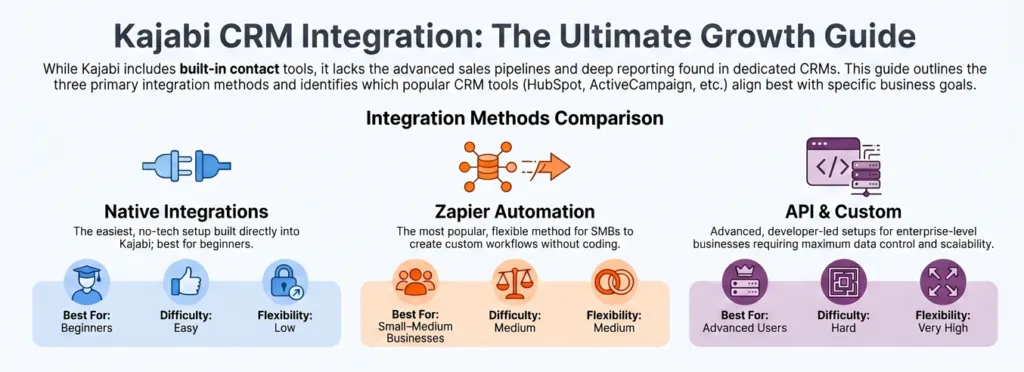
Zapier vs Native vs API Integration
Each method suits a different level of business need. Before you choose, it helps to compare them side by side. That way, you can make the right decision for your situation.
| Method | Best For | Difficulty | Flexibility |
|---|---|---|---|
| Native Integration | Beginners | Easy | Low |
| Zapier | Small–Medium Businesses | Medium | Medium |
| API Integration | Advanced Users | Hard | Very High |
As you can see, the right method depends on your goals and your comfort with tech. If you are just starting out, native integrations or Zapier are the most practical choices. On the other hand, if your business is growing fast and needs custom logic, an API integration is worth the extra cost.
For most users, Zapier is the fastest and most flexible starting point. And you do not need a developer to use it.
Common Mistakes in Kajabi CRM Integration
Many users face problems not because of the tools, but because of simple setup mistakes. Fortunately, most of these issues are easy to avoid once you know what to watch for.
Creating duplicate contacts across systems. This is the most common issue. If your automation creates a new contact every time, your CRM will fill up with duplicates fast. So, always use a “find or create” action in Zapier to stop this.
Incorrect field mapping between Kajabi and your CRM. When you link two platforms, the right data needs to go to the right fields. For instance, if the email goes to the wrong field, your whole automation breaks. Therefore, always check your field mapping before you go live.
Broken or looping automations. Sometimes automations trigger each other in a loop. This leads to repeated emails or messy data. So, always test your full workflow before turning it on for real users.
Not testing workflows before going live. It is tempting to set up your integration and launch it right away. But skipping the testing step is one of the biggest mistakes you can make. Even a small error can affect every new lead who joins your list.
Overcomplicating simple funnels. More automation is not always better. So, start with the simplest version of your workflow first. Then, add more steps only when you need them.
Fixing these issues early ensures smooth data flow and better results across your entire Kajabi CRM Integration setup.
FAQ: Kajabi CRM Integration
Is Kajabi a CRM?
Kajabi has basic CRM features like contact management, tagging, and email automation. But it is not a full CRM system. It does not have advanced pipeline tools, deep reporting, or enterprise-level features that dedicated CRM platforms offer.
Does Kajabi Have CRM Features?
Yes, Kajabi includes basic CRM tools. You can store contacts, tag users, and send auto emails. But if you need advanced sales pipelines or complex workflows, you will need to connect an external CRM.
Can Kajabi Integrate with HubSpot?
Yes. Kajabi can connect with HubSpot using native integrations or Zapier. This is very popular among businesses that need a sales pipeline alongside their course platform.
What Is the Best CRM for Kajabi?
It depends on your goals. HubSpot is best for sales pipelines and team visibility. ActiveCampaign is the top pick for email automation and nurture sequences. Both are great options for Kajabi CRM Integration.
Do I Need Zapier for Kajabi CRM Integration?
Not always. Some CRMs have a native connection with Kajabi. But Zapier gives you far more options and connects Kajabi with hundreds of tools that do not have a direct native link.
Can Kajabi Connect to Salesforce?
Yes, but usually through API or middleware tools rather than a native link. Because Salesforce is an enterprise platform, the setup takes more tech work than linking Kajabi to HubSpot or ActiveCampaign.
How Do I Automate Customer Data Between Kajabi and a CRM?
You use tools like Zapier or native integrations to sync contacts, tags, and actions between the two platforms. For example, when a user takes action in Kajabi, such as buying a product or filling out a form, the data is sent to your CRM right away. As a result, the next step in your workflow starts automatically on its own.
References
- Preprints.org Customer Relationship Management (CRM) Systems and their Impact on SMEs Performance: A Systematic Review (2024).
- International Journal of Research and Innovation in Social Science (IJRISS) Increasing Business Growth Through Strategic Integration of Big Data in Customer Relationship Management (CRM): A Systematic Literature Review (2025).
- ScienceDirect Unlocking the Power of AI in CRM: A Comprehensive Multidimensional Exploration (2025). Available at:
Final Thought
The best Kajabi CRM Integration setup depends on your business size and your goals. There is no one answer that works for everyone. But there is a clear path forward based on where you are right now.
- Beginners: Start with native integrations to keep things simple
- Marketers focused on email automation: ActiveCampaign + Zapier is the strongest combination
- Growth-focused businesses building a sales team: HubSpot + Kajabi gives you pipeline power and CRM control
- Enterprises with complex operations: Salesforce + API integration is the right long-term move
For most users, combining Kajabi with HubSpot or ActiveCampaign through Zapier gives the best mix of simplicity, automation, and growth. You get the course delivery strength of Kajabi plus the marketing power of a real CRM.
So, start with the method that fits your current stage. Then build and grow from there. The most important step is simply getting started. Because the right Kajabi CRM integration will save you hours every week. And it will help you turn more leads into paying customers.
Authored by: Laiba Ayaz