
Creating interactive LearnDash Courses is not difficult. However, it must be done the right way.
Many online courses fail because they are passive. In fact, they only deliver content. As a result, learners simply watch or read without real engagement.
However, modern learners prefer to interact with content, apply their knowledge, and receive meaningful feedback.
Therefore, this guide will help you turn simple lessons into interactive LearnDash Courses. Moreover, the language here is simple. In addition, the steps are practical. As a result, you can apply them right away.
We will focus on:
- Clear structure
- Simple instructional design
- Multimedia use
- Quizzes and engagement tools
- Real learner interaction
Why Interactive LearnDash Courses Matter
Passive learning is weak. Learners forget fast.
Interactive learning is strong. Learners remember more.
When you build interactive LearnDash Courses, as a result, you get:
- Better engagement
- Higher completion rates
- Strong understanding
- More learner satisfaction
In simple words: Active learning = better results
Step 1: Keep Your Course Structure Simple
A strong course starts with structure.
Do not make lessons long or confusing.
Break content into small parts.
Simple course flow:
- Introduction
- Lesson
- Example
- Activity
- Quiz
- Summary
Each lesson should focus on one idea only.
Short lessons are better for interactive LearnDash Courses.
Explore more about creating elearning course
Step 2: Use Short Lessons
Long lessons reduce attention.
Keep lessons short and clear.
Ideal lesson length:
- 5 to 10 minutes per topic
Each lesson should answer one question.
For instance:
- What is this concept?
- How does it work?
- Why is it useful?
Short lessons improve learning speed and focus.
Step 3: Add Multimedia Content
Text alone is not enough.
Use different types of media:
- Videos
- Images
- Audio
- Slides
- PDFs
Videos should be simple and short.
Do not overload learners.
Multimedia makes interactive LearnDash Courses easier to understand.
Step 4: Use Simple Instructional Design
Instructional design means planning how learning happens.
Keep it simple:
- Start easy
- Build slowly
- Repeat key ideas
Every lesson should follow:
Learn → Practice → Check
This structure improves understanding.
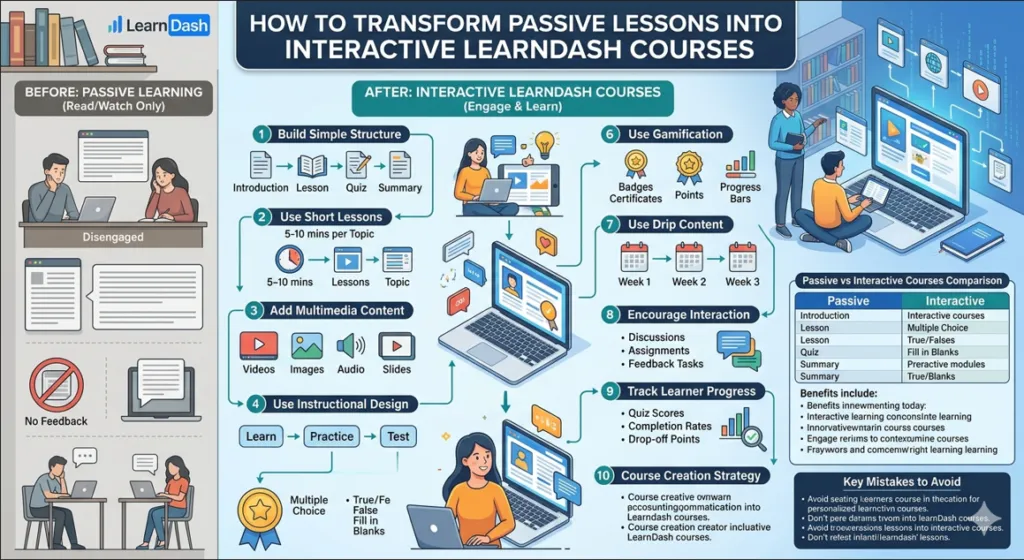
Step 5: Add Quizzes After Lessons
Quizzes make learning active.
Without quizzes, learners forget.
Add simple quizzes like:
- Multiple choice
- True or false
- Short answers
Why quizzes Matter
- Tests memory
- Improves focus
- Provides feedback
Quizzes are essential for interactive LearnDash Courses.
Step 6: Use Gamification
Gamification makes learning fun.
It adds small rewards.
You can use:
- Badges
- Certificates
- Points
- Progress bars
These tools increase motivation.
Learners feel progress. They stay longer.
Step 7: Use Drip Content
Drip content means releasing lessons slowly.
Do not give everything at once.
Benefits:
- Learners stay focused
- Less confusion
- Better learning habit
For instance:
- In the first week, learners start with basics.
- The second week focuses on practice.
- By the third week, advanced topics are introduced.
This is very useful for interactive LearnDash Courses.
Step 8: Add Real-Life Examples
People learn better with real examples.
Do not stay only in theory.
Use simple situations:
- Business examples
- Daily life examples
- Case studies
This makes learning practical.
Step 9: Encourage Interaction
Learning should not be one-way.
Add interaction:
- Discussion boards
- Comments
- Assignments
- Peer feedback
When learners interact, they learn more.
Step 10: Track Student Progress
LearnDash gives tracking tools.
Use them to check:
- Who is active
- Who is stuck
- Which lesson is weak
Data helps you grow better interactive LearnDash Courses.
Table: Passive vs Interactive Courses
| Feature | Passive Courses | Interactive LearnDash Courses |
|---|---|---|
| Learning Style | One-way | Two-way |
| Engagement | Low | High |
| Practice | Rare | Frequent |
| Retention | Weak | Strong |
| Feedback | No | Yes |
Step 11: Avoid Common Mistakes
Many creators make simple mistakes:
- Too much text
- Missing quizzes
- Unclear structure
- Low interaction
Fix these early.
Keep it simple and clear.
That is the key to interactive LearnDash Courses.
Step 12: Focus on One Goal per Lesson
Do not mix topics.
Each lesson should have one goal.
Example:
- Learn one concept
- Practice it
- Test it
This improves clarity.
Step 13: Make Learning Easy
Use simple language.
Avoid complex words.
Short sentences work best.
This improves readability and helps learners stay focused.
Step 14: Improve Over Time
A good course is never finished.
Keep improving it.
Ask learners about:
- Challenges faced during the process?
- Things that went well?
- Areas that can be improved?
Then update your content.
References
- LearnDash Official Documentation
https://www.learndash.com/support/docs/ - eLearning Industry – Instructional Design Basics
https://elearningindustry.com/instructional-design-101-guide-for-beginners
Conclusion
Creating interactive LearnDash Courses is about simplicity. You do not need complex tools. Instead, you need short lessons, a clear structure, simple language, interaction, and practice. When you combine these elements, learning becomes easy and effective. As a result, learners understand better and stay engaged. Therefore, start small and improve step by step. That is how great courses are built.
Frequently Ask Questions
1. What are interactive LearnDash Courses?
Courses that include quizzes, videos, and activities instead of only reading or watching content LearnDash courses. Learners actively participate in learning.
2. How do I make LearnDash courses more engaging?
You can use short lessons, multimedia, quizzes, and real-life examples. This keeps learners active and improves understanding.
3. Why is interaction important in online learning?
Interaction helps learners remember better. It also increases motivation and reduces drop-off rates in courses.
4. Does LearnDash support quizzes and activities?
Yes, LearnDash supports quizzes, assignments, and progress tracking for better engagement.
5. What is drip content in LearnDash?
Drip content means releasing lessons step by step instead of all at once. This helps learners stay focused and consistent.
6. Can I track learner progress in LearnDash?
Yes, LearnDash provides built-in reporting tools to track quiz scores, completion rates, and progress.
7. Are interactive LearnDash Courses better than passive courses?
Yes. Interactive courses improve retention, engagement, and completion rates compared to passive learning.
8. Do I need technical skills to build LearnDash courses?
No. LearnDash is beginner-friendly and designed for easy course creation without advanced coding skills.
Authored by: Laiba Ayaz