We are seeking a skilled Instructional Designer to transform our existing content into engaging and effective e-learning training modules. All raw content has already been developed — your role will be to structure, enhance, and present it in an interactive, learner-friendly format.
Transforming Existing Content into Engaging Interactive Training Modules: A Practical Guide
In today’s fast-paced world, organizations have plenty of training material. But raw content alone rarely delivers results.
Many companies sit on documents, slides, and manuals that contain valuable information. The real challenge is turning that static material into something learners actually enjoy and remember.
This is where a skilled instructional designer comes in.
Their job is to breathe life into existing content and create training modules that are clear, interactive, and effective.
Why Repurposing Content Matters
Creating training from scratch takes time and money. Most organizations already have solid subject matter expertise captured in reports, guides, or old presentations.
Instead of starting over, smart teams focus on repurposing.
This approach saves resources while delivering better learning experiences.
When done right, transformed modules can improve knowledge retention, boost engagement, and drive real behavior change in the workplace.
The Role of Instructional Design
Instructional design is not just about making things look pretty. It is a systematic process that ensures learning happens effectively.
Good designers follow proven frameworks like ADDIE — Analysis, Design, Development, Implementation, and Evaluation.
They start by understanding the audience. Who are the learners? What do they already know? What problems do they face?
Next, they define clear learning objectives. These should answer: “By the end of this module, learners will be able to…”
Without strong objectives, training often feels scattered and pointless.
Step 1: Analyze and Chunk the Existing Content
Begin by reviewing all available material.
Separate the “need-to-know” from the “nice-to-know.”
Cut out anything that does not directly support the learning goals.
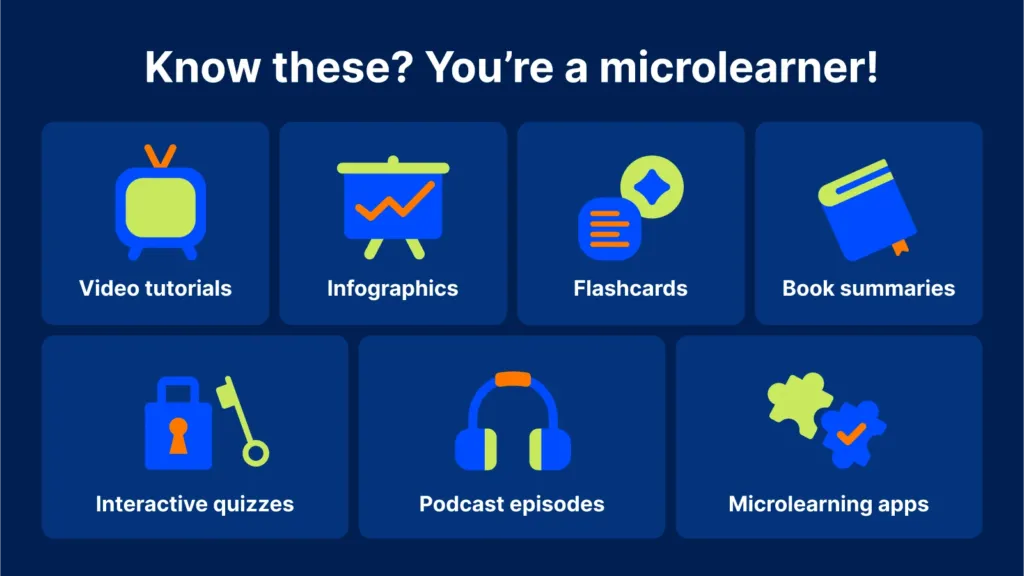
Then, break the content into small, manageable chunks.
Microlearning works best — aim for modules that take 10 to 20 minutes to complete.
Short sections prevent cognitive overload and fit busy schedules.
Use headings, bullet points, and short sentences to improve readability. Keep paragraphs brief and focused.
Step 2: Set Clear Learning Objectives
Every successful module starts with purpose.
Write objectives using action verbs: “identify,” “apply,” “demonstrate,” or “solve.”
Make them specific and measurable.
For example: “By the end of this module, learners will be able to handle customer complaints using the three-step resolution process.”
Clear objectives guide every decision — from content selection to assessment methods.
Step 3: Add Structure and Flow
Organize modules with a simple, consistent structure:
- Welcoming introduction with a hook
- Clear objectives
- Main content delivered in varied ways
- Interactive activities and practice
- Summary and key takeaways
- Assessment or knowledge check
This roadmap helps learners know where they are and what comes next. Good navigation prevents frustration.
Step 4: Make It Interactive and Engaging
Static text is the fastest way to lose attention.
Transform passive content by adding interactive elements.
Include:
- Quizzes and knowledge checks — Short multiple-choice or true/false questions with immediate feedback.
- Real-world scenarios — Present realistic situations and let learners choose how to respond. Branching scenarios show consequences of different decisions.
- Drag-and-drop activities — Perfect for matching concepts, sequencing steps, or classifying items.
- Clickable hotspots on images or diagrams for exploration.
- Reflective questions that encourage learners to think about their own experiences.
Vary the format throughout the module. Mix text with short videos, infographics, audio narration, and animations. This keeps energy high and suits different learning styles.
Step 5: Incorporate Storytelling and Real-Life Examples
People remember stories better than facts alone.
Turn dry procedures into relatable narratives.
Create characters that learners can identify with — a new employee facing a common challenge, for example.
Use authentic scenarios from your industry. When learners see themselves in the training, they stay engaged and apply the knowledge more easily.Step 5: Incorporate Storytelling and Real-Life Examples
People remember stories better than facts alone.
Turn dry procedures into relatable narratives.
Create characters that learners can identify with — a new employee facing a common challenge, for example.
Use authentic scenarios from your industry. When learners see themselves in the training, they stay engaged and apply the knowledge more easily.
Step 6: Focus on Visual Design and Accessibility
Clean, professional visuals make a big difference.
Use consistent colors, fonts, and branding.
Choose high-quality images and avoid clutter.
Ensure good contrast for readability.
Make modules mobile-friendly and accessible — add alt text for images, closed captions for videos, and keyboard navigation options.
Remember: great design supports learning, it does not distract from it.
Step 7: Build in Assessment and Feedback

Learning improves when learners get feedback quickly.
Include practice quizzes throughout the module, not just at the end.
Provide detailed explanations for both correct and incorrect answers. This turns mistakes into learning opportunities.
For final assessments, consider scenario-based questions that test application rather than simple recall.
Track completion and performance data where possible. This helps measure the training’s real impact.
Common Challenges and How to Overcome Them
One frequent issue is content overload.
Fight this by being ruthless with editing. If something does not serve the objective, remove it.
Another challenge is keeping learners motivated.
Add light gamification — progress bars, badges, or points — but use it thoughtfully so it feels natural, not forced.
Time constraints can also slow development.
Prioritize high-impact modules first. Start with one or two and expand based on feedback.
Tools That Help Instructional Designers
Modern authoring tools make the process smoother.
Popular options include Articulate Storyline, Articulate Rise, Adobe Captivate, and Genially.
Many support rapid development, responsive design, and easy publishing to learning management systems (LMS).
Even simple tools like PowerPoint can be enhanced with interactive features when combined with the right approach.
Measuring Success
Effective training goes beyond completion rates.
Look at:
- Knowledge improvement (pre- and post-tests)
- Learner satisfaction and feedback
- On-the-job application and performance changes
- Business outcomes linked to the training
Regular evaluation allows continuous improvement. Update modules as processes change or new content becomes available.
The Future of Training Modules
In 2026 and beyond, instructional design continues to evolve.
Personalized and adaptive learning paths are becoming more common. AI helps generate initial drafts, but human designers still ensure relevance, accuracy, and emotional connection.
The focus is shifting from simply delivering information to building real capabilities that drive organizational success.
External Links
The DIY Guide to Converting Existing Content into an eLearning Course
Transform Existing Content into Engaging eLearning
https://www.skillshub.com/blog/transform-elearning-content
E-Learning Content Development Made Easy: A Step-by-Step Guide
FAQS:
Q .What is an instructional designer? An instructional designer creates effective, engaging learning experiences by structuring content, setting clear objectives, and adding interactive elements to help people learn better.
Q .What does an instructional designer do with existing content? They analyze raw material, remove unnecessary parts, break it into small modules, add quizzes/scenarios, and turn static content into dynamic interactive e-learning modules.
Q .Why turn existing content into interactive training modules? It saves time and cost compared to creating new material from scratch, while making learning more engaging, memorable, and effective for busy employees.
Q . How long does it take to convert content into e-learning modules? It depends on the volume, but a skilled designer can often transform a module in a few days to a couple of weeks using rapid authoring tools.
Q . What makes training modules truly interactive? Adding elements like quizzes with feedback, drag-and-drop activities, branching scenarios, clickable hotspots, and real-world simulations that let learners practice actively.
Final Thoughts
Transforming existing content into engaging training modules is both an art and a science.
It requires creativity, attention to detail, and a deep understanding of how people learn.
When done well, these modules turn passive readers into active participants. They make learning enjoyable, memorable, and practical.
If your organization has valuable content sitting unused, now is the time to bring it to life.
Hire or partner with a talented instructional designer who can turn good material into great training experiences.
The result? More engaged employees, better knowledge retention, and stronger performance across the board.
Investing in quality instructional design pays dividends far beyond the training itself. It builds a culture of continuous learning that keeps your team ready for whatever comes next.