Creating engaging online courses often feels overwhelming. Instructional designers battle boring content and high dropout rates while working under tight deadlines. L&D managers struggle to prove real ROI with limited budgets.These challenges matter because poor learning experiences waste time, money, and potential. Learners disengage, skills gaps remain, and organizations miss growth opportunities. The good news is there is a proven solution: Moodle. This powerful, flexible open-source Learning Management System adapts to your exact needs. At TheEduAssist, we help organizations and creators implement and optimize Moodle for higher engagement, better completion rates, and measurable results.
eachers, trainers, and coaches face disengaged learners who lose interest quickly. Independent course creators find it hard to produce professional material without big teams or big spending. Training institutes and decision-makers worry about scalability, compliance, and keeping programs future-ready in a fast-changing world.
What Is Moodle LMS?
Moodle stands for Modular Object-Oriented Dynamic Learning Environment. It is a free, open-source platform launched in 2002 that has become one of the world’s most popular Learning Management Systems. Millions of users across schools, universities, companies, and nonprofits in more than 240 countries rely on it daily.
Unlike expensive proprietary platforms, Moodle gives you full control. You can download, install, customize, and extend it without ongoing license fees. The latest versions in 2026 bring modern improvements including better mobile experience, AI tools, stronger accessibility, and easier administration while keeping the platform educator-friendly.
Why Choose Moodle in 2026?
- Complete data ownership and privacy control
- Thousands of free plugins and themes
- Scales from small classes to enterprise deployments
- Strong accessibility and mobile support
- Active global community with regular updates
- Lower total cost of ownership
Professionals choose Moodle because it is flexible, reliable, and built by educators for educators.
How to Login to Moodle – Step-by-Step Guide
- Open the Moodle site URL provided by your organization (example:
learn.yourinstitute.com). - Enter your username and password.
- If it is your first time, complete any required profile setup or use single sign-on (Google, Microsoft, etc.).
- On mobile, download the official Moodle App for easier access.
- Use the “Forgot password” link if needed a reset email arrives quickly.
- Once logged in, explore your dashboard showing enrolled courses, deadlines, and messages.
Tip from TheEduAssist: Add a short welcome video or clear instructions on the dashboard to reduce first-time confusion and improve early engagement.
Core Features of Moodle That Deliver Results
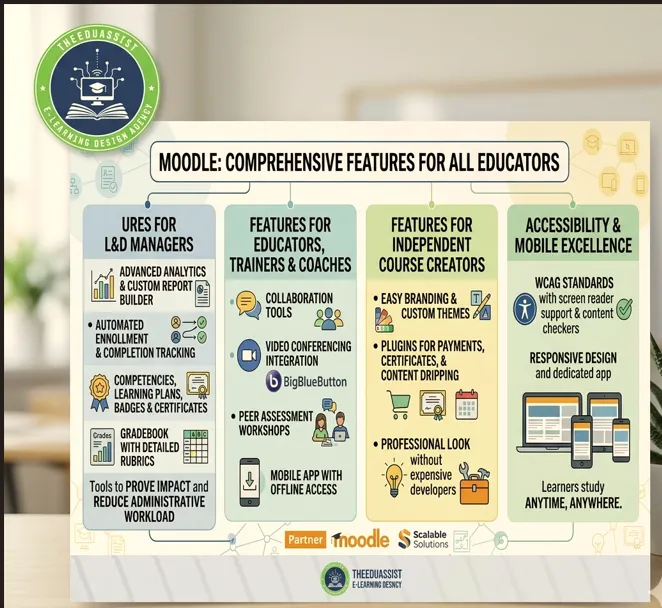
Moodle offers rich tools tailored for different users.
Features for Instructional Designers
- Drag-and-drop course builder
- Wide activity types: quizzes, assignments, forums, wikis, lessons, workshops, and H5P interactive content
- Reusable question banks with randomization
- Conditional activities for personalized learning paths
- Bulk editing tools to save time
Practical example: One instructional designer we supported at TheEduAssist used templates and conditional restrictions to cut course development time by nearly 40% while increasing interactivity.
Features for L&D Managers
- Advanced analytics and custom report builder
- Automated enrollment and completion tracking
- Competencies, learning plans, badges, and certificates
- Gradebook with detailed rubrics
These tools help prove training impact and reduce administrative workload.
Features for Educators, Trainers, and Coaches
- Collaboration tools including forums, chats, and group activities
- Integration with video conferencing (BigBlueButton and others)
- Peer assessment workshops
- Mobile app with offline access
Features for Independent Course Creators
- Easy branding and custom themes
- Plugins for payments, certificates, and content dripping
- Professional look without expensive developers
Accessibility and Mobile Excellence
Moodle meets WCAG standards with screen reader support and content checkers. The responsive design and dedicated app ensure learners can study anytime, anywhere.
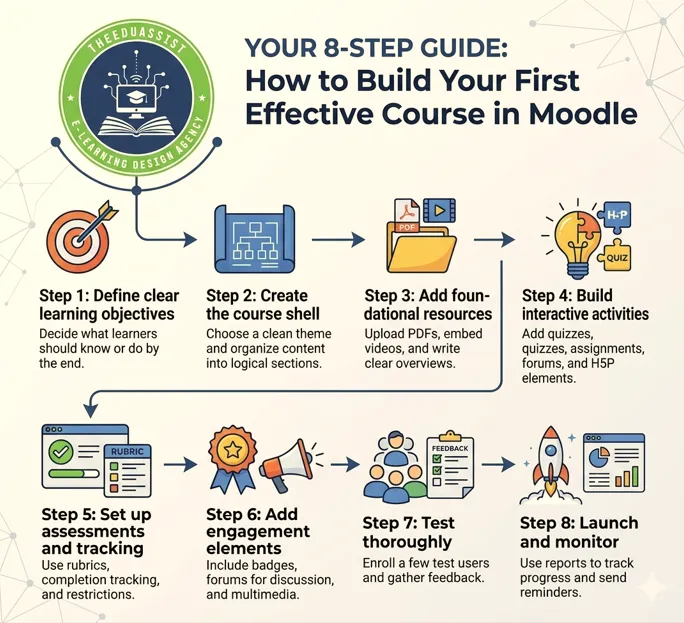
Step-by-Step: How to Build Your First Effective Course in Moodle
- Define clear learning objectives Decide what learners should know or do by the end.
- Create the course shell Choose a clean theme and organize content into logical sections.
- Add foundational resources Upload PDFs, embed videos, and write clear overviews.
- Build interactive activities Add quizzes, assignments, forums, and H5P elements.
- Set up assessments and tracking Use rubrics, completion tracking, and restrictions.
- Add engagement elements Include badges, forums for discussion, and multimedia.
- Test thoroughly Enroll a few test users and gather feedback.
- Launch and monitor Use reports to track progress and send reminders.
Real success story: A corporate trainer working with TheEduAssist built a compliance program using branching scenarios and peer reviews. Completion rates jumped from 65% to 92%, and learners reported the training felt practical and relevant.
Benefits of Moodle for Instructional Designers
Instructional designers need speed and creativity. Moodle provides ready templates, reusable components, and quick ways to add interactivity even on tight budgets. You can create microlearning modules, gamified elements, and personalized paths without starting from zero every time.
Quick-win tip: Combine forums with workshop activities for peer feedback. This boosts retention and reduces your revision workload.
Benefits for L&D Managers and Learning Professionals
L&D leaders focus on results and budgets. Moodle delivers strong reporting tools that support Kirkpatrick evaluation levels. You can track behavior change and business impact more easily. Automation handles routine tasks, freeing resources for strategic work. Many organizations report significant cost savings compared to licensed platforms.
Measurable outcome example: One mid-sized company reduced onboarding time and improved employee performance metrics after switching to a well-configured Moodle environment.
Benefits for Educators, Corporate Trainers, and Coaches
Teachers and coaches want learning to feel personal and engaging. Moodle supports live sessions, group work, reflective journals, and easy multimedia integration. The platform helps you build community even in fully online programs.
Human connection example: A business coach used Moodle groups to create smaller cohorts. Participation and satisfaction scores increased noticeably because learners felt seen and supported.
Benefits for Independent Course Creators
Solopreneurs and consultants need professional results without big teams. Moodle lets you brand courses cleanly, sell directly or through integrations, and deliver high-quality experiences that reduce refunds and increase testimonials.
Creator success tip: Use progress bars, completion certificates, and mobile optimization. Many creators we helped doubled their course completion rates with these simple additions.
Benefits for Training Institutes and Decision Makers
Institute owners and CLOs need scalability and compliance. Moodle supports multi-tenancy (especially Moodle Workplace), strong security, role management, and audit trails. Regular updates and AI enhancements keep the platform future-proof.
Scale example: A large training institute serving thousands of learners across regions successfully used Moodle to maintain consistent quality while reducing operational costs.
Integrating Research and Best Practices
Build evidence-based courses by drawing from reputable sources. Explore journals such as the Australasian Journal of Educational Technology, British Journal of Educational Technology, and The Internet and Higher Education. Use open repositories like ERIC, DOAJ, OER Commons, and MIT OpenCourseWare for free, high-quality materials.
Industry reports from LinkedIn Workplace Learning, World Economic Forum, and eLearning Industry provide valuable trends and benchmarks.
Practical integration: Link to open textbooks or embed curated research summaries to add depth without increasing workload.
Advanced Tips to Maximize Moodle
- Use AI tools responsibly for content generation and personalized feedback.
- Extend functionality with trusted plugins.
- Design mobile-first experiences.
- Set up automated rules for reminders and enrollment.
- Regularly review analytics to improve courses.
At TheEduAssist, we provide custom theme development, plugin integration, staff training, data migration, and ongoing support so you get the most from your Moodle investment.
Measuring Success and ROI
Track these key metrics:
- Course completion rates
- Time spent learning
- Assessment scores
- Learner feedback and Net Promoter Score
- Business outcomes (productivity, error reduction, retention)
Moodle’s built-in tools plus custom reports make evaluation straightforward. Organizations often achieve strong return on investment through lower costs and improved performance.
Conclusion
Moodle is a powerful, flexible, and cost-effective LMS that solves real learning challenges. It helps instructional designers create engaging courses, enables L&D managers to prove ROI, supports trainers in boosting interaction, and gives independent creators professional tools — all without expensive licenses.
With strong mobile support, excellent customization, and reliable analytics, Moodle delivers better completion rates and measurable results for organizations of any size.
At TheEduAssist, we make Moodle easy to implement and highly effective through expert setup, custom design, and ongoing support.
Frequently Asked Question:
What is Moodle LMS and why is it so popular?
Moodle is a free, open-source Learning Management System (LMS) used by millions of educators, universities, and companies worldwide.
How do I login to Moodle?
To login to Moodle, simply go to your organization’s Moodle site URL, enter your username and password, and click login. First-time users can use single sign-on (Google/Microsoft) or reset their password via email. Download the official Moodle App for easy mobile access anytime.
Is Moodle completely free?
Yes, the core Moodle LMS is 100% free and open-source. You only pay for hosting, custom development, premium plugins, or professional support if needed. This makes it far more affordable than proprietary LMS platforms like Blackboard or Canvas.
What are the main benefits of using Moodle?
Moodle offers full data ownership, excellent customization, advanced analytics, mobile learning, accessibility compliance, and scalability. Organizations using Moodle typically report higher completion rates, lower costs, and better learner engagement compared to rigid paid platforms.
How can instructional designers create engaging courses in Moodle?
Instructional designers can use Moodle’s drag-and-drop builder, H5P interactive content, conditional activities, quizzes with randomization, and peer workshops. These tools help create microlearning, branching scenarios, and personalized paths quickly — even on tight budgets.
Is Moodle suitable for corporate training and L&D teams?
Yes. Moodle (especially Moodle Workplace) is excellent for corporate training. It supports automated enrollment, competencies, detailed reporting, compliance tracking, certificates, and integration with HR systems — helping L&D managers prove ROI and reduce administrative work.
How do I create my first course in Moodle?
- Log in and create a new course.
- Organize content into sections.
- Add resources (videos, PDFs) and activities (quizzes, assignments, forums).
- Enable completion tracking and restrictions.
- Test with sample users, then publish.
How can TheEduAssist help with Moodle?
TheEduAssist provides expert Moodle installation, custom theme design, course development, staff training, plugin integration, and ongoing optimization. We help instructional designers, L&D teams, and training institutes get maximum results from Moodle quickly and affordably.
Call To Action:
Moodle offers a powerful, adaptable foundation for modern learning. Whether you run small workshops or enterprise programs, it delivers the flexibility and control you need.
TheEduAssist specializes in Moodle implementation, instructional design, customization, and optimization. We work closely with instructional designers, L&D teams, educators, creators, and decision-makers to create learning experiences that truly work.
Ready to transform your eLearning? Contact TheEduAssist today and discover how Moodle can help you achieve better engagement, stronger results, and sustainable success.
Authored By: Atiqa Sajid http://www.linkedin.com/in/atiqa-sajid-747b57137