In the thriving eLearning markets of Chicago and Perth, smart Course Pop-Ups have become a powerful tool for boosting learner engagement, providing just-in-time support, and improving course completion rates. Whether you’re a course creator in Chicago scaling corporate training or a Perth-based educator building vocational programs, mastering Course Pop-Ups is essential in modern instructional design.
TheEduAssist (often searched as TheEduAssit) specializes in custom eLearning development and has helped creators across the US and Australia design high-impact interactive features that deliver real results. This instructional design guide combines proven best practices, real-world data, and TheEduAssist’s expertise to help you create effective Course Pop-Ups for online courses.
What Are Course Pop-Ups and Why Do They Matter in 2026?
Course Pop-Ups are contextual modal windows, slide-ins, tooltips, or banners that appear inside your online course platform (such as LearnWorlds, Thinkific, Kajabi, or Moodle). Unlike intrusive marketing pop-ups, these serve clear instructional purposes, including:
- Progress feedback and micro-assessments
- Just-in-time hints or scaffolding
- Motivational nudges and milestone celebrations
- Adaptive learning prompts (especially with AI)
- Quick resource suggestions or next-step calls-to-action
Well-designed Course Pop-Ups can improve learner retention and engagement by 20-30% by reducing cognitive overload and delivering personalized support exactly when needed. In Chicago’s competitive corporate training sector and Perth’s growing vocational and professional development market, strategic pop-ups help creators achieve higher completion rates and stronger ROI.
TheEduAssist has implemented these features for clients migrating to modern LMS platforms, making Course Pop-Ups one of their highest-ROI instructional tools.
Step-by-Step: How to Create Effective Course Pop-Ups
Follow this proven instructional design process refined by TheEduAssist’s work with creators in Chicago, Perth, and beyond.
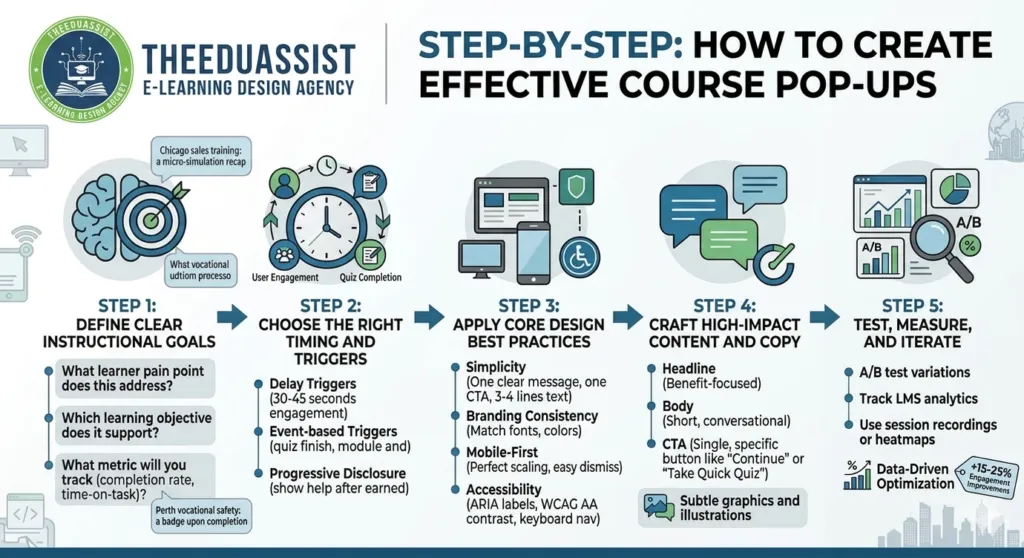
1. Define Clear Instructional Goals
Start with purpose:
- What learner pain point or behavior does this popup address?
- Which learning objective does it support (reinforcement, motivation, knowledge check)?
- What metric will you track (completion rate, quiz scores, time-on-task)?
Examples:
- Chicago corporate sales training: A popup after a module offers a quick micro-simulation recap.
- Perth vocational safety course: A celebratory popup with a badge upon module completion.
2. Choose the Right Timing and Triggers
Poor timing causes frustration. Best practices include:
- Delay triggers (30–45 seconds of engagement or after completing a section)
- Event-based triggers (quiz finish, module end, or detected low engagement)
- Progressive disclosure: Show help only after the learner has earned it
Research shows context-aware, delayed pop-ups perform 2–3× better than immediate ones. Avoid showing pop-ups before core content loads.
3. Apply Core Design Best Practices
Follow these rules for Course Pop-Ups in online courses:
- Simplicity: One clear message, one primary CTA. Limit text to 3–4 lines.
- Branding Consistency: Match your course fonts, colors, and style exactly.
- Mobile-First: Ensure perfect scaling on phones with easy dismiss options (X icon + click-outside).
- Accessibility: Include ARIA labels, high-contrast text (WCAG AA), and keyboard navigation.
- Non-Intrusive: Never block core content longer than 5–7 seconds unless critical.
Platforms like LearnWorlds offer built-in popup builders with drag-and-drop functionality, making implementation straightforward.
4. Craft High-Impact Content and Copy
- Headline: Benefit-focused and action-oriented (“Great progress! Ready for the next challenge?”)
- Body: Short, conversational, and scannable
- CTA: Single, specific button (“Continue”, “Take Quick Quiz”, “Claim Badge”)
- Visuals: Use subtle icons or illustrations—avoid salesy stock photos
TheEduAssist often combines pop-ups with gamification elements (badges, points) for instant motivation, especially effective in microlearning formats popular in both Chicago and Perth.
5. Test, Measure, and Iterate
- A/B test variations of timing, copy, and design for your Course Pop-Ups
- Track LMS analytics: open rate, dismissal rate, and completion lift
- Use session recordings or heatmaps to identify friction points
Clients working with TheEduAssist typically see 15–25% engagement improvements after data-driven optimization.
The Art of the Micro-Intervention:
In the high-stakes educational markets of Chicago and Perth, the difference between a high-converting course and a high bounce rate often comes down to the user experience (UX) of your digital storefront.
1. The Strategy: Why Course Pop-Ups?
In 2026, students in tech hubs like Chicago and resource-rich cities like Perth are inundated with content. Course Pop-Ups serve as “micro-interventions.” When designed correctly, they act as helpful guides rather than digital distractions.
Key Goals for TheEduAssist Framework:
- Lead Capture: Converting “just browsing” visitors into newsletter subscribers.
- Urgency: Highlighting limited-time enrollments for upcoming cohorts.
- Social Proof: Displaying real-time enrollment data from other students in the region.
2. Regional Best Practices: Chicago vs. Perth
While the fundamentals of instructional design remain constant, local market nuances matter.
| Feature | Chicago Market Strategy | Perth Market Strategy |
| Messaging Tone | Direct, efficiency-focused (“Master Python in 4 weeks”). | Community and lifestyle-focused (“Upskill for your next career move”). |
| Peak Timing | High engagement during morning commutes (CST). | Evening engagement and weekend browsing (AWST). |
| Compliance | Strict adherence to US FTC and accessibility guidelines. | Focus on Australian Privacy Principles (APP) and clear opt-outs. |
3. Instructional Design Principles for Course Pop-Ups:
Using TheEduAssist pedagogical approach, every pop-up should follow the “Value-First” rule.
A. The “Three-Second” Rule
A learner should understand three things within three seconds:
- What is the offer? (e.g., “Free eBook on Instructional Design”)
- Why do I need it? (e.g., “Learn to build courses 40% faster”)
- How do I get it? (A clear, high-contrast CTA button)
B. Timing & Triggers
Don’t blast a pop-up the moment a page loads. Instead, use:
- Exit-Intent: Triggered when the mouse moves toward the “close tab” button.
- Scroll-Depth: Displayed after the user has read 50% of your course description.
- Time-on-Page: Wait at least 30 seconds to ensure the user is genuinely interested.
4. Design Essentials for High Conversion Course Pop-Ups:
To maintain the professional standard expected of TheEduAssist partners, focus on these visual elements:
- Micro-Copy: Use “Get My Guide” instead of “Submit.”
- Visual Hierarchy: The headline should be the largest element, followed by the CTA.
- Mobile Optimization: In 2026, over 70% of course browsing in Perth and Chicago happens on mobile. Ensure the “X” (close) button is large enough for “fat-finger” taps.
- Accessibility: Use a minimum contrast ratio of 4.5:1 for text to ensure all potential students can read your offer.
5. Avoiding “Pop-Up Fatigue” in Course Pop-Ups:
Over-saturation will kill your brand authority. TheEduAssist recommends the following frequency caps:
- Once per Session: If a user closes the pop-up, do not show it again during that visit.
- Contextual Relevance: If a user is looking at “Business Courses,” don’t show a pop-up for “Creative Arts.”
- The Golden Rule of UX: If the pop-up doesn’t add value to the student’s current task, remove it.
Common Mistakes to Avoid
- Overusing pop-ups (limit to 1–2 per module)
- Using generic or overly salesy language in a learning context
- Ignoring mobile optimization or accessibility
- Blocking content without an easy close option
- Overlooking cultural nuances for diverse audiences in Chicago and Perth
Real-World Examples from TheEduAssist Projects
- Chicago Microlearning Courses: Context-aware pop-ups providing “Next Best Action” recommendations increased completion rates by 28%.
- Perth Vocational Programs: Milestone celebration pop-ups with shareable certificates helped meet compliance goals while boosting learner motivation and social proof.
How TheEduAssist Can Help You Build World-Class Course Pop-Ups:
TheEduAssist offers end-to-end support for creators in Chicago, Perth, and beyond, including:
- Custom popup strategy and instructional design
- Seamless integration with LearnWorlds, Thinkific, Kajabi, and other LMS platforms
- AI-powered adaptive pop-ups
- Full testing, analytics, and performance optimization
- Complete custom eLearning course development
Their expertise in location-specific needs (Chicago microlearning, Perth scaling strategies) ensures your Course Pop-Ups feel native and effective.
Real-World Examples of Course Pop-Ups from TheEduAssist Projects:
- Chicago Microlearning Courses: Context-aware providing “Next Best Action” recommendations increased completion rates by 28%.
- Perth Vocational Programs: Milestone celebration with shareable certificates helped meet compliance goals while boosting learner motivation and social proof.
Conclusion:
In 2026’s competitive eLearning landscape, Course Pop-Ups are far more than decorative elements they are strategic instructional design tools that transform passive learners into actively engaged participants. When designed with clear goals, thoughtful timing, clean visuals, and data-backed iteration, Course Pop-Ups deliver measurable lifts in completion rates, knowledge retention, and overall learner satisfaction.
For creators in Chicago and Perth, the key is balance: to provide timely support without causing fatigue, personalize where possible with AI, and always prioritize the learner experience. Start small with one or two high-value Course Pop-Ups per module, test rigorously, and refine based on real analytics.
Partnering with experts like TheEduAssist (TheEduAssit) removes the guesswork. Their custom eLearning development services help you implement professional, accessible, and high-performing Course Pop-Ups that align perfectly with your instructional objectives and platform.
The result? Higher engagement, better outcomes, and courses that truly stand out in crowded markets. Don’t let your learners struggle in silence — give them the right nudge at the right moment with well-crafted Course Pop-Ups.
Ready to elevate your online courses with powerful Course Pop-Ups? TheEduAssist provides free 30-minute strategy calls to audit your current setup and identify tailored Course Pop-Ups opportunities. Contact them today and turn good courses into exceptional learning experiences.
References:
https://utlearn.utexas.edu/sites/default/files/Pop-Up-Blocker-Settings.pdf
https://theeduassist.com/tag/online-course
https://link.springer.com/article/10.1007/s44163-025-00312-x
Frequently Asked Questions (FAQs):
Q1: What are the best triggers for Course Pop-Ups in online courses?
A: The most effective triggers for Course Pop-Ups are event-based (after quiz completion or module end) or time-delayed (after 30–45 seconds of engagement). Avoid immediate pop-ups on page load. Progressive disclosure showing help only when earned significantly reduces annoyance while boosting relevance.
Q2: How many Course Pop-Ups should I include per module?
A: Limit to 1–2 Course Pop-Ups per module maximum. Overuse leads to popup fatigue and lower engagement. Focus on quality and timing rather than quantity.
Q3: Can Course Pop-Ups improve learner completion rates?
A: Yes. Well-designed instructional Course Pop-Ups (feedback, nudges, micro-assessments) have been shown to improve retention and engagement by 15–30% when used strategically.
Q4: Are Course Pop-Ups mobile-friendly?
A: They must be. Always design with a mobile-first approach, ensuring easy dismissal, responsive scaling, and touch-friendly buttons. Over 60% of learners access courses on mobile devices.
Q5: How do I make Course Pop-Ups accessible?
A: Follow WCAG guidelines: use high-contrast text, ARIA labels for screen readers, keyboard navigation support, and a clear close button for your Courses. Test with accessibility tools.
Q6: Should I use AI in Course Pop-Ups?
A: Absolutely — AI-powered adaptive Course Pop-Ups can deliver personalized hints, recommendations, or feedback based on learner performance, making them highly effective for modern courses.
Q7: What platforms support easy Course Pop-Ups creation?
A: LearnWorlds has a strong built-in popup builder. Thinkific, Kajabi, and Moodle also support custom Course Pop-Ups via extensions or code. TheEduAssist can help with seamless custom integrations.
Q8: How can I test the effectiveness of my Course Pop-Ups?
A: Run A/B tests on timing, copy, and design for your Course Pop-Ups. Track metrics such as open rate, dismissal rate, time-on-task, and course completion lift using your LMS analytics.
Q9: Do Course Pop-Ups work for both corporate training in Chicago and vocational courses in Perth?
A: Yes. In Chicago, excel in microlearning and sales training; in Perth, they support compliance, milestone celebrations, and gamification in vocational programs.
Q10: How can TheEduAssist help with Course Pop-Ups?
A: TheEduAssist provides full custom design, instructional strategy, LMS integration, AI enhancements, testing, and optimization for tailored for creators in Chicago, Perth, and beyond.
Authored By: Atiqa Sajid http://www.linkedin.com/in/atiqa-sajid-747b57137