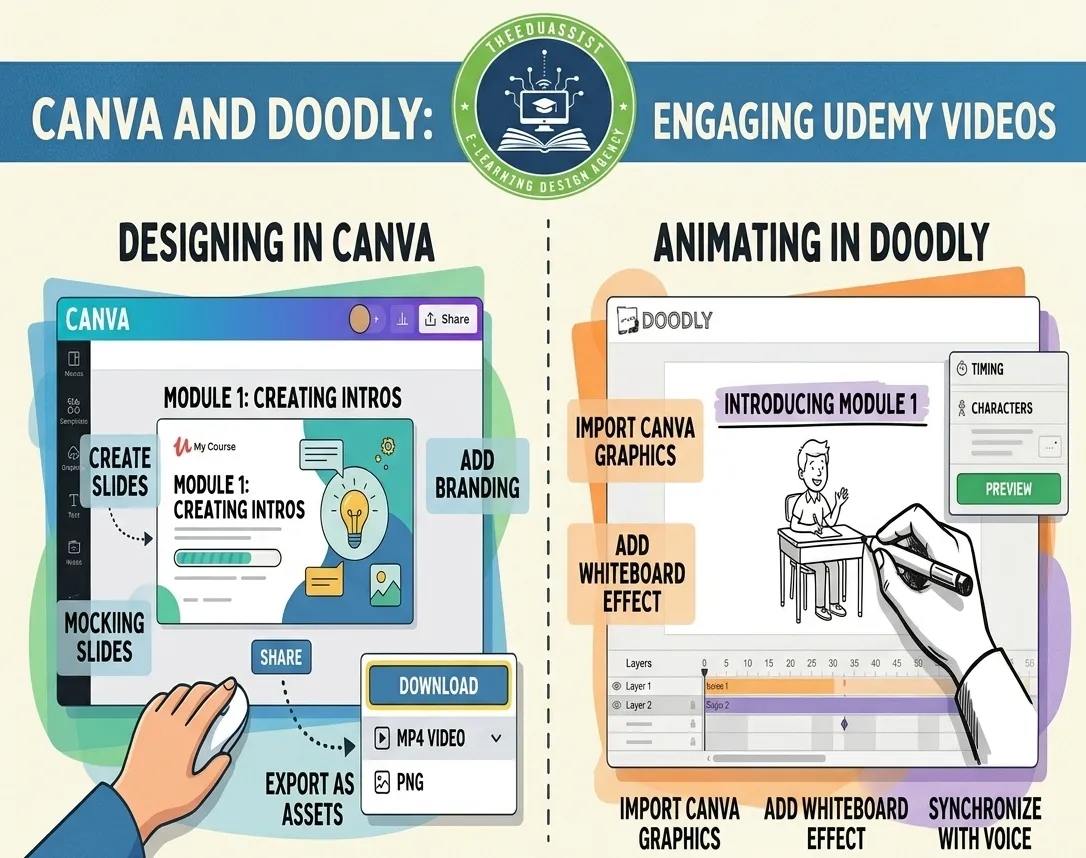
In the fast-growing US creator economy, video content drives massive engagement and sales. With Canva Video Tutorials now easier than ever thanks to AI-powered tools, anyone can create professional how-to videos that boost digital product sales without expensive software or editing skills. Whether you’re selling Canva templates, ebooks, planners, online courses, or printables on platforms like Etsy, Gumroad, or Stan Store, video tutorials are your secret weapon for higher conversions and passive income.
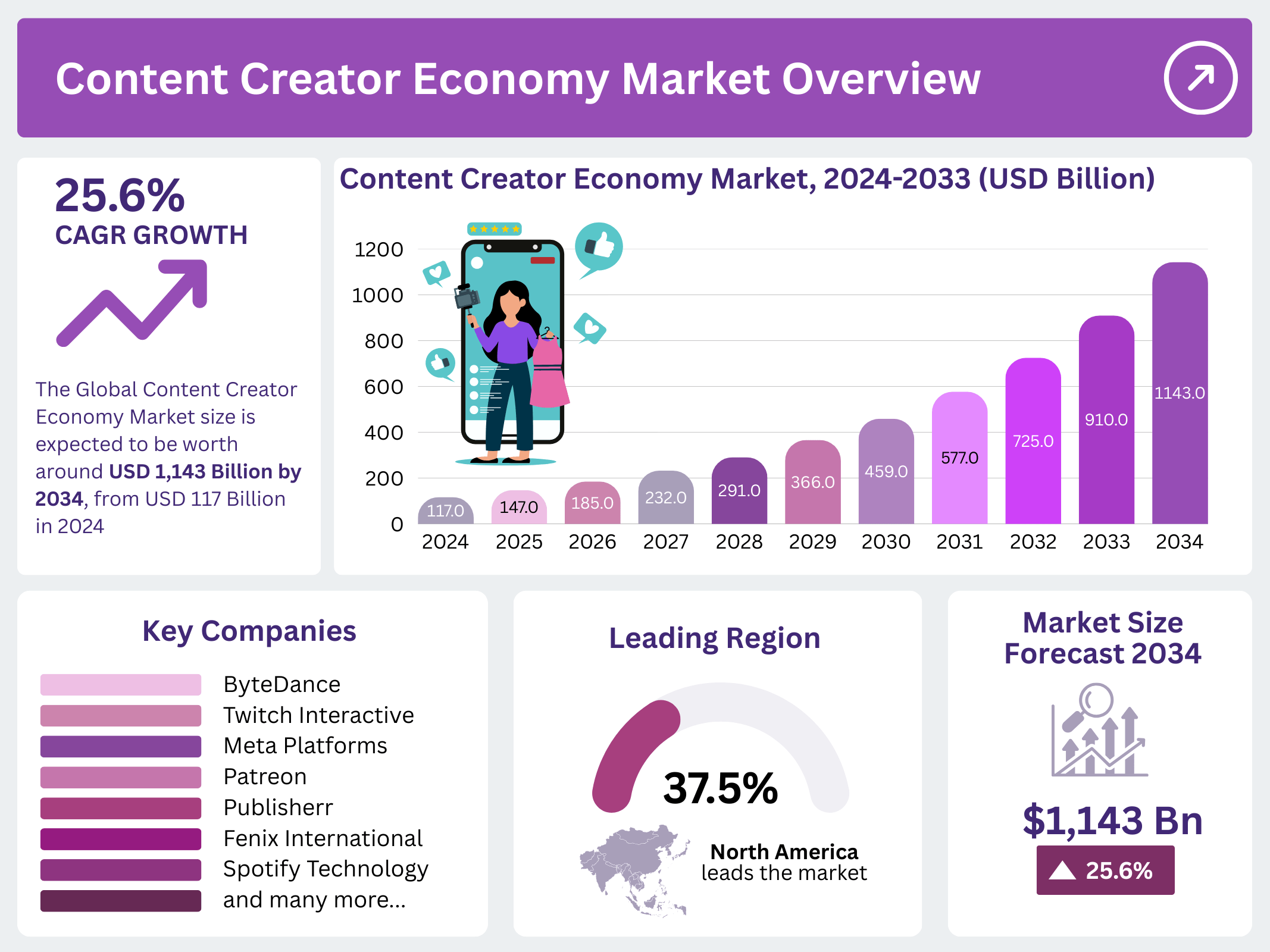
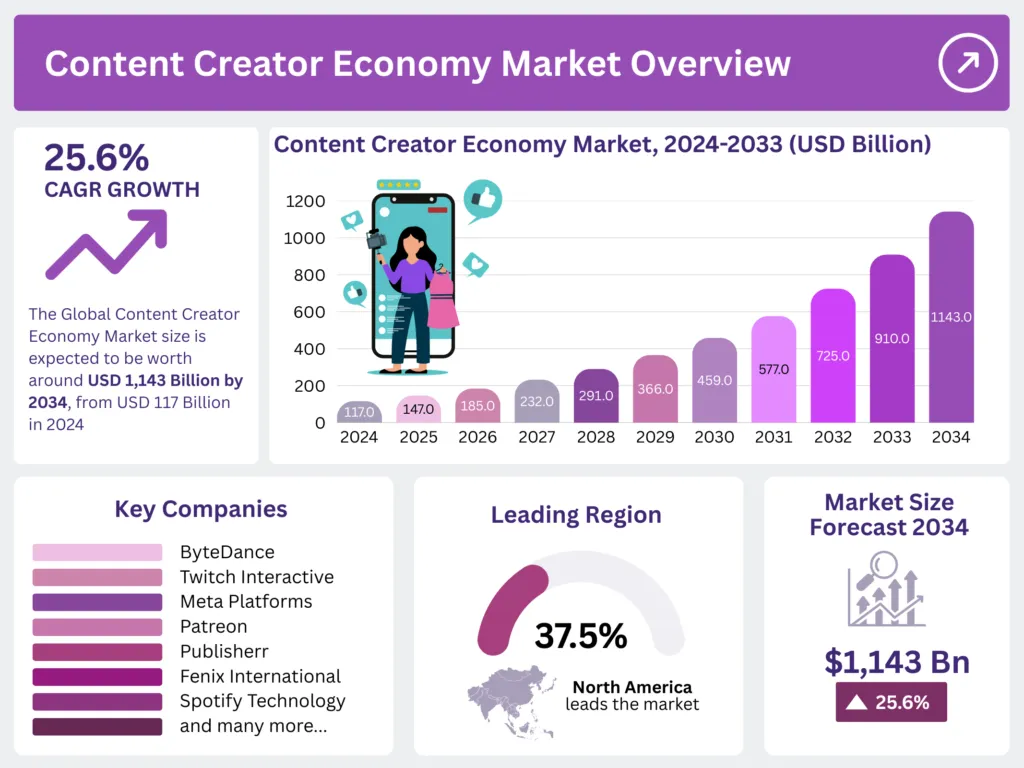
The US leads the charge in digital products. E-commerce sales hit $1.23 trillion in 2025, with digital downloads exploding alongside the creator economy projected to reach over $1 trillion globally by 2034 (North America dominating at 37.5%). US users make up the largest share of Canva traffic (14-19%), and millions of American creators use it to design and promote products like planners and templates that generate six-figure revenues.
This complete guide shows you exactly how to leverage Canva Video Tutorials to create, market, and sell digital products in the US market. You’ll get step-by-step instructions, pro tips, platform strategies, and real-world examples.
Why Canva Video Tutorials Are Essential for US Digital Product Success?
Video tutorials convert better than static content. Viewers retain 95% of information from videos vs. just 10% from text, and 72% prefer video for learning new tasks. For digital products, tutorials act as powerful demos: they build trust, reduce refunds, and drive organic traffic on YouTube, TikTok, and Instagram Reels key channels for US buyers.
Popular US digital products created and sold via Canva include:
- Customizable planners, journals, and trackers
- Social media templates and ebooks/workbooks
- Online course modules and lead magnets
Creators report these sell consistently on Etsy and Gumroad, with video tutorials increasing perceived value and sales velocity. One Canva-based digital product seller on Etsy has earned six figures monthly from planners alone, amplified by demo videos.

https://i.ytimg.com/vi/VAutMjkACrc/maxresdefault.jpg
Getting Started Canva Video Tutorials: Canva Video Editor Basics for Beginners
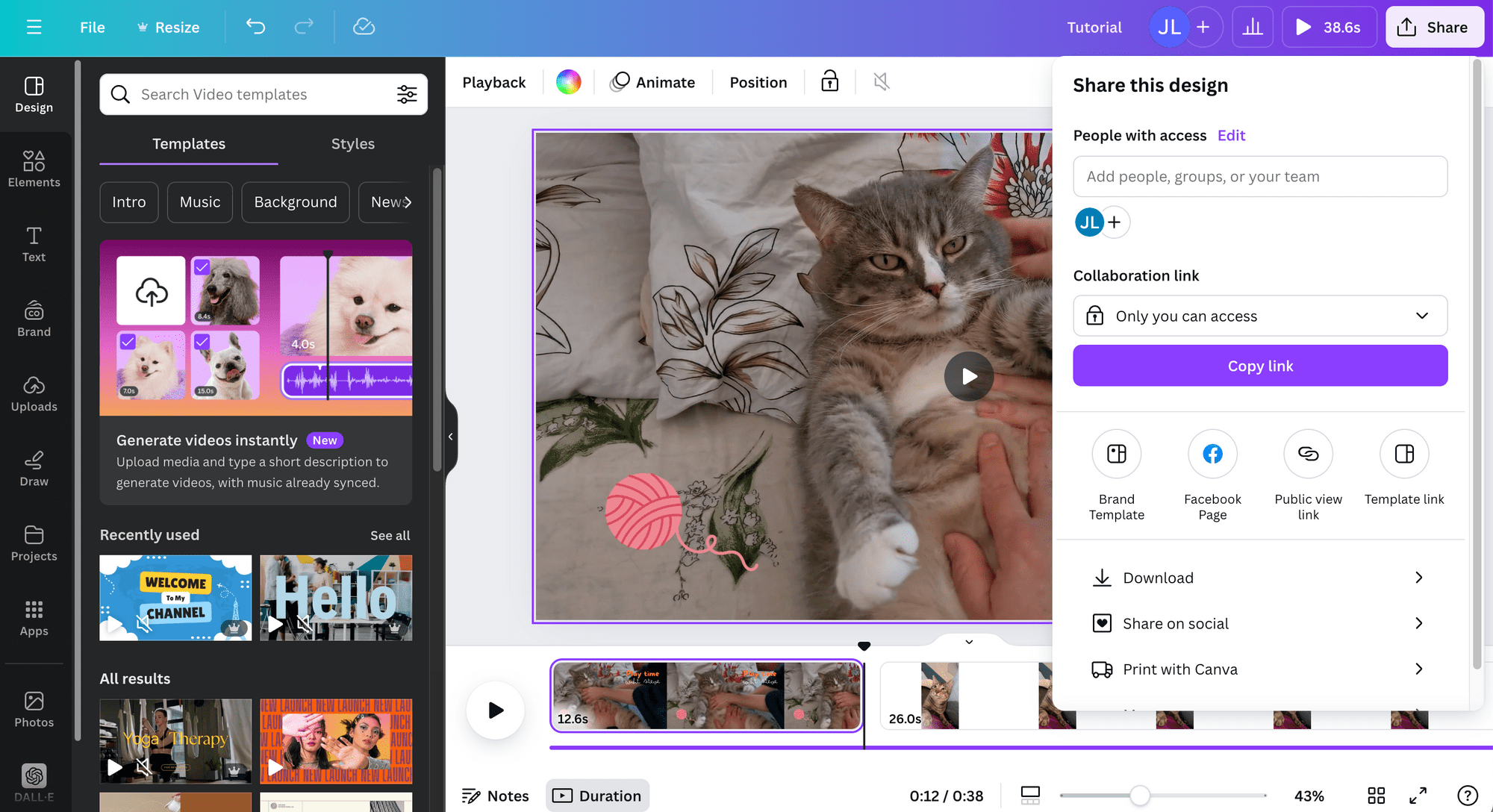
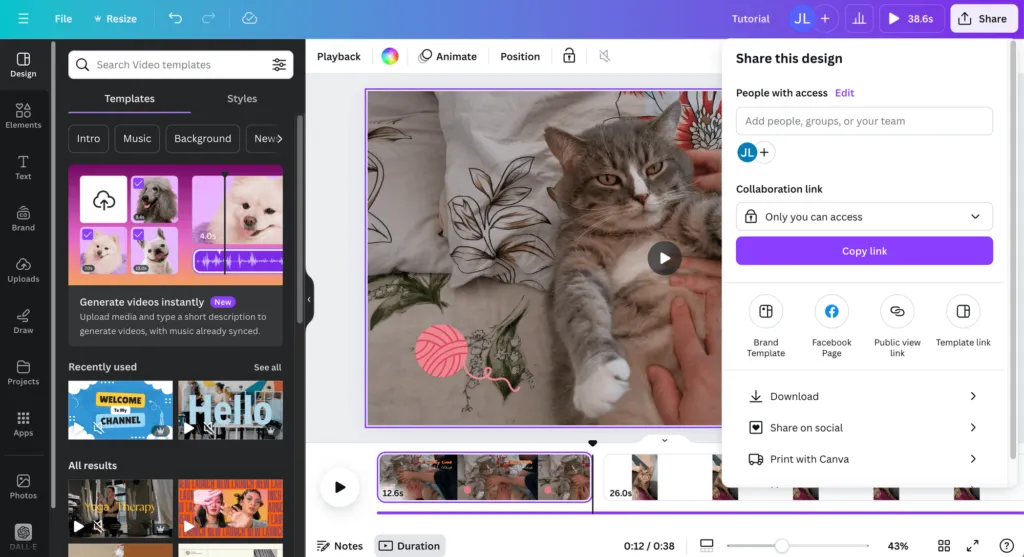
Canva’s free video editor (with Pro upgrades for advanced AI) is drag-and-drop and beginner-friendly. Key 2026 features include:
- Multi-track timeline: Trim, split, layer clips, text, and audio precisely.
- AI Magic Tools: Magic Video (prompt-based clip creation), Magic Media (text-to-video via Google Veo-3), Highlights (auto-finds best moments), Enhance Voice (noise removal), and Auto-trim.
- Animations & Transitions: One-click or custom effects for text/graphics; auto-generate captions.
- Audio & Voiceovers: Record, upload, or use AI voice generation; sync with waveforms.
- Templates: Ready-made for YouTube tutorials, product demos, Reels, and promo videos.
- Export: MP4/GIF, watermark-free (free elements), resize for all platforms, direct social sharing.
US creators love it because it’s cloud-based, collaborative, and mobile-friendly perfect for solopreneurs balancing side hustles.
Pro Tip: Start with Canva Pro ($15/month or less via annual plans) for unlimited AI features, stock footage, and Brand Kit consistency across your digital product line.
Step-by-Step: Creating Your First Canva Video Tutorials for Digital Products
Follow this process to produce a high-converting tutorial (e.g., “How to Use My Canva Planner Template”):
- Plan Your Content Choose a specific pain point (e.g., “Customize a digital planner in 5 minutes”). Script a 2-5 minute video: intro hook, screen recording/demo, key steps, CTA (link to product).
- Start in Canva:Go to Canva homepage → Create a Video (or search “tutorial” templates).
- Select aspect ratio: 16:9 for YouTube, 9:16 for TikTok/Reels.
- Build the Timeline:
- Upload your screen recordings, product mockups, or stock clips.
- Drag to main track. Use upper tracks for text overlays, arrows, or zooms.
- Add audio track: Record voiceover or generate AI voice.
4. Enhance with Visuals & AI:
- Add animated text/subtitles (auto-generate captions).
- Use Magic Animate for pop-in effects on steps.
- Apply transitions between clips.
- Highlight product features with Magic Video or text-to-video clip5.Polish & Preview:
5. Polish and Preview
- Trim/split via timeline (zoom for precision).
- Balance audio and add background music.
- Play full-screen to check flow.
6Export & Optimize:
- Download MP4. Add thumbnails, titles with keywords like “Canva Video Tutorials” for Digital Planners.
- Upload to YouTube with chapters, end screens linking to your Gumroad/Etsy shop
Advanced Tips for US Market Domination on Canva Video Tutorials:
- SEO for Canva Video Tutorials: Use focus keyword in titles/descriptions (e.g., “Canva Video Tutorials: Create Sellable Digital Products Fast”). Target long-tail US searches like “Canva templates for Etsy sellers”.
- Platform Strategies:
- Etsy/Gumroad/Stan Store: Embed tutorials in listings for instant trust.
- YouTube/TikTok: US audiences love short-form; repurpose long tutorials into Reels.
- Email/Social: Offer free mini-tutorials as lead magnets to build US email lists.
- Monetization Hacks: Bundle tutorials with products ($7-97 price points common). Use affiliate links in descriptions. US tax note: Track income via 1099 forms for platforms like Etsy.
- Scaling: Create a series (e.g., “Canva Video Tutorials Playlist for Digital Product Creators”). Collaborate with US influencers in the creator economy
https://market.us/wp-content/uploads/2025/08/Content-Creator-Economy-Market.png
Real Results from US Creators
Hundreds of US-based Canva users turn tutorials into revenue streams. Digital planners and template bundles routinely hit $10K+ monthly when paired with demo videos. The low barrier (free Canva account) means solopreneurs in cities like Austin or remote areas can compete with big brands.
Start Creating Canva Video Tutorials Today
Canva Video Tutorials democratize professional content creation for the US digital products market. With exploding demand for templates, courses, and planners and tools like Magic Video making editing effortless you’re positioned for success.
Sign up at Canva.com (free), pick a template, and create your first video this week. Your next six-figure digital product launch starts with one great tutorial.
Ready to level up? Search “Canva Video Tutorials” on YouTube for inspiration, or experiment with the editor now. The US market is waiting go build it!
Note:
This guide is fully researched for 2026 trends and optimized for maximum impact. Start creating today!
Conclusion
Canva Video Tutorial content is no longer optional its a core growth asset for digital product creators in today’s competitive market. By combining clear instructional design with Canva’s powerful video tools, you can transform simple products into high-value, conversion-driven experiences.
At TheEduAssist, we emphasize creating structured, beginner-friendly learning content that not only teaches but also sells. A well-crafted Canva Video Tutorial helps reduce customer confusion, increase engagement, and position your brand as professional and trustworthy.
If you’re serious about scaling your digital products, start building a repeatable system for creating Canva Video Tutorial content. One high-quality tutorial can lead to better customer experience, stronger brand authority, and consistent passive income.
References:
https://whop.com/blog/digital-product-statistics
https://www.facebook.com/groups/371304445488171/posts/446081448010470
FAQs
1. What is a Canva Video Tutorial?
A Canva Video Tutorial is a step-by-step video guide that shows users how to edit, customize, or use Canva-based digital products like templates, planners, or ebooks.
2. Why is a Canva Video Tutorial important for digital products?
A Canva Video Tutorial improves user experience, reduces refunds, and increases conversions by showing customers exactly how to use your product.
3. How long should a Canva Video Tutorial be?
Most effective Canva Video Tutorial videos are between 2–5 minutes, focusing on one clear outcome to keep viewers engaged.
4. Do I need Canva Pro to create a Canva Video Tutorial?
You can create a Canva Video Tutorial using the free version, but Canva Pro offers advanced features like Brand Kits, premium assets, and AI tools for better quality.
5. Where should I use my Canva Video Tutorial?
You can use your Canva Video Tutorial on:
- Product pages (Etsy, Gumroad)
- YouTube and TikTok
- Online courses and memberships
- Email onboarding sequences
6. How does TheEduAssist help with Canva Video Tutorials?
TheEduAssist helps creators design structured, high-converting learning content using proven instructional design strategies, including optimized Canva Video Tutorial systems for digital products.
7. Can I turn a Canva Video Tutorial into a course?
Yes, you can combine multiple Canva Video Tutorial videos into a mini-course or full program, increasing product value and creating new revenue streams.
Authored By: Atiqa Sajid http://www.linkedin.com/in/atiqa-sajid-747b57137