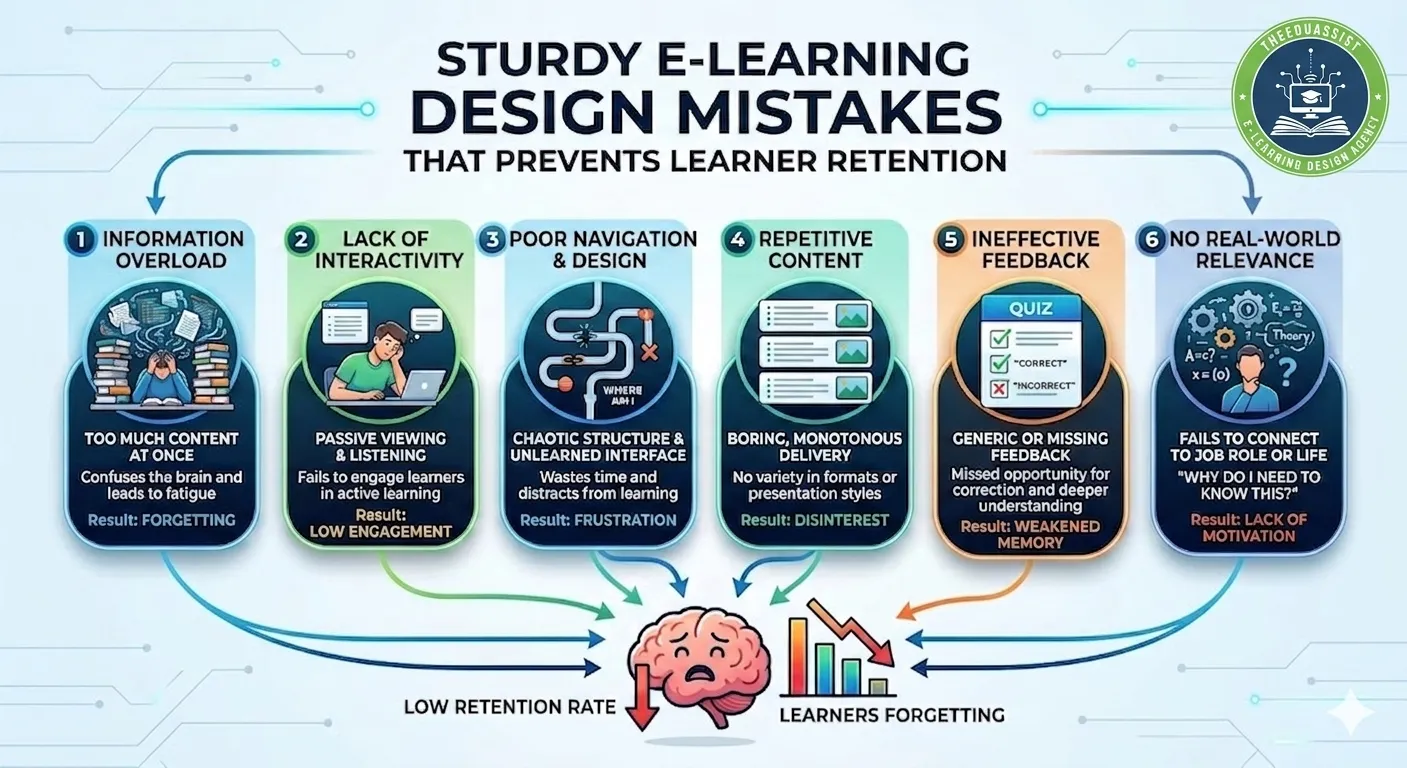
For TheEduAssist, whose audience spans instructional designers, L&D managers, corporate trainers, independent course creators, and training‑institute decision‑makers, E-learning Design is not just about “pretty” slides. It is about building experiences that stick,However, learners actually remember, apply, and act on what they learn. Therefore, many courses still sabotage retention from the very first design choice.
Below is a research‑informed breakdown of the most sturdy E‑learning Design mistakes that prevent learner retention, plus concrete fixes you can reuse in your next course.
1. Ignoring cognitive load and information overload in E-learning Design:
One of the most destructive but invisible E‑learning Design mistakes is cognitive overload meanwhile, asking the brain to process too much information at once. In practice, this looks like:
- Long, text‑heavy slides or pages.
- Screens with too many visuals, animations, and icons.
- Dense explanations instead of layered, bite‑sized chunks.
Cognitive Load Theory shows that working memory has limited capacity. However,when E‑learning Design piles on extraneous details, learners either skim, tune out, or forget core concepts quickly.
Why this hurts retention
- Learners exposed to overloaded screens recall fewer key concepts and perform worse on application‑based tasks.
- Well‑designed E‑learning manages intrinsic (difficulty), extraneous (poor layout), and germane (schema‑building) load, which boosts long‑term retention.
Retention‑first E‑learning Design fixes
- Chunk first, then design: Break each module into 3–7 micro‑sections (Concept → Example → Mini‑task → Reflection).
- One‑idea‑per‑screen: Focus every slide or card on one core idea, supported by a single visual and short copy.
- Progressive complexity: Start with simple examples and gradually layer in harder tasks (the “Gradual” element of the ICEBERG model for retention‑focused design).
For L&D managers and course creators, this means shorter modules with clearly defined “learning snacks” instead of marathon sessions.
2. Designing for “teach then test” instead of “apply then retain” in E-learning Design:
A classic E‑learning Design mistake is structuring courses as passive exposition followed by a quiz (“teach then test”). Therefore, this assumes that learners retain what they hear or read once, but research shows that passive exposure alone yields low retention and transfer.
Why this hurts retention
- Surface learning: Learners memorize for the quiz, not for real‑world use.
- No retrieval practice: Without spaced practice, review, and application, concepts fade quickly from working memory.
Research on learning design for student retention shows that active, applied tasks not just information delivery are essential for persistence.
How to redesign for retention
- Flip the sequence: Start with context (e.g., “You’ll decide how to handle this client email”), then let learners apply the concept before explaining it.
- Embed practice early: Use branching scenarios, drag‑and‑drop tasks, or mini‑simulations in the first 10–15 minutes of each module, not just at the end.
- Space out practice: Add a recap quiz and a practical “challenge” 24–48 hours later to reinforce retrieval.
Instructional designers and educators can frame each module as a mini‑workshop (concept + guided practice + reflection) instead of a lecture.
Even brilliant content becomes frustrating when learners cannot easily navigate the course. Many organizations underestimate how much navigation friction damages retention.
Common UX issues:
- Unintuitive menus or inconsistent buttons.
- Hidden progress indicators or unclear next‑step cues.
- Poorly structured modules (e.g., “Click anywhere and see what happens”).
Research‑linked consequences
- Studies on course design and online learning show that frustration and confusion reduce persistence and increase dropout.
- A clear, predictable structure supports cognitive ease, which supports better focus and memory encoding.
TheEduAssist‑ready E‑learning Design fixes
- Minimum‑viable navigation: Use a simple left‑side menu with 3–5 main sections and clear labels (e.g., “Start Here”, “Practice”, “Resources”).
- Visual progress markers: Show completion bars, checkmarks, or “Lesson 3 of 8” so learners feel they are moving forward.
- Consistent UI patterns: Same button style, same color for “next”, same location for “back” across all modules.
For L&D managers and training institutes, this means standardized templates that reduce cognitive load and help learners focus on content, not on the interface.
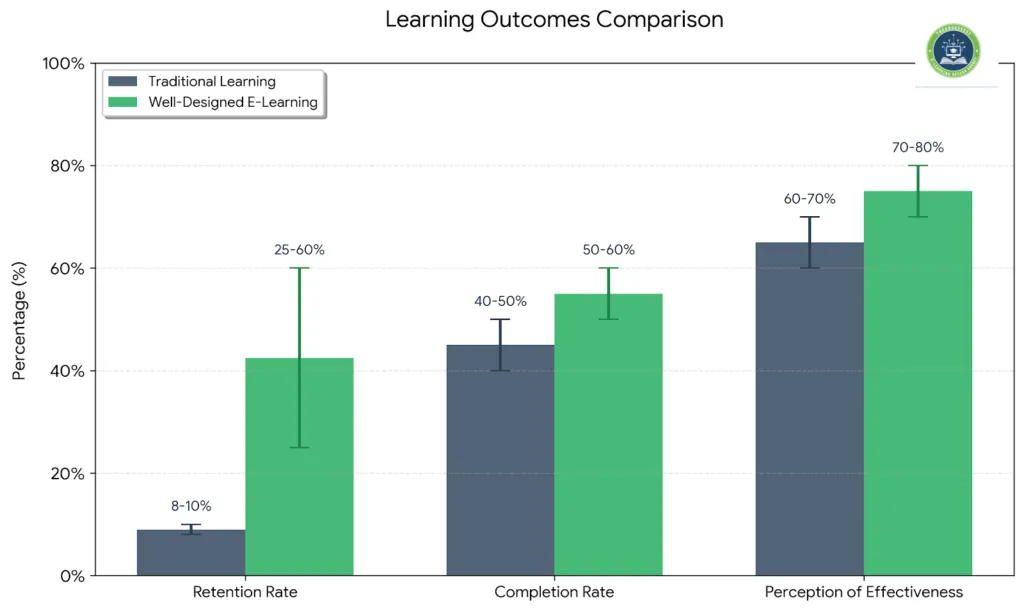
4. Boring or impersonal delivery that kills engagement in E-learning Design:
Engagement is not a luxury; it is a prerequisite for retention. When E‑learning Design feels like a wall‑of‑text or a flat, robotic voiceover, learners disengage quickly and retain very little.
Common design issues:
- Monotonous text‑only screens.
- Long, unbroken voiceovers without pauses or interaction.
- Generic scenarios that feel irrelevant to learners’ real roles.
Science‑backed insight
- Research on interactive e‑learning shows that relatable scenarios, conversational tone, and micro‑interactions increase attention and retention.
- Learners remember more when content is tied to personal relevance (e.g., “Here’s how this works in your daily workflow”).
How to make E‑learning feel human
- Use learner‑centric voice: Write in second‑person (“You will…”) and avoid jargon where possible.
- Add short, scenario‑based choices: “Which of these three responses would you send to this client?” instead of passive “read this paragraph.”
- Rotate formats: Mix short videos, infographics, and text‑based tasks to keep rhythm and energy high.
Course creators and corporate trainers can frame modules as mini‑conversations instead of monologues, which boosts both completion and application.
5. Over‑designing for interaction (yes, too much interactivity) in E-learning Design:
Paradoxically, excessive interactivity can hurt retention if it is not purposeful. Gamification, animations, and click‑heavy activities are useful only when they support the learning goal—not when they obscure it.
Typical over‑interaction problems:
- Every concept turned into a drag‑and‑drop.
- Constant pop‑ups, hotspots, or mini‑games that distract from the core idea.
- Complex navigation overlays that bury the content.
Research‑aligned insight
- Cognitive Load Theory warns that extraneous interactivity increases extraneous load and reduces time spent on meaningful learning.
- Learners benefit most from focused, meaningful clicks (e.g., selecting the correct answer, choosing a scenario path) rather than decorative interactions.
Smart, retention‑first interaction design
- Align interactions with learning objectives: If the goal is “apply this sales technique,” use a scenario where the learner chooses phrases, not a generic quiz.
- Default to simple, low‑distraction tools: Use inline multiple‑choice, hotspot‑images, or short reflection prompts.
- Provide a “non‑interactive” mode: For learners who want to skim later, offer a condensed, text‑based version for review.
Instructional designers and independent creators can adopt a “essential‑interaction‑only” philosophy: If an interaction does not help apply or test the concept, remove it.
6. Poor device and accessibility in E-learning Design:
Modern learners expect mobile‑first access, but many E‑learning Design experiences still assume a desktop screen. When modules are not responsive or lack accessibility, retention drops because learners cannot comfortably engage anytime, anywhere.
Key design gaps:
- Non‑responsive layouts that break on mobile.
- Tiny text or buttons that are hard to tap.
- No keyboard navigation or screen‑reader support.
Retention and equity implications
- Studies on course design and student retention note that accessibility and usability are key to persistence, especially in diverse, remote, or hybrid cohorts.
- Courses optimized for multiple devices increase the chance that learners can revisit content just‑in‑time (e.g., on a phone before a client meeting).
TheEduAssist‑friendly accessibility checklist
- Responsive design: Use mobile‑optimized layouts (stacked cards, large touch targets); test on at least one phone and one tablet.
- Accessible content: Add alt text for images, captions for videos, and logical heading structure.
- Keyboard‑friendly navigation: Ensure learners can move through the course with tabs and enter keys, not only mouse clicks.
For training institutes and HR‑led L&D teams, this translates into accessibility‑first standards for every course, which improves compliance and retention.
Learning is not just an individual mental act; it is social and reflective. Many E‑learning Design experiences ignore this, leaving learners in isolation.
Common oversights:
- No discussion prompts or peer interaction.
- No space for self‑reflection or goal‑setting.
- Less opportunities to share experiences or ask questions.
Evidence‑based retention benefits
- Research on learning design for student retention shows that collaborative and reflective designs (the “Collaborative” and “Reflective” elements of the ICEBERG model) improve persistence and deep understanding.
- Reflection prompts and peer‑shared examples help learners encode concepts into long‑term memory.
How to embed social and reflective design
- Add discussion or reflection prompts: After each module, include a short written response or discussion‑board question linked to real‑world practice.
- Design cohort‑style courses: Use group projects, peer feedback, or live‑session syntheses to build community.
- Incorporate reflection frameworks: Use templates such as “What did I learn?”, “What will I try?”, therefore, “What questions do I still have?” at key checkpoints.
For educators and coaches, this shifts the design from “course as content library” to “course as learning community,” which directly boosts retention and application.
8. Not aligning design with learning context and business outcomes in E-learning Design:
A subtle but sturdy E‑learning Design mistake is designing in isolation from context. Courses that look polished but do not match learners’ real‑world tasks, tools, or business goals see low completion and even lower application.However,
Typical context‑related problems:
- Generic examples instead of role‑specific situations.
- No clear link to job performance or KPIs.
- No connection to managers or on‑the‑job support.
Retention‑linked research insights
- Studies on course design for student retention emphasize that contextual relevance and balanced workload improve persistence.
- Corporate training research shows that when learners clearly see how a course connects to their role, they are more likely to complete it and apply it.
How to strengthen context‑aware E‑learning Design
- Use role‑specific personas: Before designing, map out who the learner is (e.g., “sales manager in a mid‑sized SaaS company”) and mirror their real tasks.
- Align objectives with business outcomes: For L&D clients, define clear K‑level outcomes (e.g., “reduce onboarding time by 30%”) and design each module to support them.
- Embed just‑in‑time tools: Provide checklists, templates, or quick‑reference PDFs learners can use immediately after a module.
For independent course creators and training institutes, this means designing solution‑oriented pathways (e.g., “From onboarding to mastery in 8 weeks”) instead of generic topic‑based courses.
9. Under‑designing for motivation and feedback loops in E-learning Design:
Motivation is not a side‑note; it is a design constraint. When learners do not receive timely, meaningful feedback or do not feel a sense of progress, they are more likely to drop out.
Common feedback‑related mistakes:
- Only end‑of‑course grades or scores.
- No formative feedback during the module.
- No encouragement or celebration of milestones.
Research‑aligned guidance
- Work on knowledge retention and cognitive load shows that immediate, specific feedback helps learners correct misconceptions and reinforces correct understanding.
- Microlearning and mobile‑friendly design benefit from small rewards and progress markers that signal advancement.
Retention‑boosting feedback design
- Inline feedback on activities: After each quiz or scenario choice, explain corrections in 1–2 lines.
- Progress frameworks: Use “milestone unlocks” (e.g., “You’ve completed Module 3; here’s your next challenge”) to create momentum.
- Personalized reinforcement: Allow learners to receive brief, automated messages summarizing key takeaways and next‑steps.
For HR and L&D leaders, this shifts feedback from “reporting” to “guidance,” directly supporting long‑term retention.
10. Not designing for scalability and long‑term maintenance in E-learning Design:
Finally, many E‑learning Design experiences are fragile and hard to scale. Modules are tightly coupled to one subject expert, one tool, or one platform, making updates costly and inconsistent.
Typical scalability mistakes:
- Highly customized, non‑reusable templates.
- No documentation for future editors or designers.
- Courses that are difficult to localize or translate.
Impact on retention
- When updates are delayed or ignored, content becomes outdated, learners lose trust, and completion drops.
- Consistent, reusable components help maintain a coherent learning journey across programs, which supports long‑term retention.
How to build “sturdy” E‑learning Design systems
- Create modular, reusable templates: Use standard slide layouts, color schemes, and interaction patterns across all TheEduAssist‑branded courses.
- Document key design decisions: Capture style guides, interaction rules, and accessibility standards so new designers can maintain the course without breaking the UX.
- Plan for versioning: Design modules so that updates can be patched without rebuilding everything.
For training institutes and decision‑makers, this means treating E‑learning Design as a system, not a one‑off project, which pays off in long‑term learner retention and cost‑effective scaling.
An E-learning Design Framework for Retention:
Taking inspiration from retention‑focused learning‑design models such as the ICEBERG framework (Integrated, Collaborative, Experiential, Balanced, Engaging, Reflective, Gradual), TheEduAssist can reframe E‑learning Design as a retention‑first discipline rather than a cosmetic layer on top of content.
By:
- minimizing cognitive overload,
- embedding practice and reflection,
- aligning with context and business outcomes, and
- building scalable, accessible, mobile‑first experiences,
you turn E‑learning Design into the engine of retention—not the obstacle. For every persona you serve (IDs, L&D managers, corporate trainers, course creators, and training‑institute leaders), this approach turns courses into measurable learning outcomes instead of one‑time clicks.
Conclusion: Make E‑learning Design the Engine of Retention
E‑learning design is not just about visuals or interactivity; it’s about deliberately engineering experiences that learners actually remember and use. When you remove common mistakes cognitive overload, poor navigation, weak feedback, and lack of context your courses stop sabotaging retention and start accelerating it.
For TheEduAssist and its audience of instructional designers, L&D managers, course creators, and training institutes, the path forward is clear: treat E‑learning Design as a retention‑first discipline. Use modular, mobile‑first, and socially‑connected structures; balance engagement with clarity; and align every design choice with real‑world outcomes. When you do, completion rates rise, knowledge sticks, and learning becomes a visible business driver, not just a checklist item.
References:
Kirschner, P. A., Sweller, J., & Clark, R. E. (2006). Why minimal guidance during instruction does not work: An analysis of the failure of constructivist, discovery, problem‑based, experiential, and inquiry‑based teaching. Educational Psychologist, 41(2), 75–86.
https://doi.org/10.1207/s15326985ep4102_1
van Merriënboer, J. J. G., & Ayres, P. (2005). Research on cognitive load theory and its design implications for e‑learning. Educational Technology Research and Development, 53(3), 5–13.
https://doi.org/10.1007/BF02504799
Cognition in Medicine Group. (2023). Cognitive load theory in action: e‑learning modules improve performance in simulation‑based education. Journal of Medical Education, 98(12), 1120–1128.
https://pubmed.ncbi.nlm.nih.gov/37751082/
ShifteLearning. (2026). Knowledge retention strategies for e‑learning.
https://www.shiftelearning.com/blog/knowledge-retention-strategies-for-elearning
Elearningindustry.com. (2024). Effective eLearning instructional design: Strategies to maximize engagement and retention.
https://elearningindustry.com/effective-elearning-instructional-design-strategies-to-maximize-engagement-and-retention
Capytech. (2023). 6 strategies to improve e‑learning knowledge retention.
https://www.linkedin.com/pulse/6-strategies-improve-e-learning-knowledge-retention-capytech
TTMS. (2025). Top e‑learning best practices for organization success – evidence‑based approaches.
https://ttms.com/top-e-learning-best-practices-for-organization-success-evidence-based-approaches/
Elucidat. (2021). Mastering mobile learning: A strategy guide for elearning success.
https://www.elucidat.com/blog/mobile-learning-design-strategies/
Elearningindustry.com. (2025, October 4). Mobile‑first learning: Designing educational apps that actually engage.
https://elearningindustry.com/mobile-first-learning-designing-educational-apps-that-actually-engage
Edutech Global. (2025). Mobile‑first learning: Designing education for the next generation.
https://edutech.global/mobile-first-learning-next-generation/
Lawson, C. (2018). Learning design for student retention. Journal of Perspectives in Applied Academic Practice, 6(3), 72–81.
https://jpaap.ac.uk/JPAAP/article/view/318
University of North Texas, Digital Strategy Institute. (2025). Course design for student retention.
https://digitalstrategy.unt.edu/clear/teaching-resources/theory-practice/course-design-student-retention.html
Frequently Asked Questions for E-learning Design:
What is E‑learning Design, and why does it affect retention?
E‑learning design is the process of structuring online learning experiences so they are engaging, usable, and effective. Poor E‑learning design such as information overload or confusing navigation undermines retention because learners get overwhelmed or disengaged instead of encoding and applying the content.
What are the most common E‑learning Design mistakes that hurt retention?
The biggest mistakes include cognitive overload (too much information at once), passive “teach then test” flows, cluttered UX, boring delivery, and designing for desktops only. These issues increase cognitive load, reduce motivation, and weaken long‑term retention.
How can I use E‑learning Design to improve knowledge retention?
Use micro‑chunks, progressive complexity, and frequent retrieval practice. Embed short scenarios, reflection prompts, and spaced‑practice quizzes instead of long lectures. This E‑learning Design approach aligns with how memory works and keeps learners actively applying concepts.
Is E‑learning Design different from instructional design?
E‑learning design is a subset of instructional design focused on digital environments LMSs, authoring tools, and mobile platforms. While instructional design defines learning outcomes and strategies, E‑learning design translates those into interactive screens, navigation, and multimedia that support retention.
How can I make E‑learning Design more engaging without losing retention?
Balance engagement with purpose: use short videos, scenario‑based choices, and discussion prompts where they directly support the learning objective. Avoid decorative animations or forced gamification that increase extraneous cognitive load. Effective E‑learning design keeps learners focused on what they must remember and apply.
Should E‑learning Design be mobile‑first for better retention?
Yes. Modern learners use phones and tablets to access courses, and if E‑learning design is not mobile‑responsive, navigation becomes frustrating and retention drops. A mobile‑first E‑learning design improves accessibility, just‑in‑time learning, and overall persistence.
How can I future‑proof my E‑learning Design for long‑term retention?
Build modular, reusable templates, document design rules, and plan for updates. A scalable E‑learning Design system lets you maintain consistency across programs, keeps content fresh, and supports long‑term retention over time.
Authored By : Atiqa Sajid http://www.linkedin.com/in/atiqa-sajid-747b57137