Many businesses today already have training materials that they sometimes deliver via Google Classroom. They have:
- SOPs in Google Docs
- Recorded Loom videos
- Internal checklists
- Scattered process documents
But here’s the real problem:
These materials exist, but they are not structured into a proper learning experience.
For businesses in Miami, this creates major issues:
- New employees feel overwhelmed
- Training lacks consistency
- Onboarding takes longer than expected
The solution is not creating more content; it’s organizing existing content into a structured Google Classroom training system.
This is where instructional design, curriculum development, and custom eLearning strategies come in.
Why Most Google Classroom Training Fails
Many creators treat Google Classroom like a file storage system instead of a learning platform.
Common mistakes include:
- Uploading random documents without structure
- No clear learning path
- Lack of quizzes or assessments
- No defined progression
According to research in the Journal of Education and Social Sciences, structured digital classrooms significantly improve learner engagement and understanding when content is organized into clear modules and sequences.
Without structure, learners struggle to:
- Understand priorities
- Follow workflows
- Retain knowledge
The Core Problem: Content Without Structure
If your training looks like:
- Folders full of documents
- Unorganized videos
- Disconnected instructions
Then you don’t have a course — you have content chaos.
The goal is to convert this into:
A step-by-step training journey
What a Well-Designed Google Classroom Training Looks Like
A high-quality training system includes:
- Clearly defined modules
- Structured topics
- Step-by-step lesson flow
- Interactive assignments
- Quizzes for reinforcement
Research published in Emerald Insight (Development and Learning in Organizations) highlights that platforms like Google Classroom are most effective when used for structured, guided learning rather than simple content sharing.
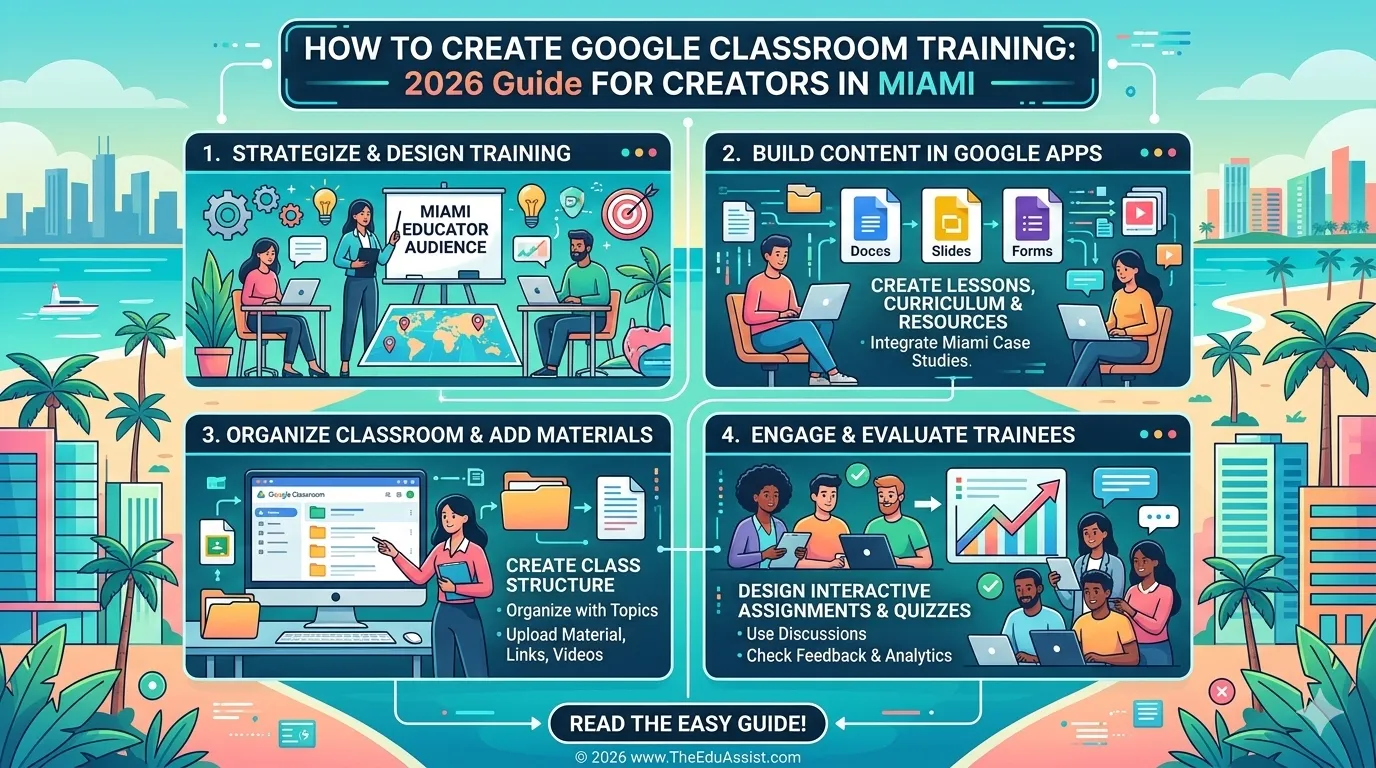
Step 1: Audit and Organize Existing Content
Start by reviewing everything you already have:
- SOP documents
- Loom videos
- Checklists
- Process workflows
Group them into logical categories like:
- Onboarding basics
- Department-specific training
- Advanced processes
For example, a business in Miami may structure content into:
- Purchasing
- Returns
- Inventory
This is the foundation of your curriculum development process.
Step 2: Create Modules and Topics in Google Classroom
Inside Google Classroom:
- Modules = Topics
- Lessons = Posts under topics
Example structure:
| Module | Topics |
|---|---|
| Module 1 | Company Overview |
| Module 2 | Purchasing SOP |
| Module 3 | Inventory Management |
| Module 4 | Returns Process |
Each topic should follow a clear learning sequence.
Step 3: Convert Content Into Structured Lessons
Each lesson should include:
- Introduction (what will be learned)
- Content (Doc or video)
- Task (what learner must do)
- Summary
Instead of just linking a document, guide learners:
“Watch this video → Review SOP → Complete checklist”
This transforms static content into interactive learning experiences.
Step 4: Add Quizzes for Reinforcement
Each module should include short quizzes (5–10 questions).
Quizzes help:
- Reinforce learning
- Test understanding
- Improve retention
Research from ResearchGate on Google Classroom training models suggests that assessment-driven learning improves comprehension and long-term retention in digital environments.
Step 5: Design a Clear Learning Flow
Your training should feel like a journey:
- Start with basics
- Move to role-specific tasks
- End with advanced processes
Avoid:
- Random lesson order
- Overwhelming learners with too much content
A clear flow improves:
- Engagement
- Completion rates
- Real-world application
Step 6: Make It Interactive (Not Passive)
To align with eLearning trends 2026, add interaction:
- Assignments
- Scenario-based tasks
- Reflection prompts
Example:
“You receive a return request; what steps do you take?”
This turns training into real-world problem-solving.
Step 7: Track Progress and Improve Training
Google Classroom allows you to:
- Track assignment completion
- Monitor quiz scores
- Identify weak areas
This helps improve:
- Content development
- Training efficiency
- Onboarding quality
For growing businesses, this is essential for scaling operations.
Quick Comparison Table: Google Classroom vs Traditional Training
| Approach | Limitation | Google Classroom Advantage |
|---|---|---|
| SOP documents only | No structure | Organized modules |
| Video-only training | Passive learning | Interactive assignments |
| Manual onboarding | Inconsistent | Scalable system |
Cost Reality Check: Building Google Classroom Training
| Category | Estimated Cost |
|---|---|
| Instructional design | $1,500 – $4,000 |
| Content organization | $500 – $2,000 |
| Quiz and activity setup | $300 – $1,000 |
| Tools (Google Classroom) | Free |
While the platform itself is free, investing in professional content development and consulting services significantly improves outcomes.
Unique Perspective: From SOPs to Scalable Learning Systems
In 2026, the biggest shift is this:
Businesses are moving from documents → learning systems
Instead of static SOPs, they are building:
- Structured training programs
- Interactive onboarding systems
- Scalable learning environments
This is the foundation of custom eLearning in modern L&D strategies.
Final Thoughts
For businesses in Miami, creating structured training in Google Classroom is one of the most efficient ways to scale operations.
But success depends on structure, not content volume.
By applying:
- Instructional design
- Structured curriculum development
- Interactive learning methods
- Clear LMS organization
you can transform scattered SOPs into a professional, scalable training program.
References
- https://www.researchgate.net/publication/401181689_Developing_a_Google_Classroom_Training_Model_for_Elementary_School_Teachers
- https://jesoc.com/wp-content/uploads/2016/03/KC3_35.pdf
- https://www.emerald.com/dlea/article/15/3/51/1310260/Google-Classroom-for-the-Online-ClassroomAn
FAQs
Can Google Classroom be used for business training?
Yes, Google Classroom can be used to create structured training programs with modules, assignments, and quizzes.
How do you organize SOPs into a course?
Group SOPs into modules, create lessons for each process, and add tasks and quizzes for reinforcement.
What makes training interactive?
Interactive training includes assignments, quizzes, and real-world scenarios instead of passive content.
How long does it take to build a Google Classroom training program?
Typically 2–6 weeks, depending on content volume and structure complexity.
How can TheEduAssist help build Google Classroom training?
Through edu-assist consulting services, theeduassist.com helps businesses convert SOPs into custom eLearning systems with structured curriculum and LMS-ready content.
Authored By: Sofia Arif