In digital and blended learning environments, educators often debate slides or screen recordings (screencasts) as the more effective format. Static slides (e.g., PowerPoint or Google Slides decks) offer clear structure and quick sharing. Screen recordings, narrated videos capturing on-screen actions, sometimes with annotations or simple animations, provide dynamic demonstrations and learner control through pause, rewind, and speed adjustment.
Which format supports better comprehension, retention, engagement, and transfer of knowledge? Drawing from peer-reviewed studies in journals like the Australasian Journal of Educational Technology (AJET), Computers & Education (ScienceDirect), British Journal of Educational Technology, ERIC, and resources from Mayer’s Cognitive Theory of Multimedia Learning (CTML), the evidence shows no universal winner. Effectiveness depends heavily on instructional design, content type, learner characteristics, and implementation. Well-designed versions of either can work, but poor design in any format undermines learning.
This article for TheEduAssist blog synthesizes key findings to help teachers, instructional designers, and L&D teams make informed choices or combine both formats effectively.
Theoretical Foundation: Cognitive Theory of Multimedia Learning
Richard Mayer’s Cognitive Theory of Multimedia Learning (CTML) underpins most comparisons. It assumes learners process information through dual channels (visual and auditory), each with limited capacity, and must actively select, organize, and integrate material for meaningful learning. Key principles relevant to slides or screen recordings include:
- Modality principle: Learners often do better with narration (spoken words) + visuals than on-screen text + visuals, as it distributes load across channels.
- Redundancy principle: Adding on-screen text that duplicates narration can overload the visual channel and hurt learning.
- Coherence principle: Extraneous material (decorative images, unnecessary animations) distracts and reduces outcomes.
- Segmenting and signaling: Breaking content into short parts and highlighting essentials aids processing.
Static slides frequently violate these (e.g., dense bullet points read aloud create redundancy or split attention). Screen recordings can align better when they use clear narration with dynamic or simple visuals and avoid talking-head overload. However, research shows mixed or null results for features like visible instructors in videos.
Cognitive Load Theory (Sweller) adds that dynamic formats may reduce extraneous load for procedural tasks by showing processes in real time, while static slides require learners to mentally animate steps.
Source: https://educationalvoice.co.uk/wp-content/uploads/2025/04/v2-t3e49-iidmk.jpg
Strengths and Limitations of Static Slides
Slides remain widely used for their simplicity, low production cost, and suitability for overviews, frameworks, and conceptual content.
Advantages supported by research:
- Concise slides with minimal text and clear visuals can support signaling and spatial contiguity without overwhelming learners.
- They work reasonably well for factual recall or structured presentations when paired with good narration (or used as handouts for review).
- Some studies show comparable immediate comprehension to other formats for certain topics.
Limitations:
- Text-heavy or regular slides can create a “speech suppression effect,” where learners focus more on reading slides than processing spoken explanations, lowering retention of oral content. This stems from attention allocation rather than pure overload.
- Static formats make it harder to convey motion, sequences, or procedures—learners must imagine changes, increasing cognitive effort.
- Engagement and enjoyment are often lower compared to dynamic alternatives. Long-term transfer (applying knowledge) may suffer without additional activities.
Overall, slides suit quick delivery or reference but risk passive viewing and limited depth for complex or hands-on skills.
Strengths and Limitations of Screen Recordings (Screencasts)
Screen recordings capture screen activity with voiceover, enabling demonstrations (e.g., software tutorials, step-by-step problem-solving). They offer flexibility for self-paced learning.
Advantages supported by research:
- In computer and math courses, high-quality screencasts covering full curricula were rated highly for effectiveness, assimilation, and flexibility (students could review, pause, and fill gaps). One ERIC study reported strong positive perceptions when clips were pedagogically sound.
- Dynamic visuals, such as whiteboard animations, have shown higher comprehension and enjoyment than narrated static slides or on-stage lectures in online settings (AJET study).
- Videos can support better retention and lower cognitive load than illustrated texts in some primary and higher-education contexts, especially for learners with weaker reading skills. They allow temporal contiguity (words and images presented together).
- Lecture recordings aid revision, accessibility, and missed content, though benefits are stronger with active use rather than passive full viewing.

Limitations:
- Adding video elements (e.g., talking head + slides) can increase cognitive load via split attention in some studies, though learning outcomes may still hold.
- Short videos sometimes correlate with surface learning approaches and lower knowledge acquisition if over-relied upon without deeper processing tasks.
- Instructor presence yields mixed results—some satisfaction gains but no consistent learning improvement. Long or poorly edited recordings can overload working memory.
- Production quality matters: Pedagogical features (clear pacing, segmentation) outweigh technical polish.
Evidence from ScienceDirect and AJET indicates videos often perform well for procedural or visual-spatial content but are not automatically superior.
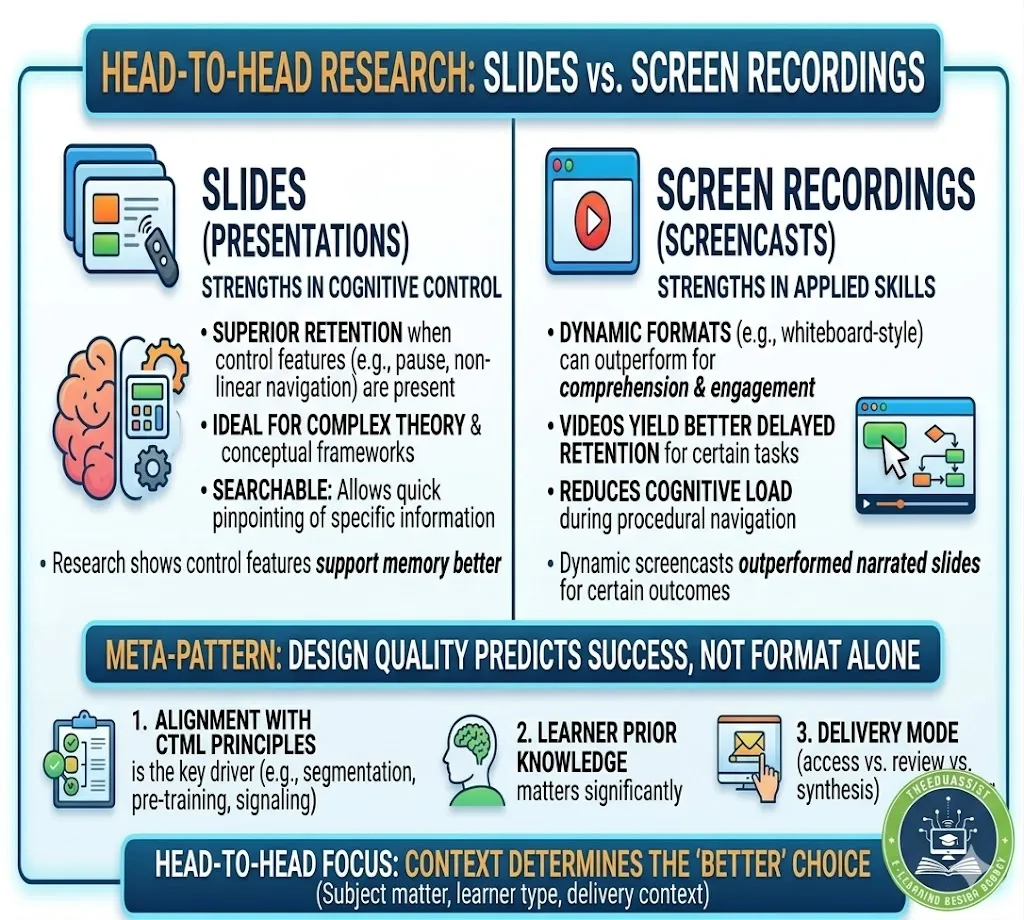
Direct Comparisons and Mixed Findings of Slides or Screen Recordings
Head-to-head research reveals nuance rather than clear dominance:
- Dynamic formats (whiteboard-style screencasts) outperformed narrated slides on comprehension and engagement in one AJET experiment, but results vary by topic and design.
- Videos sometimes yield better delayed retention than static illustrated texts, yet immediate comprehension can be equivalent across text, subtitled video, and narrated video.
- Multimedia presentations (often video-based) can boost outcomes versus non-video controls for certain tasks, but slides with control features (e.g., pause) support memory better than fully linear versions.
- Lecture capture helps with access and review but does not always translate to higher attainment; targeted use matters more than availability.
Meta-pattern: Design quality and alignment with CTML principles predict success more than format alone. Context (subject, learner prior knowledge, delivery mode) is crucial. For example, novices may benefit more from dynamic demonstrations; advanced learners might prefer concise slides for efficiency.
Factors That Influence Outcomes
- Content type: Slides for conceptual overviews or frameworks; screen recordings for procedures, demos, or sequences.
- Learner factors: Self-paced control helps diverse learners (e.g., working students, non-native speakers). Reading ability moderates benefits of video vs. text.
- Design practices: Apply segmenting (<10–15 min segments), avoid redundancy, use signaling, and pair with activities (quizzes, reflections) rather than passive viewing.
- Hybrid/blended use: Many effective approaches combine slides as outlines or supplements with short targeted recordings.
- Accessibility: Both need captions/transcripts; recordings add bandwidth considerations.
Practical Recommendations for Educators
- Prioritize design over format Follow Mayer’s principles regardless of choice. Test materials with small groups.
- Combine strategically Use slides for structure and reference; convert key sections into short, focused screen recordings for demonstrations.
- Keep it concise and active Segment content. Add prompts or follow-up tasks to encourage deeper processing.
- Measure what matters Track not just completion rates but comprehension, retention, and transfer via quizzes or assignments.
- Leverage available tools Free/low-cost options for recordings; repositories like MERLOT or OER Commons for examples.
- Consider your context Fully online courses may lean toward recordings; classroom or hybrid settings benefit from both.
Resources from ATD, eLearning Industry, or UNESCO Digital Education can support implementation.
Conclusion:Slides or Screen Recordings
Slides or screen recordings—research does not declare one clearly better for effective learning. Static slides offer simplicity and structure but can limit engagement and procedural understanding. Screen recordings provide dynamism and flexibility, often supporting better retention and lower load for certain tasks, yet they require careful design to avoid new overloads. Mixed findings across studies underscore that thoughtful application of multimedia principles drives results more than the medium itself.
For TheEduAssist readers, the best approach is evidence-informed experimentation: start with learner needs and content goals, apply CTML guidelines, and iterate based on feedback and outcomes. In a digital education landscape, combining both formats thoughtfully often yields the strongest results.
References :
- Mayer, R.E. (2021). Evidence-based principles for instructional videos. Educational and Developmental Psychologist.
- https://psycnet.apa.org/record/2021-42922-001
- Türkay, S. et al. (2022). Comparison of dynamic visuals… Australasian Journal of Educational Technology.
- https://ajet.org.au/index.php/AJET/article/view/7639
- Ghilay, Y. & Ghilay, R. (2015). Improving learning by screencast technology. ERIC / Journal of Educational Technology.
- https://journal.trunojoyo.ac.id/penasains/article/view/19248#:~:text=The%20use%20of%20screencast%20has%20a%20good,achievement%20before%20and%20after%20treatment%20to%20screencast.
- Wecker, C. (2012). Slide presentations as speech suppressors. Computers & Education (ScienceDirect).
- Additional studies from AJET, ScienceDirect, and Springer as synthesized.
- https://ajet.org.au/index.php/AJET
Conclusion: Slides or Screen Recordings ?
Research does not show a clear winner between slides or screen recordings for effective learning. Both formats can help students understand, remember, and apply knowledge — but only when they are designed well.
Static slides are simple to create and good for giving overviews, key points, or material that students need to review quickly. However, slides with too much text or when the speaker just reads them aloud can make learning harder because students split their attention between reading and listening.
Screen recordings (screencasts) let students see processes in action and control the pace by pausing or rewinding. Studies suggest they often work better for showing steps, software tasks, or hands-on skills. Still, long or poorly planned recordings can also overwhelm learners.
What matters most, according to studies from sources like the Australasian Journal of Educational Technology and Computers & Education, is good design rather than the format itself. Using clear narration, keeping content short, avoiding unnecessary details, and adding simple activities after the material helps in both cases.
For most teachers and trainers, the practical approach is to use a mix of slides or screen recordings. Start with clean slides as a base and turn the trickier parts into short screen recordings. Test what works with your students and adjust based on their feedback and results.
In the end, choosing between slides or screen recordings should depend on your learners, the topic, and how you deliver the content. Good design and thoughtful use will make the bigger difference for effective learning.
Frequently Asked Questions (FAQs) about Slides or Screen Recordings
Q1: Which is better for effective learning – slides or screen recordings?
Neither is always better. It depends on the topic and how they are made. Slides are useful for clear structure and review. Screen recordings often help more with step-by-step learning because students can watch processes and control the speed. Many teachers get good results by using both together.
Q2: Do screen recordings always work better than slides?
No. Good screen recordings can be more engaging for certain topics, but poorly made ones (too long or confusing) are not very effective. Well-designed slides can also support learning well, especially for simple explanations or summaries.
Q3: How long should screen recordings be?
Keep them short ideally under 10–15 minutes each. Shorter segments are easier for students to follow and remember.
Q4: Should I show my face in screen recordings?
It is optional. Some students like seeing the teacher, but research shows it does not always improve learning. Focus more on clear explanation and useful visuals on the screen.
Q5: Can I just add narration to my existing slides?
Yes, but try to reduce the amount of text on each slide so students do not have to read and listen at the same time. Adding a few annotations or simple movements in the recording can also help.
Q6: Which format is easier for different types of students?
Screen recordings can help students who need to pause and replay, such as those learning in a second language or with busy schedules. Slides are quicker to scan and need less internet. Providing both options is often the fairest approach.
Q7: How do I choose between slides or screen recordings?
Think about the content: use slides for main ideas or lists, and screen recordings for showing how to do something step by step. Consider your students’ needs and try a small test first to see what works better.
Q8: What makes both slides and screen recordings more effective?
Speak clearly, keep text and visuals simple, break content into small parts, and avoid extra decorations. Give students something to do after watching or reading, such as a quick quiz or practice task.
These sections are now shorter, simpler, and more neutral ideal for a practical education blog like TheEduAssist. They avoid strong claims and focus on realistic advice.
Would you like me to combine these with the previous main article body into one complete toned-down post, or make any specific changes to wording or length? Just say the word!
Authored By: Atiqa Sajid http://www.linkedin.com/in/atiqa-sajid-747b57137